A meeting assistant for live transcription, searchable notes, summaries, and follow-ups.
At a glance
Free + paid · Source review 2026-10-15
Price & billing
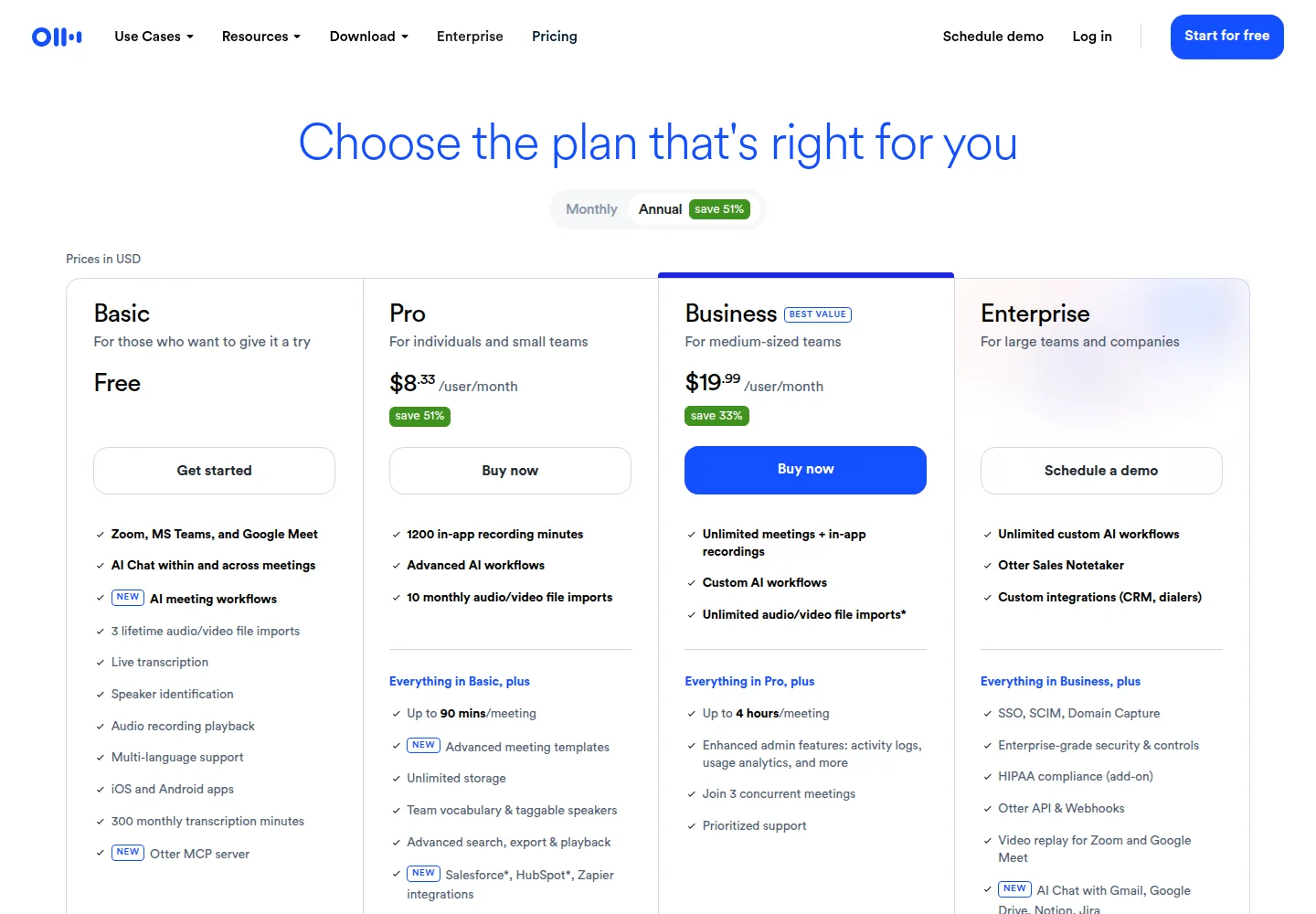
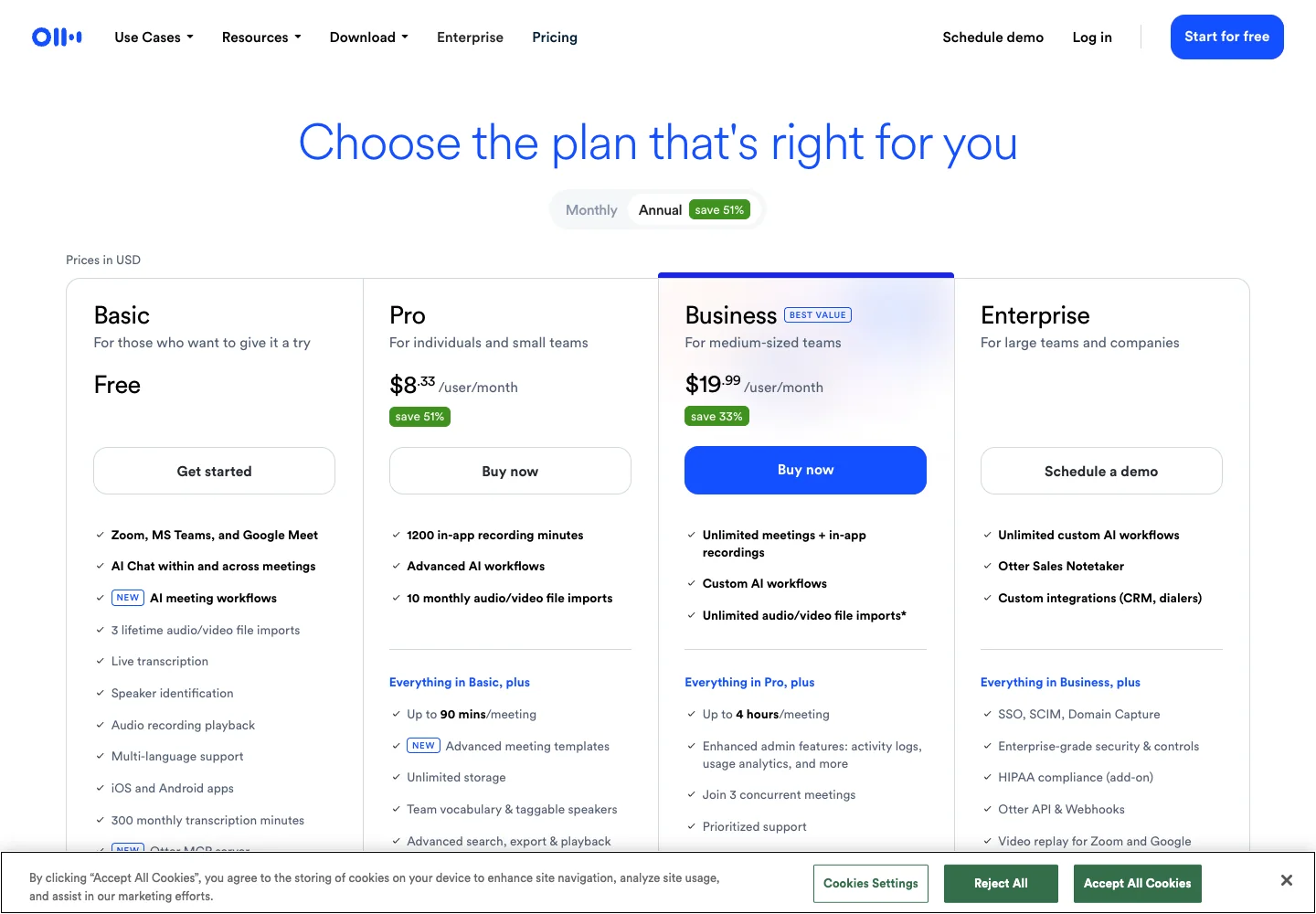
Basic is free. The monthly selector shows Pro at US$16.99 per user/month and Business at US$30 per user/month (a US$24 first-time-subscriber offer for 3 months is not the standard price). Annual views show Pro at US$8.33 and Business at US$19.99 per user/month averages (save 51% and 33%); annual charged totals are not shown on the pricing page, so verify the annual total in checkout before quoting it.
Published-source facts and editorial guidance. No product test is implied. Confirm current conditions before purchase.
Start with one clear task
Turn a short meeting into checked action items
Suggested first task based on the reviewed documentation; no product run or measured outcome is claimed.
Bring
A short recording you have permission to use, the participant names, and the decisions you need to recover.
A useful result
Each action links back to the transcript. Owners and deadlines stay unknown unless someone explicitly stated them.
Budget and access
Basic is free. The monthly selector shows Pro at US$16.99 per user/month and Business at US$30 per user/month (a US$24 first-time-subscriber offer for 3 months is not the standard price). Annual views show Pro at US$8.33 and Business at US$19.99 per user/month averages (save 51% and 33%); annual charged totals are not shown on the pricing page, so verify the annual total in checkout before quoting it.
Choose another approach when
You need to edit and publish finished audio or video rather than produce a meeting record.
Capturing a meeting, reviewing its transcript, and turning verified discussion into a short recap and action list.
Limits and trade-offs
Basic allows 300 transcription minutes per month, 30 minutes per conversation, and three lifetime audio/video imports; Basic exports text as TXT only. Transcription minutes are a shared pool across transcription types. Otter lists six transcription languages, with Simplified Chinese and German marked beta on its Help page.
Plans and free allowances
Basic is free. The monthly selector shows Pro at US$16.99 per user/month and Business at US$30 per user/month (a US$24 first-time-subscriber offer for 3 months is not the standard price). Annual views show Pro at US$8.33 and Business at US$19.99 per user/month averages (save 51% and 33%); annual charged totals are not shown on the pricing page, so verify the annual total in checkout before quoting it.
Official published documentation reviewed; not a product test
Dates: Last reviewed 2026-10-19 · Sources checked 2026-10-15. Last reviewed is the latest source or editorial review date; it is not a content-change date.
A closer look at Otter.ai
Otter focuses on recording meetings and turning speech into searchable transcripts, summaries, and follow-up notes. Choose it when the meeting record is the deliverable; choose a transcript-led editor such as Descript when you need to cut and publish a finished media piece.
Editorial guidance based on published documentation. The workflow below is a suggested starting point, not a measured product result.
When to choose Otter.ai
Creating a searchable recap of a short team meeting with speakers, decisions, and follow-up actions.
Reviewing a live or imported conversation and correcting its names, figures, and owners before sharing notes.
Capturing occasional short recordings within Basic's monthly-minute and lifetime-import limits.
When to choose something else
Producing a polished video clip, podcast cut, or captioned media export without a separate editor.
Transcribing recordings longer than 30 minutes per conversation on Basic.
Handling a meeting that switches among languages beyond Otter's current transcription behavior.
A practical starting workflow
Tell participants before recording and stop if someone objects; a product notice is not a substitute for your own permission process.
Set the transcription language before the conversation, then review the transcript against the audio.
Check names, dates, numbers, owners, decisions, and uncertain speaker labels before sharing action items.
On Basic, export as TXT; check paid export options only if another format is needed.
Share the recording and transcript only with the intended audience.
Check before committing
Basic is capped at 300 transcription minutes per month, 30 minutes per conversation, and three lifetime imports.
Basic users can export text only as TXT; additional formats require a paid plan.
The Help Center lists six languages and marks German and Simplified Chinese as beta; the interface remains English.
The annual view shows Pro at US$8.33 and Business at US$19.99 per user/month averages (save 51% and 33%); annual charged totals are not shown on the pricing page, so verify the annual total in checkout before quoting it.
Common questions
Which languages can Otter transcribe?
Otter lists English, Spanish, French, German, Japanese, and Simplified Chinese. Its Help Center marks German and Simplified Chinese as beta; set the language before recording.
Yes. Otter's Help Center recommends obtaining required consent, and its Notetaker is visible in supported meetings. This is workflow advice, not a legal determination.
Basic: 300 transcription minutes per month, shared pool across transcription typesVerified
Basic: 30-minute maximum transcription time per conversationVerified
Basic: three lifetime audio/video file importsVerified
Basic exports text only as TXT; paid plans add formats; bulk export is Business and higherVerified
Pro: $16.99/user/month on monthly billingVerified
Pro annual view shows $8.33/user/month average (save 51%); annual charged total is NOT shown on the pricing pageSource noted
Business: $30/user/month standard monthly list priceVerified
Business $24 is a 3-month first-time-subscriber offer, not the standard priceSource noted
Business annual view shows $19.99/user/month average (save 33%); annual charged total is NOT shown on the pricing pageSource noted
Otter desktop app offers botless recording for supported meetings: it captures device audio without Notetaker joining as a meeting participantSource noted
Each fact above is bound to a frozen official-source excerpt; facts marked Conflict noted carry the conflict note on this page.
After transcription, check the action items
You already have the transcript text? Use the ByTask meeting worksheet to check and edit a one-page handoff list — decisions, committed actions, suggestions and open questions, each kept next to its spoken quote.
Choose this tool by condition
Check whether this tool is confirmed for your conditions before choosing a plan. The check only treats a requirement as confirmed when the linked vendor source states it.
Tools the catalogue itself links to Otter.ai: an editor lists them as related, an editorial comparison or switching guide covers the pair, or both are reviewed picks for the same task. Each reason below can be checked on the tool pages. This is not a quality ranking.
A transcript-led editor for recording, editing, captioning, and exporting audio or video.
Why it is listed Different category: Video (Otter.ai is Audio & Voice) · Covered in an editorial comparison with Otter.ai · Listed by editors as related to Otter.ai · Shares 1 task (Capture meeting notes) · Access in common: Web + Desktop · Same pricing type: Free + paid
Automatically turn meetings into searchable notes and tasks.
Why it is listed Different category: Productivity (Otter.ai is Audio & Voice) · Covered in an editorial comparison with Otter.ai · Its review lists Otter.ai as related · Shares 1 task (Capture meeting notes) · Access in common: Web + Desktop + Mobile · Same pricing type: Free + paid
A transcription workspace for meetings and uploaded audio or video, with export and sharing controls.
Why it is listed Different category: Productivity (Otter.ai is Audio & Voice) · Covered in an editorial switching guide with Otter.ai · Shares 1 task (Capture meeting notes) · Access in common: Web + Desktop + Mobile · Same pricing type: Free + paid
A meeting recorder that creates searchable transcripts, summaries, and highlights for supported calls.
Why it is listed Different category: Productivity (Otter.ai is Audio & Voice) · Covered in an editorial comparison with Otter.ai · Shares 1 task (Capture meeting notes) · Access in common: Web · Same pricing type: Free + paid
A meeting assistant for searchable transcripts, recaps, and follow-up tasks.
Why it is listed Different category: Productivity (Otter.ai is Audio & Voice) · Covered in an editorial comparison with Otter.ai · Shares 1 task (Capture meeting notes) · Access in common: Web · Same pricing type: Free + paid
A desktop meeting-notes app for turning supported calls into written recaps.
Why it is listed Different category: Productivity (Otter.ai is Audio & Voice) · Covered in an editorial comparison with Otter.ai · Shares 1 task (Capture meeting notes) · Access in common: Desktop · Same pricing type: Free + paid
When this listing’s recorded facts changed, from what to what. Dates are the day (UTC) the change was recorded in the ByTask data, not the day the vendor changed anything. Only changes that can be traced in the data history appear here; a fact that has not changed shows nothing.
Recorded (UTC)
Price & plansPrice and plan wording changed
Links & sourcesOfficial sources on file: 1 added, 2 re-checked


 Official site reference


