A transcript-led editor for recording, editing, captioning, and exporting audio or video.
At a glance
Free + paid · Source review 2026-10-15
Price & billing
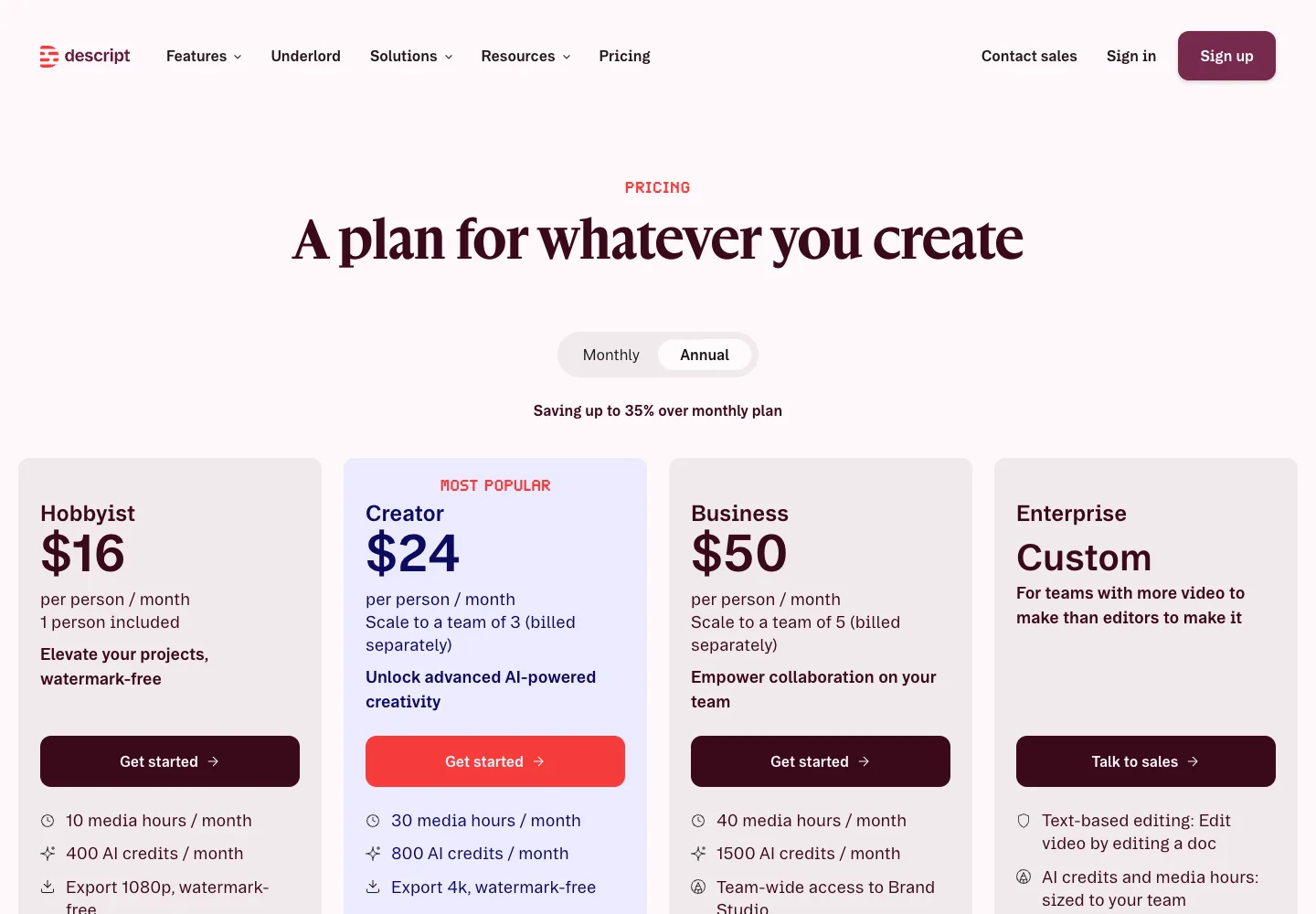
Free includes 60 media minutes per month. Hobbyist is displayed as $24 per editor/month on monthly billing or $16 per editor/month on annual billing, with 10 media hours and 400 AI credits; the official page does not label a currency code, so confirm the regional checkout.
Published-source facts and editorial guidance. No product test is implied. Confirm current conditions before purchase.
Official website; English-locale reshoot · Captured 2026-10-18 · Source ↗
This listing has 1 image; no further gallery images exist.
What to know before choosing
Good fit
Turning an existing interview, podcast, screen recording, or product walkthrough into a corrected and captioned media piece.
Limits and trade-offs
Free includes 60 media minutes per month, 720p local video export, and no watermark-free video export. The published transcription table lists 25 languages and does not list Mandarin; media-minute and AI-credit allowances are separate.
Plans and free allowances
Free includes 60 media minutes per month. Hobbyist is displayed as $24 per editor/month on monthly billing or $16 per editor/month on annual billing, with 10 media hours and 400 AI credits; the official page does not label a currency code, so confirm the regional checkout.
Official published documentation reviewed; not a product test
Dates: Last reviewed 2026-10-15. Last reviewed is the latest source or editorial review date; it is not a content-change date.
A closer look at Descript
Descript is a transcript-led audio and video editor: edit the text to revise a recording, add captions, and export a media piece. It fits production work where the edited recording is the deliverable; a meeting assistant such as Otter is organized around capturing meetings and reviewing notes.
Editorial guidance based on published documentation. The workflow below is a suggested starting point, not a measured product result.
When to choose Descript
Editing an existing interview or podcast by correcting the transcript and removing unwanted sections.
Producing a captioned product walkthrough from a real screen recording and narration.
Making short clips from a longer recording after checking the transcript and speaker labels.
When to choose something else
Needing only searchable meeting notes, follow-up summaries, and action items from recurring calls.
Requiring Mandarin transcription without first confirming current support; Mandarin is absent from the published 25-language list.
Expecting substantial free media time or watermark-free high-resolution export from the Free plan.
A practical starting workflow
Define the final clip and select the real source recording before editing.
Generate a transcript, then check names, numbers, speaker labels, and important wording against the audio.
Edit the text for pacing, but listen to each cut and confirm the audio matches the intended edit.
Create captions or an SRT/VTT file and review line breaks and timing.
Export at the required resolution and watch the complete file before publishing.
Check before committing
Free gives 60 media minutes per month and local export up to 720p; watermark-free video export is unavailable on Free.
The published language list has 25 transcription languages and does not list Mandarin.
Correcting a transcript changes on-screen text without changing the underlying audio or video.
Current plans use separate media-minute and AI-credit allowances.
Common questions
Can I edit a video by editing its transcript?
Yes. Descript describes text-based editing: revise transcript text to edit the video, then review the timeline and resulting media.
The current pricing table lists 25 transcription languages, but Mandarin is not among the languages shown. Confirm directly before choosing it for Mandarin work.
Tools the catalogue itself links to Descript: an editor lists them as related, an editorial comparison or switching guide covers the pair, or both are reviewed picks for the same task. Each reason below can be checked on the tool pages. This is not a quality ranking.
A meeting assistant for live transcription, searchable notes, summaries, and follow-ups.
Why it is listed Different category: Audio & Voice (Descript is Video) · Covered in an editorial comparison with Descript · Listed by editors as related to Descript · Shares 1 task (Capture meeting notes) · Access in common: Web + Desktop · Same pricing type: Free + paid
Generate and revise spoken audio from scripts with a range of synthetic voices.
Why it is listed Different category: Audio & Voice (Descript is Video) · Covered in an editorial switching guide with Descript · Listed by editors as related to Descript · Access in common: Web · Same pricing type: Free + paid
Edit recorded clips on a timeline, with optional templates and AI features.
Why it is listed Same category: Video · Covered in an editorial comparison with Descript · Its review lists Descript as related · Shares 1 task (Make or edit a video) · Access in common: Web · Same pricing type: Free + paid
Build a prompt-led video draft with stock footage, narration, or a manual editing timeline.
Why it is listed Same category: Video · Covered in an editorial comparison with Descript · Shares 1 task (Make or edit a video) · Access in common: Web · Same pricing type: Free + paid
Edit and caption footage, with separate tools for stock-based AI scenes and generative video models.
Why it is listed Same category: Video · Covered in an editorial comparison with Descript · Shares 1 task (Make or edit a video) · Access in common: Web
Create, edit, and enhance high-quality audio/video content.
Why it is listed Same category: Video · Covered in an editorial comparison with Descript · Its review lists Descript as related · Same pricing type: Free + paid
When this listing’s recorded facts changed, from what to what. Dates are the day (UTC) the change was recorded in the ByTask data, not the day the vendor changed anything. Only changes that can be traced in the data history appear here; a fact that has not changed shows nothing.


 Official site reference


