Generate and revise spoken audio from scripts with a range of synthetic voices.
At a glance
Free + paid · Source review 2026-10-15
Price & billing
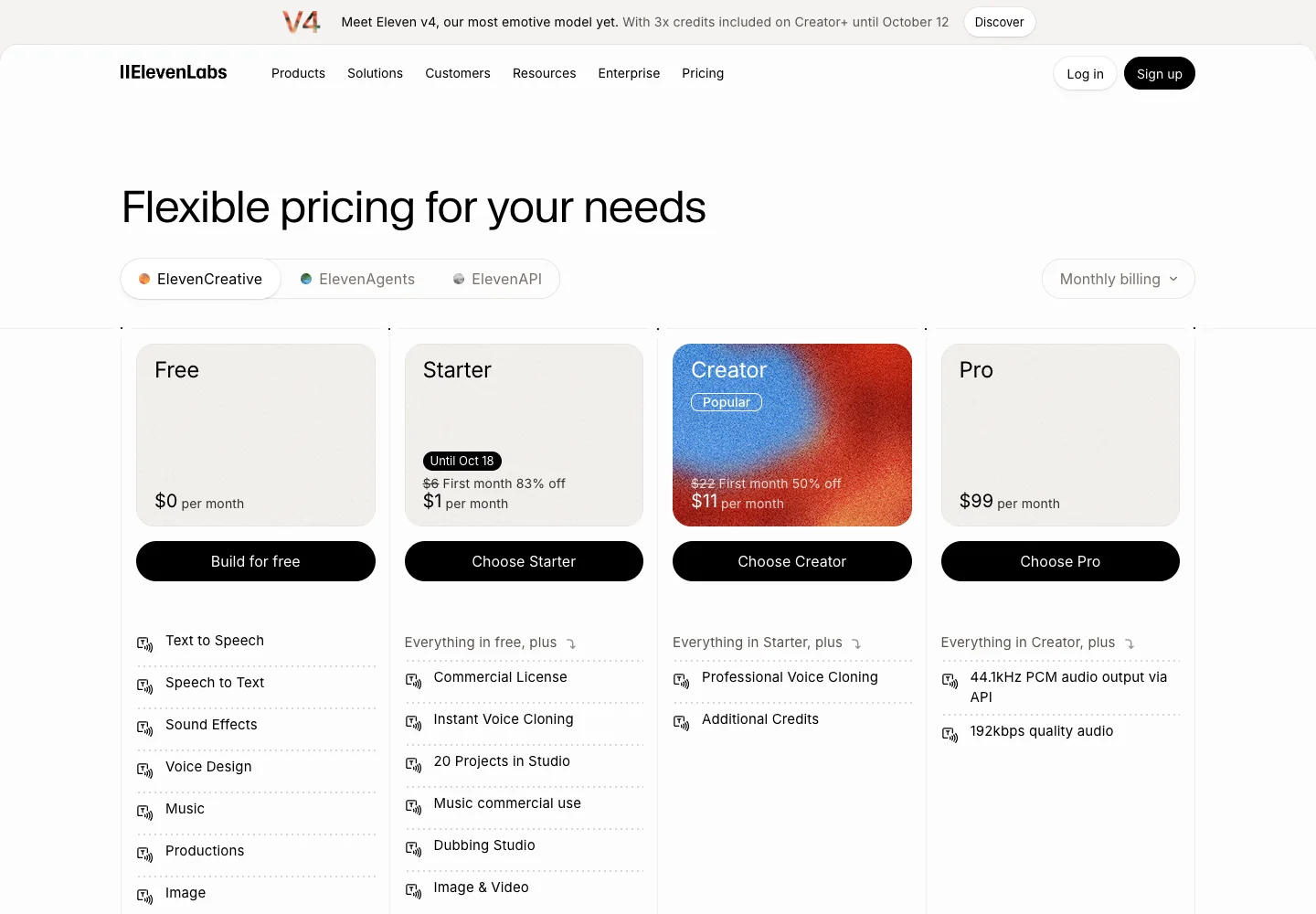
The pricing page lists a free plan and regular paid prices of $6/month for Starter and $22/month for Creator. First-month promotions are separate from renewal pricing. Confirm the billing currency, current offer and renewal amount before subscribing.
Drafting narration or dialogue, then adjusting voice and delivery across selected passages.
Limits and trade-offs
Free-plan output has no commercial license; paid access, credit use, voice permissions, and beta-service terms affect what you can publish.
Plans and free allowances
The pricing page lists a free plan and regular paid prices of $6/month for Starter and $22/month for Creator. First-month promotions are separate from renewal pricing. Confirm the billing currency, current offer and renewal amount before subscribing.
Official published documentation reviewed; not a product test
Dates: Last reviewed 2026-10-15. Last reviewed is the latest source or editorial review date; it is not a content-change date.
A closer look at ElevenLabs
ElevenLabs turns written scripts into synthetic speech and supports passage-level voice and delivery adjustments in longer projects. Treat each render as a reviewable draft: check names, numbers, emphasis, and timing, then confirm that the plan and voice permissions cover the intended release.
Editorial guidance based on published documentation. The workflow below is a suggested starting point, not a measured product result.
When to choose ElevenLabs
A creator needs a narrated first pass for a product walkthrough, explainer, or short audio segment.
A script has distinct speakers or sections that need different voice settings.
An editor wants to revise wording and regenerate only the passages that changed.
When to choose something else
A project needs commercial use from output created on the free plan.
A team needs a guaranteed unlimited number of low-cost retries; generation actions can consume credits.
A production relies on a cloned or shared voice without documented permission for that use.
A practical starting workflow
Write and fact-check the script before generating, marking names, acronyms, numbers, and pauses.
Choose a voice for a short representative passage and check pronunciation before processing the full script.
Generate in sections so wording, speaker changes, and pacing can be reviewed independently.
Revise the text or voice settings and track which passages need a new render because generation can use credits.
Before release, confirm the output's plan-based commercial terms, attribution requirements, and permissions for any voice model.
Check before committing
The free plan does not include a commercial license; published free-plan output has attribution requirements for noncommercial sharing.
Paid-plan commercial permission is subject to rights in the input, the service terms, applicable policy, and exclusions such as beta services.
Credit use depends on the generation action; check the current plan meter before repeated revisions.
Common questions
Can I use free-plan audio in a paid ad or customer-facing product?
The published guidance says the free plan has no commercial license. Check the current terms for output made under a paid plan before publishing.
The help article says generation actions can use quota, including changes made in Studio. Review the account's credit meter before iterating across a long script.
What should I check before using a voice model based on a person?
Confirm you have the necessary rights and permissions for the voice and its intended use, and review the Voice Library rules if you share a model there.
Tools the catalogue itself links to ElevenLabs: an editor lists them as related, an editorial comparison or switching guide covers the pair, or both are reviewed picks for the same task. Each reason below can be checked on the tool pages. This is not a quality ranking.
Create and revise voiceovers for presentations, training, and video scripts.
Why it is listed Same category: Audio & Voice · Covered in an editorial comparison with ElevenLabs · Listed by editors as related to ElevenLabs · Shares 1 task (Turn a script into speech) · Access in common: Web + API · Same pricing type: Free + paid
Produce synthetic voiceovers with controls for tone, pacing, and pronunciation.
Why it is listed Same category: Audio & Voice · Covered in an editorial comparison with ElevenLabs · Listed by editors as related to ElevenLabs · Shares 1 task (Turn a script into speech) · Access in common: Web
A transcript-led editor for recording, editing, captioning, and exporting audio or video.
Why it is listed Different category: Video (ElevenLabs is Audio & Voice) · Covered in an editorial switching guide with ElevenLabs · Listed by editors as related to ElevenLabs · Access in common: Web · Same pricing type: Free + paid
AI realistic text-to-speech voice generator - Can train your own voice.
Why it is listed Same category: Audio & Voice · Covered in an editorial comparison with ElevenLabs · Its review lists ElevenLabs as related · Same pricing type: Free + paid
Natural sounding text-to-speech with speed options.
Why it is listed Same category: Audio & Voice · Covered in an editorial comparison with ElevenLabs · Its review lists ElevenLabs as related · Same pricing type: Free + paid
When this listing’s recorded facts changed, from what to what. Dates are the day (UTC) the change was recorded in the ByTask data, not the day the vendor changed anything. Only changes that can be traced in the data history appear here; a fact that has not changed shows nothing.


 Official site reference