AI assistance for notes, documents, meeting workflows, and team knowledge inside Notion.
At a glance
Trial available · Source review 2026-10-15
Price & billing
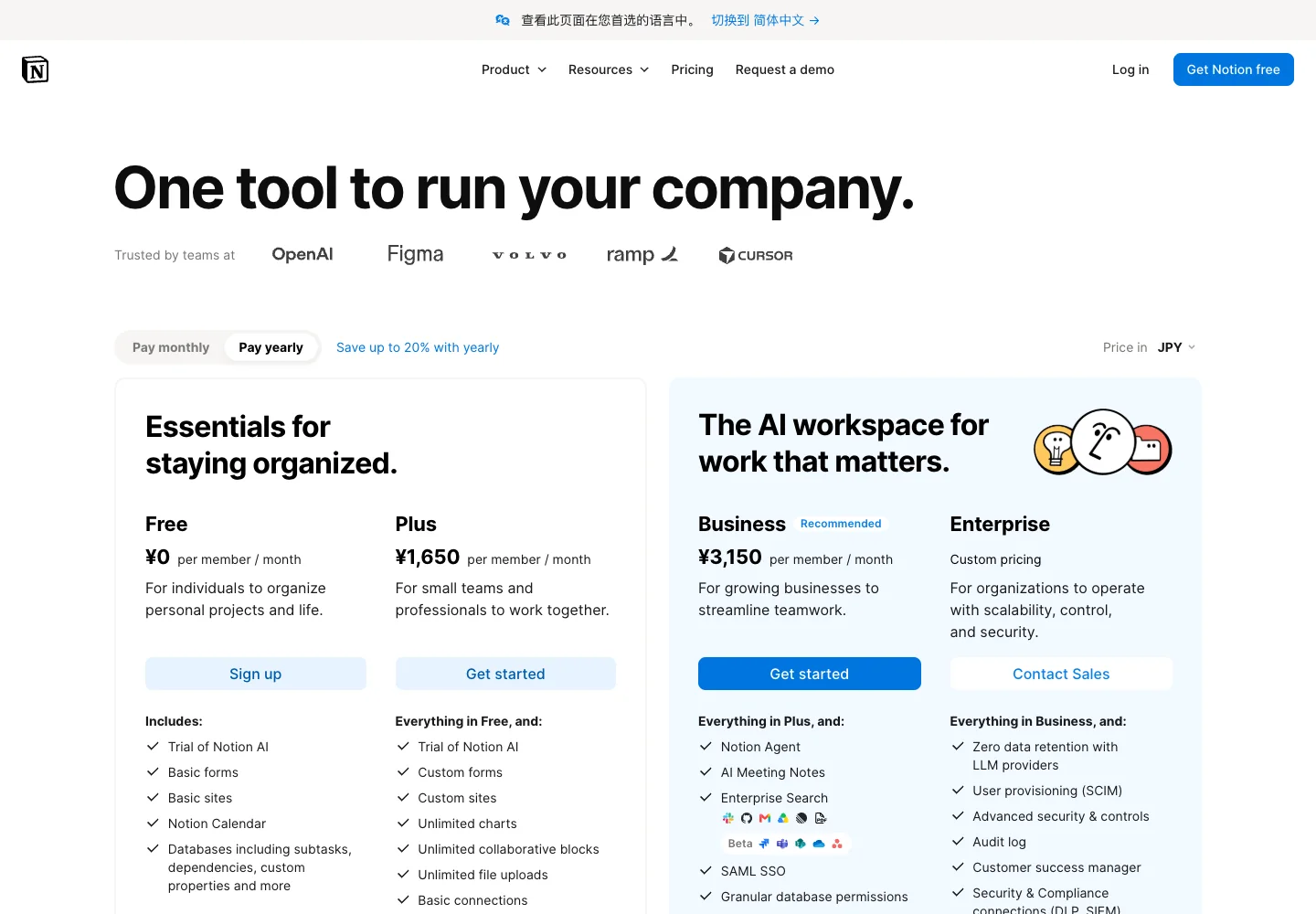
Anyone can try Notion AI with complimentary responses; after those are used, ongoing AI access requires Business or Enterprise. Custom Agents are a separate credit-based charge: the pricing page displays $10 per 1,000 monthly Notion credits, but the reviewed text does not explicitly label the currency ISO code. Workspace plan prices are region-selectable, confirm the local billing currency and total before purchase.
Teams already using Notion who want to search workspace context, draft or revise pages, summarize meetings, and turn notes into structured databases or actions.
Fit is editorial guidance, not a measured result.
Platforms
Access: Web, Desktop, Mobile. Operating systems not separately verified. Deployment: Vendor cloud.
Published-source facts and editorial guidance. No product test is implied. Confirm current conditions before purchase.
Official website; English-locale reshoot · Captured 2026-10-18 · Source ↗
This listing has 1 image; no further gallery images exist.
What to know before choosing
Good fit
Teams already using Notion who want to search workspace context, draft or revise pages, summarize meetings, and turn notes into structured databases or actions.
Limits and trade-offs
Free and Plus users only receive a limited number of complimentary AI responses; continued AI access requires Business or Enterprise. Some included features have usage allowances, while Custom Agents and premium AI models use Notion credits separately.
Plans and free allowances
Anyone can try Notion AI with complimentary responses; after those are used, ongoing AI access requires Business or Enterprise. Custom Agents are a separate credit-based charge: the pricing page displays $10 per 1,000 monthly Notion credits, but the reviewed text does not explicitly label the currency ISO code. Workspace plan prices are region-selectable, confirm the local billing currency and total before purchase.
Official published documentation reviewed; not a product test
Dates: Last reviewed 2026-10-15. Last reviewed is the latest source or editorial review date; it is not a content-change date.
A closer look at Notion AI
Notion AI is a workspace assistant for questions, page drafting and editing, meeting notes, and structured knowledge. Pick it when your team already keeps working context in Notion; standalone writers may not justify changing workspace plans just to add AI.
Editorial guidance based on published documentation. The workflow below is a suggested starting point, not a measured product result.
When to choose Notion AI
Asking questions across team pages and turning the answer into a draft or action list.
Summarizing a meeting and keeping notes searchable alongside existing projects.
Drafting or updating database entries from information already stored in a workspace.
When to choose something else
A user who wants a standalone writing editor without moving work into Notion.
A workspace that needs ongoing AI on a Free or Plus plan after its complimentary responses are used.
A team that expects Custom Agents or premium models to be included in the base AI allowance.
A practical starting workflow
Keep approved source pages, meeting notes, and project facts in the workspace the AI will use.
Ask one focused question and name the source pages or connected context to prioritize.
Review citations, dates, and proposed edits; accept or discard page changes rather than pasting blindly.
Check the workspace's AI allowance and credit settings before enabling premium models or Custom Agents.
Check before committing
Free and Plus include only complimentary AI responses for trying the features; continued AI use requires Business or Enterprise.
Some AI features use six-hour and monthly allowances that may temporarily pause when exhausted.
Custom Agents and premium models use Notion credits separately from included AI features.
The pricing page is region-selectable; local workspace pricing and credit currency should be checked before purchase.
Common questions
Can I keep using Notion AI on the Free or Plus plan?
Free and Plus users can try a limited number of complimentary AI responses. After those are used, Notion says an upgrade to Business or Enterprise is needed to continue using AI features.
What is included with a Business or Enterprise plan?
Notion describes its core AI features as included on Business and Enterprise, subject to usage allowances. Premium models and some agent workflows use credits separately.
They use a separate Notion credit system. The pricing page currently displays $10 per 1,000 monthly credits after the free-to-try period; confirm the currency and workspace-specific terms before buying credits.
Tools the catalogue itself links to Notion AI: an editor lists them as related, an editorial comparison or switching guide covers the pair, or both are reviewed picks for the same task. Each reason below can be checked on the tool pages. This is not a quality ranking.
A general-purpose AI assistant for writing, research, file work, and analysis.
Why it is listed Different category: Chatbots (Notion AI is Productivity) · Covered in an editorial comparison with Notion AI · Listed by editors as related to Notion AI · Shares 1 task (Write clearer content) · Access in common: Web + Mobile
Why it is listed Different category: Chatbots (Notion AI is Productivity) · Covered in an editorial comparison with Notion AI · Its review lists Notion AI as related
A meeting assistant for live transcription, searchable notes, summaries, and follow-ups.
Why it is listed Different category: Audio & Voice (Notion AI is Productivity) · Listed by editors as related to Notion AI · Shares 1 task (Capture meeting notes) · Access in common: Web + Desktop + Mobile
Sembly Studio builds client-facing documents from project materials; Meeting Notes remains a separate optional module.
Why it is listed Same category: Productivity · Shares 2 tasks (Capture meeting notes, Write clearer content) · Access in common: Web · Same pricing type: Trial available
When this listing’s recorded facts changed, from what to what. Dates are the day (UTC) the change was recorded in the ByTask data, not the day the vendor changed anything. Only changes that can be traced in the data history appear here; a fact that has not changed shows nothing.
Recorded (UTC)
Price & plansPrice and plan wording changed
Links & sourcesOfficial sources on file: 4 added, 1 re-checked

 Official site reference


