Xmas Dance AI turns one or two clear adult portraits into a 720p vertical Christmas dance video in four ready-made routines (Elf Solo, Kitchen Duo, Fireplace Duo, Party Solo), keeping the template's routine, scene and reference audio. Registration includes no free render: one-time credit packs cost $3.99 for 6 credits (one 6-second solo) or $6.99 for 14 credits, with larger packs at $10.90 for 20, $29.90 for 60 and $49.50 for 100 credits - no subscription, and purchased credits do not expire.
Fit is editorial guidance, not a measured result.
Platforms
Access: not separately verified. Operating systems not separately verified.
Published-source facts and editorial guidance. No product test is implied. Confirm current conditions before purchase.
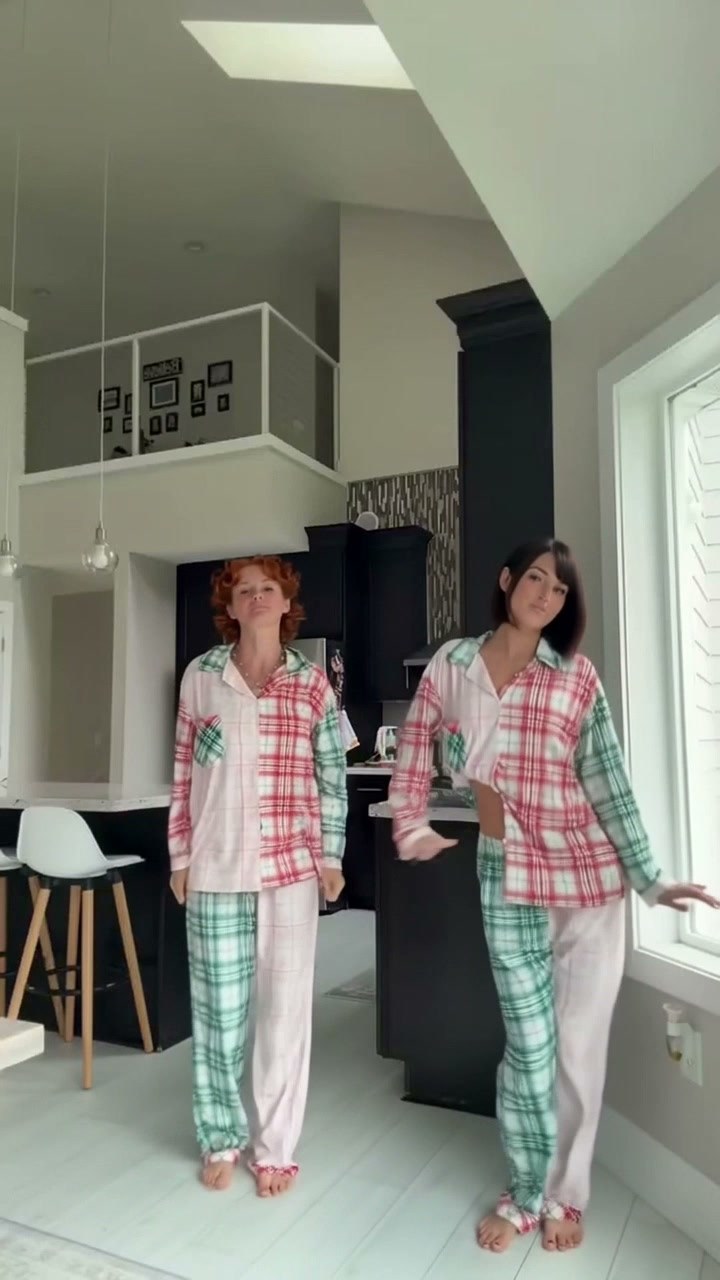
Maker-provided screenshot · Capture date not recorded · Asset reviewed 2026-11-27 · Source ↗
This listing has 1 image; no further gallery images exist.
What to know before choosing
Good fit
Xmas Dance AI turns one or two clear adult portraits into a 720p vertical Christmas dance video in four ready-made routines (Elf Solo, Kitchen Duo, Fireplace Duo, Party Solo), keeping the template's routine, scene and reference audio. Registration includes no free render: one-time credit packs cost $3.99 for 6 credits (one 6-second solo) or $6.99 for 14 credits, with larger packs at $10.90 for 20, $29.90 for 60 and $49.50 for 100 credits - no subscription, and purchased credits do not expire.
Limits and trade-offs
Creating an account is free, but it does not include free generation credits; registration includes no free render.
Plans and free allowances
One-time credit packs from $3.99 (6 credits) or $6.99 (14 credits), with zero auto-renewal.
Maker-submitted product description
Reviewed for publication 2026-11-27. This material was supplied with the submission; it is not a hands-on test or independent verification of every claim.
Xmas Dance AI is a browser-based tool for making short Christmas dance videos from portrait photos. Choose a solo template and upload one photo, or choose a duet and upload two separate photos so both adults appear in the same dance. The finished clip can be downloaded as an MP4 to send as a holiday greeting or share in a group chat. The homepage shows sample input portraits and completed clips so you can see the result before paying. Generation is a one-time purchase: US$3.99 for a solo or US$6.99 for a duo. Use your own portrait or a photo you have permission to animate.
Maker-reported pricing model: paid. Pricing has not been independently verified. Confirm current plans on the official website.
Official-site collection and source-backed editorial review
Dates: Last reviewed 2026-11-29 · Sources checked 2026-11-28 · Catalogued 2026-11-27. Last reviewed is the latest source or editorial review date; it is not a content-change date.
A closer look at Xmas Dance AI
Xmas Dance AI is a Christmas dance video generator that turns one or two clear adult portraits into a 720p vertical Christmas dance video. Instead of describing a scene, you pick from four ready-made routines — the page names Elf Solo, Kitchen & Fireplace Duos and Party Solo — and the template supplies the choreography and the camera work. Pricing runs on one-time credit packs with no subscription and zero auto-renewal, paid through PayPal. Creating an account is free, but the account includes no free generation credits and no free render: the button shows the charge before you submit. The smallest pack is the 6-credit tryout at $3.99, enough for one 6-second solo; the 14-credit tryout at $6.99 covers one couple routine or two 6-second solos. Larger packs are Starter at $10.90 for 20 credits, Party at $29.90 for 60 credits and Squad at $49.50 for 100 credits. A 6-second solo uses 6 credits, Party solos also come in 12-second (12 credits) and 18-second (18 credits) versions, and either couple routine uses 14 credits. All purchased credits share one balance and work with any style, so you can mix solo and couple videos without buying separate packs for each template. It suits someone who wants a festive dance clip of themselves or of two people for the holiday season without filming or learning choreography, and who prefers a small one-time payment over a subscription. It is a poor fit if you want a free first render, a non-Christmas theme, or any say over the dance itself beyond choosing the routine.
Editorial guidance based on published documentation. The workflow below is a suggested starting point, not a measured product result.
When to choose Xmas Dance AI
You want a Christmas dance video of one or two people from portrait photos, with the choreography supplied by a ready-made routine.
You prefer one-time credit packs with no subscription and zero auto-renewal, and one shared credit balance that works across all styles.
You only need one clip: the $3.99 tryout pack covers a single 6-second solo.
When to choose something else
You expect a free first video: creating an account is free, but it includes no free generation credits and no free render.
You want a non-seasonal theme or your own choreography: the output is one of the fixed Christmas routines at 720p vertical.
You need longer or landscape output: solos run 6 to 18 seconds and couple routines are a fixed credit cost, all in vertical format.
A practical starting workflow
Create a free account (note that the account comes with no free generation credits).
Buy a one-time credit pack through PayPal — from the 6-credit tryout at $3.99 up to the 100-credit Squad pack at $49.50.
Pick one of the four ready-made routines (such as Elf Solo, Kitchen & Fireplace Duos or Party Solo) and add one or two clear adult portraits.
Check the charge shown on the button before you submit: a 6-second solo uses 6 credits, longer Party solos 12 or 18 credits, and a couple routine 14 credits.
Generate and download your 720p vertical Christmas dance video.
Check before committing
Registration includes no free render: generation always spends credits, starting at $3.99 for the smallest pack, so budget for at least one pack before you start.
Credits are shared across every style and both template types from one balance, which is convenient, but a couple routine (14 credits) costs more than twice a 6-second solo (6 credits), so duo videos drain a small pack quickly.
The routines, format and length are fixed by the template: 720p vertical video, solos of 6, 12 or 18 seconds, and no option to change the choreography or music.
Common questions
Is Xmas Dance AI free?
Creating an account is free, but it does not include free generation credits and there is no free render. Generation is paid with one-time credit packs, starting at $3.99 for 6 credits, and the button shows the charge before you submit. There is no subscription and zero auto-renewal.
A 6-second solo uses 6 credits. Party solos also offer 12 seconds for 12 credits or 18 seconds for 18 credits, and either couple routine uses 14 credits. Packs run from 6 credits for $3.99 and 14 credits for $6.99 up to 20 credits for $10.90, 60 for $29.90 and 100 for $49.50, and all credits work with any style from one shared balance.
One or two: you can turn one or two clear adult portraits into a 720p vertical Christmas dance video, choosing a solo routine or a couple routine such as Kitchen & Fireplace Duos.
Christmas Photo Booth AI — Christmas Photo Booth AI turns two separate portrait photos into a Christmas photo booth-style video: a template sets the photo-strip layout, poses and camera movement, producing a portrait MP4 at 480p of about 17 seconds. Each generation attempt uses 100 credits, sold as one-time packs that never expire: Single (100 credits, $9.90), 3 videos (300 credits, $26.90) and 6 videos (600 credits, $47.90), with credits returned for confirmed technical failures.
KupiDance — KupiDance turns one adult photo into a vertical 9:16 iPhone Kupi dance video for TikTok or Reels, following a reference dance so the user joins the trend without filming. It is sold in one-time credit packs (1 credit = 1 video) and is an independent project not affiliated with Apple, TikTok or the song's performers.
Identity note KupiDance is not affiliated with Apple, TikTok, Sabi, MIA BOYKA or the creators of original clips. Read the listing
Bulin 47 Viral Video AI — Bulin47 is an independent, fan-style AI remake tool that puts one authorized photo into the viral Bulin 47 dembow freestyle clip (the dame-hombro shoulder dance) and returns a private downloadable MP4. Creating a video spends credits (the shown create uses 288 credits) through a ReelMuse account; live subscription plan prices appear only after sign-in, so no prices are published on the public page.
Identity note Not affiliated with the original creators. Read the listing
Xmas Dance AI turns one or two clear adult portraits into a 720p vertical Christmas dance video in four ready-made routines (Elf Solo, Kitchen Duo, Fireplace Duo, Party Solo), keeping the template's routine, scene and reference audio. Registration includes no free render: one-time credit packs cost $3.99 for 6 credits (one 6-second solo) or $6.99 for 14 credits, with larger packs at $10.90 for 20, $29.90 for 60 and $49.50 for 100 credits - no subscription, and purchased credits do not expire.
Capabilities and conditions
Turn one or two clear adult portraits into a 720p vertical Christmas dance video. Source ↗
One-time credit packs from $3.99 (6 credits) or $6.99 (14 credits), with zero auto-renewal. Source ↗
Creating an account is free, but it does not include free generation credits; registration includes no free render. Source ↗
Price and free allowance
See the sourced plan statements above; confirm currency, billing period and checkout eligibility on the vendor site.
Published-source profile · collected 2026-11-28. Automated collection followed by editorial review. These are vendor-published claims, not hands-on product test results.
Alternatives to Xmas Dance AI
Tools the catalogue itself links to Xmas Dance AI: an editor lists them as related, an editorial comparison or switching guide covers the pair, or both are reviewed picks for the same task. Each reason below can be checked on the tool pages. This is not a quality ranking.
When this listing’s recorded facts changed, from what to what. Dates are the day (UTC) the change was recorded in the ByTask data, not the day the vendor changed anything. Only changes that can be traced in the data history appear here; a fact that has not changed shows nothing.

 Official site reference


