KupiDance turns one adult photo into a vertical 9:16 iPhone Kupi dance video for TikTok or Reels, following a reference dance so the user joins the trend without filming. It is sold in one-time credit packs (1 credit = 1 video) and is an independent project not affiliated with Apple, TikTok or the song's performers.
Fit is editorial guidance, not a measured result.
Platforms
Access: not separately verified. Operating systems not separately verified.
Published-source facts and editorial guidance. No product test is implied. Confirm current conditions before purchase.
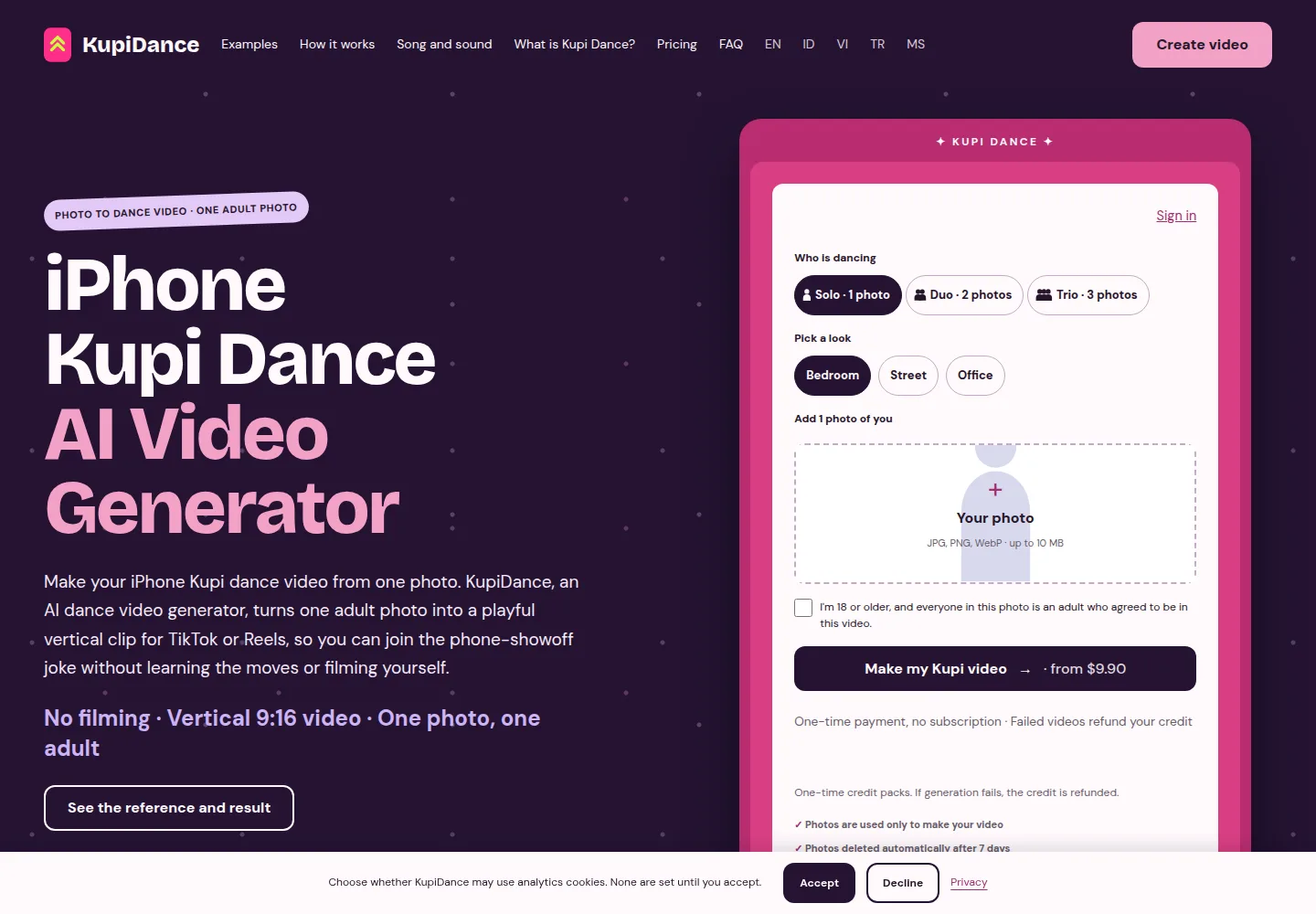
Official website; English-locale capture · Captured 2026-11-29 · Source ↗
This listing has 1 image; no further gallery images exist.
What to know before choosing
Good fit
KupiDance turns one adult photo into a vertical 9:16 iPhone Kupi dance video for TikTok or Reels, following a reference dance so the user joins the trend without filming. It is sold in one-time credit packs (1 credit = 1 video) and is an independent project not affiliated with Apple, TikTok or the song's performers.
Limits and trade-offs
The uploader confirms they are 18 or older and everyone in the photo is an adult who agreed. KupiDance is not affiliated with Apple, TikTok, Sabi, MIA BOYKA or the creators of original clips. Generated videos have no audio; the user adds the trend sound in the posting app.
Plans and free allowances
One-time credit packs start at $9.90, and 1 credit makes 1 video.
Maker-submitted product description
Reviewed for publication 2026-11-21. This material was supplied with the submission; it is not a hands-on test or independent verification of every claim.
The pricing page lists credit packs and we did not find a free plan, so the pricing model the maker reported is not shown here. Check the official site before you pay.
The iPhone Kupi dance is everywhere, but pulling off the phone reveal and the routine takes practice and a camera crew of friends. KupiDance turns one photo of an adult who agreed to appear into a playful vertical dance clip you can share on TikTok or Reels. Pick a look, add the photo and pay with one-time credit packs; photos are deleted automatically after 7 days.
Official-site collection and source-backed editorial review
Dates: Last reviewed 2026-11-28 · Sources checked 2026-11-26 · Catalogued 2026-11-21. Last reviewed is the latest source or editorial review date; it is not a content-change date.
A closer look at KupiDance
KupiDance is an AI dance video generator built around one specific trend: it turns one adult photo into a playful vertical 9:16 dance clip for TikTok or Reels, so you can join the iPhone Kupi phone-showoff joke without learning the moves or filming yourself. You pick a look (Bedroom, Street or Office), add one clear photo of yourself, and the reference dance guides the motion; the site publishes its own eight-step breakdown of the reference — a phone reveal, a step back, arm circles, an X-shaped cross and a point toward the camera — while stressing that this is its own breakdown, not official choreography. The output is a 480p vertical video made with Seedance 2.0 Mini, and it carries no audio: you add the trend sound yourself from the posting app's official music library. Pricing is one-time credit packs — 1 credit makes 1 video — at $9.90 for a Single (1 video), $19.90 for a Trio (3 videos), $39.90 for a Squad (8 videos) and $79 for a Party pack (20 videos), with credits valid for 365 days, payment through Stripe Checkout, and an automatic credit refund if generation fails. Photos are used only to make your video, are deleted automatically after 7 days, and are never used to train AI models. The vendor states that KupiDance is an independent project, not affiliated with Apple, TikTok, Sabi, MIA BOYKA or the creators of the original clips, and that “iPhone” here names the dance trend rather than an Apple phone it sells or represents.
Editorial guidance based on published documentation. The workflow below is a suggested starting point, not a measured product result.
When to choose KupiDance
You want to join the iPhone Kupi dance trend but cannot, or do not want to, film yourself dancing.
You have one clear photo of yourself as an adult and want a vertical clip ready for TikTok or Reels.
You prefer a one-time credit pack over a subscription, with a refund if generation fails.
When to choose something else
You want the finished video to include the trend song: KupiDance videos have no audio, so the sound must be added in the posting app.
You want a group or duet video, or to use a child's or someone else's photo: it is designed for one consenting adult per video.
You expect an exact copy of the reference dance or of your likeness: the vendor does not guarantee exact likeness, clothing, background or choreography.
A practical starting workflow
Pick a look — Bedroom, Street or Office — and confirm you are 18 or older and everyone in the photo is a consenting adult.
Add one clear photo of yourself (JPG, PNG or WebP, up to 10 MB); a well-lit full-body frame is recommended because the dance moves from close-up to full body.
Choose a one-time credit pack and pay through Stripe Checkout; 1 credit makes 1 video.
Generate, review the 9:16 480p clip, download it, and add the trend sound from the official music library in your posting app.
Check before committing
KupiDance is an independent project and is not affiliated with Apple, TikTok, Sabi, MIA BOYKA or the creators of the original clips; it does not reproduce, distribute or imitate those clips.
Results can vary from the reference dance, and generated movement may differ from the person in the source photo — review the clip before sharing, and label AI media where the platform requires it.
Your photo is deleted automatically after 7 days and is never used to train AI models, per the vendor's published policy.
Common questions
How much does a KupiDance video cost?
One credit makes one video, and one-time packs start at $9.90 (Single, 1 video); Trio is $19.90 for 3 videos, Squad is $39.90 for 8 and Party is $79 for 20. Credits stay valid for 365 days, there is no subscription, and a failed generation refunds the credit.
No. KupiDance videos have no audio; you add the track yourself from the official music library in TikTok or your posting app, if it is available in your region.
No. The vendor states that KupiDance is an independent project, not affiliated with Apple, TikTok, Sabi, MIA BOYKA or the creators of the original clips; “iPhone” names the dance trend and does not mean it sells or represents an Apple phone.
Photos are used only to make your video, are deleted automatically after 7 days, and are never used to train AI models. Only your own adult photo may be used — group, pet and children's photos are unsupported.
Gas Station Dance AI — Gas Station Dance AI is a single-template generator for the viral gas station dance: upload one photo per shot (dancer, walking selfie, car exit - the same photo can fill several slots) and it recasts the 15-second three-cut clip with your faces, keeping the moves, cuts and Akcent 'On and On' music, at 480p to 1080p across Seedance 2.0 Mini / Fast / Pro and 2.5. Sign-up gives 11 free credits - enough for exactly one 480p video with a watermark; the $4.99 Trial pack (11 credits) covers one watermark-free 480p video, with Starter $9.90 / 100 credits and Studio $59.90 / 750 above it.
ReelBoop — ReelBoop turns your photos into AI videos from trend templates - dances, duets, pet and outfit-change formats - using leading image and video models (GPT Image 2.6, Nano Banana 2.1, Kling 3.0 Pro, Seedance 2.5) with the credit cost shown before every run. Video generation requires credits and has no free trial. Plans are billed yearly with all credits available upfront: Creator $99/year (2,400 credits), Pro $299/year (9,600) and Studio $599/year (24,000); credits expire at period end and confirmed failures are refunded.
Video Effect AI — Video Effect AI turns photos of you, your friends or your pets into downloadable 720p template videos: 24 effects (Hotel Lobby, Tiny Desk, pet dances and reactions, cinematic scenes) where your photos supply the cast and the effect sets the scene, each with its credit cost shown before you create. Videos cost 10, 20 or 40 credits depending on the effect, paid from one-time credit packs - Starter $9 for 10 credits, Creator $29 for 40 credits, Studio $79 for 120 credits, no subscription. Confirmed generation failures return the reserved credits.
Product details from official sources
KupiDance turns one adult photo into a vertical 9:16 iPhone Kupi dance video for TikTok or Reels, following a reference dance so the user joins the trend without filming. It is sold in one-time credit packs (1 credit = 1 video) and is an independent project not affiliated with Apple, TikTok or the song's performers.
Capabilities and conditions
One adult photo becomes a playful vertical dance clip for TikTok or Reels. Source ↗
One-time credit packs start at $9.90, and 1 credit makes 1 video. Source ↗
The uploader confirms they are 18 or older and everyone in the photo is an adult who agreed. Source ↗
KupiDance is not affiliated with Apple, TikTok, Sabi, MIA BOYKA or the creators of original clips. Source ↗
Generated videos have no audio; the user adds the trend sound in the posting app. Source ↗
Price and free allowance
See the sourced plan statements above; confirm currency, billing period and checkout eligibility on the vendor site.
Published-source profile · collected 2026-11-28. Automated collection followed by editorial review. These are vendor-published claims, not hands-on product test results.
Alternatives to KupiDance
Tools the catalogue itself links to KupiDance: an editor lists them as related, an editorial comparison or switching guide covers the pair, or both are reviewed picks for the same task. Each reason below can be checked on the tool pages. This is not a quality ranking.
Showing 6 of 11 alternatives the catalogue links to KupiDance.
Change history
When this listing’s recorded facts changed, from what to what. Dates are the day (UTC) the change was recorded in the ByTask data, not the day the vendor changed anything. Only changes that can be traced in the data history appear here; a fact that has not changed shows nothing.


 Official site reference


