Generate short video shots and visual inserts from prompts, images, or existing clips.
At a glance
Free + paid · Source review 2026-10-15
Price & billing
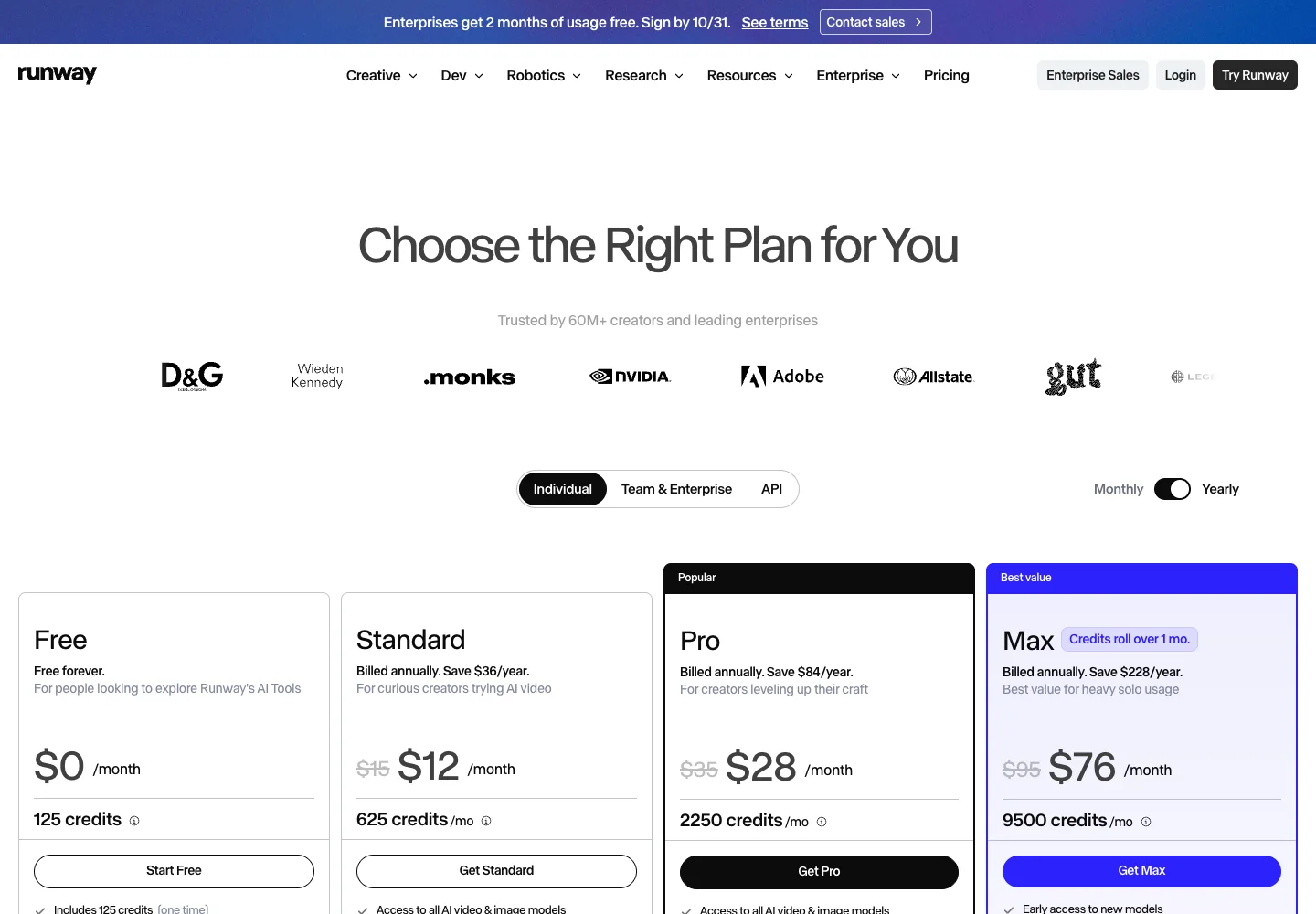
Free lists 125 one-time credits with no monthly reset. Standard is displayed at $15/month on monthly billing or $12/month equivalent billed annually. Confirm the billing currency, full annual charge and current credit allowance before subscribing.
Published-source facts and editorial guidance. No product test is implied. Confirm current conditions before purchase.
Official website; English-locale reshoot · Captured 2026-10-18 · Source ↗
This listing has 1 image; no further gallery images exist.
What to know before choosing
Good fit
Creating a few short concept shots or supporting visuals when a project needs generated motion alongside separately recorded footage.
Limits and trade-offs
Free access is limited to a one-time credit grant, not a monthly allowance. Generation length and credit cost depend on the selected model and settings; generated footage should not stand in for a real recording when a demo must prove software behavior.
Plans and free allowances
Free lists 125 one-time credits with no monthly reset. Standard is displayed at $15/month on monthly billing or $12/month equivalent billed annually. Confirm the billing currency, full annual charge and current credit allowance before subscribing.
Official published documentation reviewed; not a product test
Dates: Last reviewed 2026-10-15. Last reviewed is the latest source or editorial review date; it is not a content-change date.
A closer look at Runway
Runway fits projects that need a few generated inserts, variations, or image-to-motion shots. Use it as a shot-generation stage; record real interface actions separately when a demo must prove how software works.
Editorial guidance based on published documentation. The workflow below is a suggested starting point, not a measured product result.
When to choose Runway
Create a short visual cutaway from a prompt or supplied still for an edited sequence.
Explore motion options for a concept before arranging the final cut in a timeline editor.
Extend or assemble generated shots through a workflow when one short generation is not enough.
When to choose something else
Show exact software controls, data, or results that must match a real product screen.
Produce a predictable long-form video from one prompt without checking model length and credit limits.
Plan recurring free generations on the assumption that Free credits refresh monthly.
A practical starting workflow
Define the shot’s role and whether it needs to match real footage.
Choose a model and input type; check maximum duration and displayed credit cost before generating.
Generate only the needed insert; if it needs more time, check the available extension or assembly workflow.
Review continuity, text, and visual details, then place the shot beside real recorded footage in an editor.
Check current export and usage terms before publishing or using the result for client work.
Check before committing
Free includes 125 one-time credits, not a monthly quota; model and duration affect spend.
The product page describes model-based clips and workflow extension, so confirm selected-model limits before planning a sequence.
A generated shot can illustrate a concept but cannot verify real software behavior.
Common questions
Do Free credits refresh every month?
No. The current pricing page describes 125 Free credits as a one-time grant, not a recurring monthly allowance.
The product page presents model-based clip generation and workflow options for extending or assembling footage. Check the selected model’s duration and credit cost before treating it as a long-form workflow.
Use a real screen recording for actions or results that must be accurate. Generated footage can be an optional visual insert; it does not demonstrate a real interface.
Pika — Trying short stylized clips or motion variations from text or image references when generated footage is illustrative, not evidence of real events or software behavior.
Tools the catalogue itself links to Runway: an editor lists them as related, an editorial comparison or switching guide covers the pair, or both are reviewed picks for the same task. Each reason below can be checked on the tool pages. This is not a quality ranking.
Create short generated video clips and multi-shot sequences from prompts or reference images.
Why it is listed Same category: Video · Covered in an editorial comparison with Runway · Listed by editors as related to Runway · Shares 1 task (Make or edit a video) · Access in common: Web
Transform text into detailed 3D models, interact with AI.
Why it is listed Different category: Productivity (Runway is Video) · Covered in an editorial comparison with Runway · Its review lists Runway as related
When this listing’s recorded facts changed, from what to what. Dates are the day (UTC) the change was recorded in the ByTask data, not the day the vendor changed anything. Only changes that can be traced in the data history appear here; a fact that has not changed shows nothing.


 Official site reference