Create short generated video clips and multi-shot sequences from prompts or reference images.
At a glance
Paid · Source review 2026-10-15
Price & billing
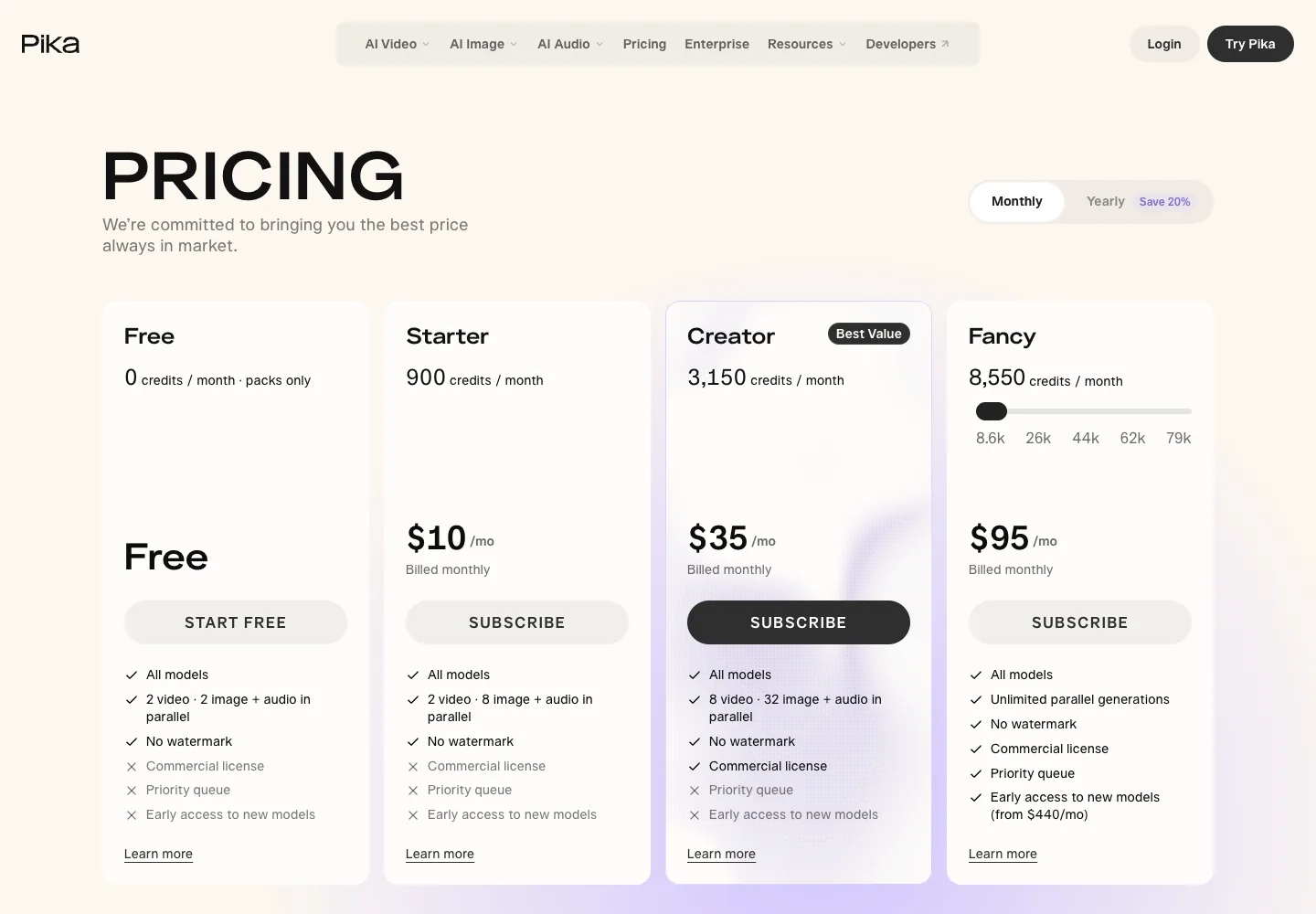
The current monthly view lists 0 monthly credits for Free, with paid subscriptions and credit packs available. Starter is displayed at $10/month, Creator at $35/month and Fancy at $95/month; confirm currency and billing term. The current table includes commercial licensing for Creator and Fancy, not Starter.
Trying short stylized clips or motion variations from text or image references when generated footage is illustrative, not evidence of real events or software behavior.
Fit is editorial guidance, not a measured result.
Platforms
Access: Web. Operating systems not separately verified. Deployment: Vendor cloud.
Published-source facts and editorial guidance. No product test is implied. Confirm current conditions before purchase.
Official website; English-locale reshoot · Captured 2026-10-18 · Source ↗
This listing has 1 image; no further gallery images exist.
What to know before choosing
Good fit
Trying short stylized clips or motion variations from text or image references when generated footage is illustrative, not evidence of real events or software behavior.
Limits and trade-offs
The current Free tier lists zero monthly generation credits, so an account is not the same as a free generation allowance. Duration, credit cost, watermark behavior, and commercial rights vary by workflow and plan; the current table does not include a commercial license on Starter.
Plans and free allowances
The current monthly view lists 0 monthly credits for Free, with paid subscriptions and credit packs available. Starter is displayed at $10/month, Creator at $35/month and Fancy at $95/month; confirm currency and billing term. The current table includes commercial licensing for Creator and Fancy, not Starter.
Official published documentation reviewed; not a product test
Dates: Last reviewed 2026-10-15. Last reviewed is the latest source or editorial review date; it is not a content-change date.
A closer look at Pika
Pika is for short generated motion from a prompt or reference image, including the newer multi-shot Video Studio workflow. Choose it when a concept clip is enough; use a screen recorder or editor when viewers need to see a real app, product, or process.
Editorial guidance based on published documentation. The workflow below is a suggested starting point, not a measured product result.
When to choose Pika
Turn a supplied visual into a short motion concept for a social or campaign edit.
Explore prompt- or reference-based shot ideas before assembling a sequence.
Use a multi-shot generation flow when a short generated montage is the intended output.
When to choose something else
Depend on Free for monthly generations; the current plan page lists zero monthly credits.
Assume any paid plan permits commercial use; the current matrix marks licensing by tier.
Show exact product interfaces, transaction steps, or outcomes through generated footage.
A practical starting workflow
Decide whether the clip is illustrative or must document something real.
Select prompt, image reference, or multi-shot workflow, then inspect model-specific duration and credit cost.
Check the exact plan’s license and intended delivery path before spending credits, especially for client or advertising work.
Generate a short shot, review motion and continuity, then revise only if the change is worth the added credits.
Edit accepted footage with real video and verify watermark behavior for the exact download or share-link path.
Check before committing
The current pricing page shows zero monthly generation credits on Free; older help content still describes a Basic allowance.
Current pricing and older FAQ use different tier names and credit amounts; check the live plan matrix.
Watermark statements differ between the current plan table and help content about shared links and downloads.
The current pricing table lists commercial licensing for Creator and Fancy; Starter is paid but is not listed with that license.
Common questions
Does Free include monthly video-generation credits?
The current monthly pricing page lists Free with 0 monthly credits and credit packs available. The older FAQ describes a Basic free allowance, so use the current plan table as the present reference and confirm the account display before budgeting.
Does every paid plan include commercial-use rights?
No. The current plan table marks commercial licensing for Creator and Fancy; Starter is paid but is not marked with that license. Check the exact tier and intended use.
Limits depend on workflow. The homepage advertises a Video Studio multi-shot video up to 30 seconds, while the FAQ gives different limits for specific generation tools; check the selected tool before planning around a duration.
The current plan table and FAQ do not describe watermark behavior the same way for every path. Verify the chosen plan and whether you are downloading a file or sharing a link before publishing.
Tools the catalogue itself links to Pika: an editor lists them as related, an editorial comparison or switching guide covers the pair, or both are reviewed picks for the same task. Each reason below can be checked on the tool pages. This is not a quality ranking.
Generate short video shots and visual inserts from prompts, images, or existing clips.
Why it is listed Same category: Video · Covered in an editorial comparison with Pika · Listed by editors as related to Pika · Shares 1 task (Make or edit a video) · Access in common: Web
When this listing’s recorded facts changed, from what to what. Dates are the day (UTC) the change was recorded in the ByTask data, not the day the vendor changed anything. Only changes that can be traced in the data history appear here; a fact that has not changed shows nothing.


 Official site reference


