AI Stem Separator (titled AI Stem Splitter on its own page) splits an uploaded song into stems — vocals, drums, bass and other instruments, with 2-, 4- and 6-stem modes — directly in the browser, with per-stem preview and MP3/M4A or lossless WAV/FLAC downloads. New accounts get 3 free minutes once; after that, minutes are bought in one-time packs that never expire (35 minutes for $4.99, 100 for $12.99, 270 for $29.99), with no subscription.
Fit is editorial guidance, not a measured result.
Platforms
Access: not separately verified. Operating systems not separately verified.
Published-source facts and editorial guidance. No product test is implied. Confirm current conditions before purchase.
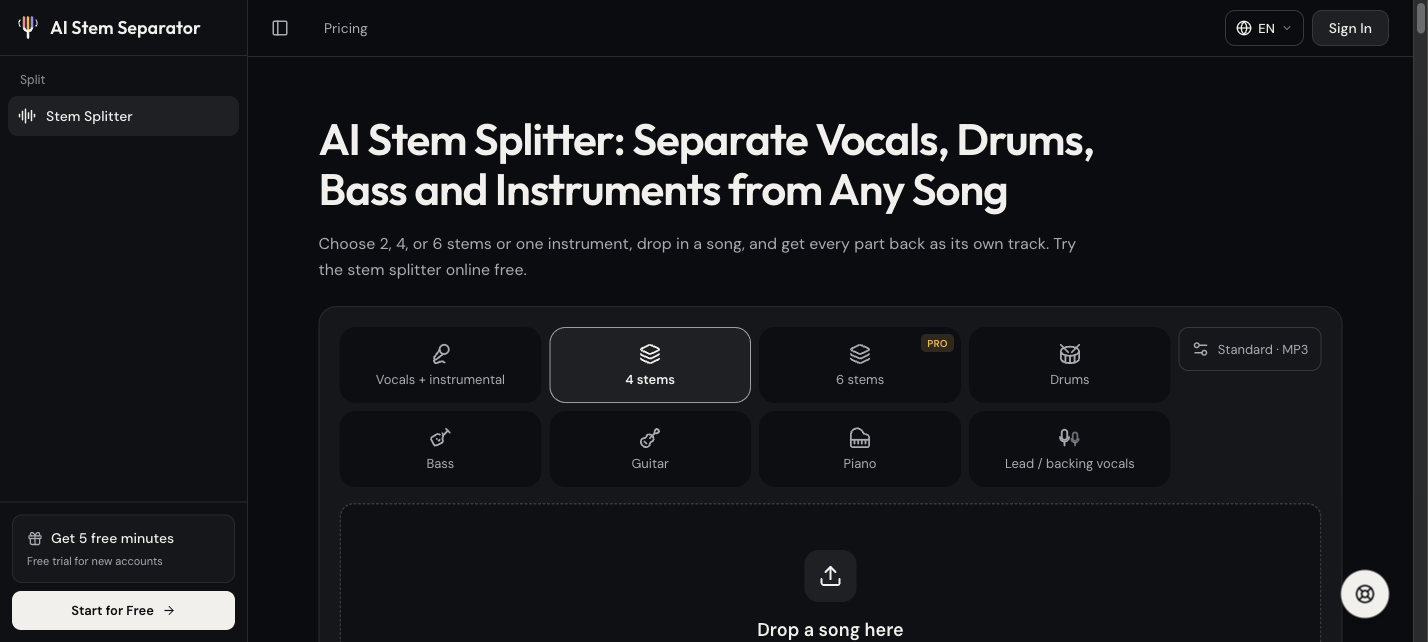
Maker-provided screenshot · Capture date not recorded · Asset reviewed 2026-11-27 · Source ↗
This listing has 1 image; no further gallery images exist.
What to know before choosing
Good fit
AI Stem Separator (titled AI Stem Splitter on its own page) splits an uploaded song into stems — vocals, drums, bass and other instruments, with 2-, 4- and 6-stem modes — directly in the browser, with per-stem preview and MP3/M4A or lossless WAV/FLAC downloads. New accounts get 3 free minutes once; after that, minutes are bought in one-time packs that never expire (35 minutes for $4.99, 100 for $12.99, 270 for $29.99), with no subscription.
Limits and trade-offs
Free accounts can upload songs up to 100 MB and 10 minutes; paid plans up to 1 GB and 60 minutes.
Plans and free allowances
New accounts get 3 free minutes, enough to try the splitter on a few real songs. Minutes are bought when needed, with no subscription and no expiry.
Maker-submitted product description
Reviewed for publication 2026-11-27. This material was supplied with the submission; it is not a hands-on test or independent verification of every claim.
AI Stem Separator is a browser-based audio separation tool for musicians, producers, and video editors who need individual parts of a mixed recording. Upload an audio file you have permission to use, choose a separation model for the parts you need, then use the resulting stems in your audio workflow. A singer can isolate accompaniment for practice, a producer can inspect a vocal or instrumental part while preparing an edit, and a video editor can work with components of a track instead of applying changes to the entire mix. Separation quality depends on the source recording and how densely its parts overlap.
Maker-reported pricing model: freemium. Pricing has not been independently verified. Confirm current plans on the official website.
Official-site collection and source-backed editorial review
Dates: Last reviewed 2026-11-29 · Sources checked 2026-11-28 · Catalogued 2026-11-27. Last reviewed is the latest source or editorial review date; it is not a content-change date.
A closer look at AI Stem Separator
The tool at aistemseparator.com calls itself AI Stem Splitter — stem splitter and stem separator are, in its own words, two names for the same tool — and it is catalogued here as AI Stem Separator. It runs in the browser and takes a finished, mixed song and separates it back into its parts: vocals, drums, bass, guitar, piano, and the other instruments. You choose the layout before you upload: 2 stems for vocals and instrumental, 4 stems for a full band, or a single instrument such as drums or bass on its own; paid plans add a 6-stem layout with guitar and piano separated. Uploads can be MP3, WAV, FLAC, M4A, or OGG, you preview each stem before downloading, and most songs are ready in a few minutes. New accounts get 3 free minutes to try it on real songs; free accounts download in MP3 or M4A with up to 4 stems and can upload songs up to 100 MB and 10 minutes. If a split fails, the minutes it used go back to your balance automatically. After the trial, you buy minutes in one-time packs that never expire, with no subscription: 35 minutes for $4.99, 100 minutes for $12.99, or 270 minutes for $29.99 — roughly $0.143, $0.130, and $0.111 per minute. Every pack includes the same paid features: up to 6 stems in one split, WAV and FLAC lossless downloads, songs up to 60 minutes or 1 GB, and results kept for 30 days.
Editorial guidance based on published documentation. The workflow below is a suggested starting point, not a measured product result.
When to choose AI Stem Separator
You occasionally need a vocal removed or an instrumental pulled from a finished song and do not want a subscription for it.
You want to test stem separation on your own songs first: the 3 free minutes and automatic refunds for failed splits make the trial low-risk.
You want lossless WAV or FLAC stems and larger uploads without committing to a monthly plan.
When to choose something else
You need MIDI export or a choice of separation engines: this tool offers neither — it sells one browser workflow billed by the minute.
Your files are longer than an hour or larger than 1 GB, which exceed even the paid upload limits.
A practical starting workflow
Create an account to receive the 3 free starter minutes.
Choose your stem layout: 2 stems, 4 stems, a single instrument, or 6 stems on a paid pack.
Upload an MP3, WAV, FLAC, M4A, or OGG file within the size and length limits.
Wait for the split — most songs are ready in a few minutes — and preview each stem.
Download the stems (MP3 or M4A on the free tier; WAV and FLAC lossless on paid packs).
Check before committing
Billing is by song length in minutes, so long tracks consume a pack quickly even though the per-minute price falls on larger packs.
Free downloads are limited to MP3 or M4A and up to 4 stems; the 6-stem layout and lossless formats require a paid pack.
Paid results are kept for 30 days, so download and back up stems you want to keep.
The vendor advises that a 320 kbps MP3 or a lossless file gives cleaner stems, so heavily compressed sources may separate less cleanly.
Common questions
Is there a free way to try it?
Yes. New accounts get 3 free minutes, free accounts can download in MP3 or M4A with up to 4 stems, and if a split fails, its minutes come back automatically.
Up to 6 stems in one split, WAV and FLAC lossless downloads, uploads up to 60 minutes or 1 GB, and results kept for 30 days; larger packs cost less per minute.
Fadr — Musicians, remixers, and DJs who want to separate vocals, drums, bass, and melodies from a song, creators who want playable instruments and drum kits from words, and hobbyists who want free-for-life basic stems and remixes.
VocalRemoverApp — VocalRemoverApp splits any song into a vocal (acapella) track and an instrumental. The free mode runs an open model entirely in your browser - no upload, no account, no daily cap, full MP3s with no watermark, songs up to 10 minutes. The paid HQ mode runs a newer model in the cloud (any device, WAV downloads, songs up to 30 minutes) at 1 credit per minute of audio, 6 cents or less per minute; new accounts get 2 free HQ minutes, and subscription tiers add monthly HQ minutes.
Product details from official sources
AI Stem Separator (titled AI Stem Splitter on its own page) splits an uploaded song into stems — vocals, drums, bass and other instruments, with 2-, 4- and 6-stem modes — directly in the browser, with per-stem preview and MP3/M4A or lossless WAV/FLAC downloads. New accounts get 3 free minutes once; after that, minutes are bought in one-time packs that never expire (35 minutes for $4.99, 100 for $12.99, 270 for $29.99), with no subscription.
Capabilities and conditions
It separates a mixed song into its parts: vocals, drums, bass and the other instruments. Source ↗
New accounts get 3 free minutes, enough to try the splitter on a few real songs. Source ↗
Minutes are bought when needed, with no subscription and no expiry. Source ↗
Free accounts can upload songs up to 100 MB and 10 minutes; paid plans up to 1 GB and 60 minutes. Source ↗
Price and free allowance
See the sourced plan statements above; confirm currency, billing period and checkout eligibility on the vendor site.
Published-source profile · collected 2026-11-28. Automated collection followed by editorial review. These are vendor-published claims, not hands-on product test results.
Alternatives to AI Stem Separator
Tools the catalogue itself links to AI Stem Separator: an editor lists them as related, an editorial comparison or switching guide covers the pair, or both are reviewed picks for the same task. Each reason below can be checked on the tool pages. This is not a quality ranking.
When this listing’s recorded facts changed, from what to what. Dates are the day (UTC) the change was recorded in the ByTask data, not the day the vendor changed anything. Only changes that can be traced in the data history appear here; a fact that has not changed shows nothing.

 Official site reference


