GAGoogle AI Studio logo
Code & Dev

Google AI Studio

Prototype prompts and Gemini API applications.

At a glance

Free + paid · Source review 2026-10-13
Price & billing

Eligible models have a free API tier; paid usage is metered by model and token type. Check the model-specific table before enabling billing.

Free allowance

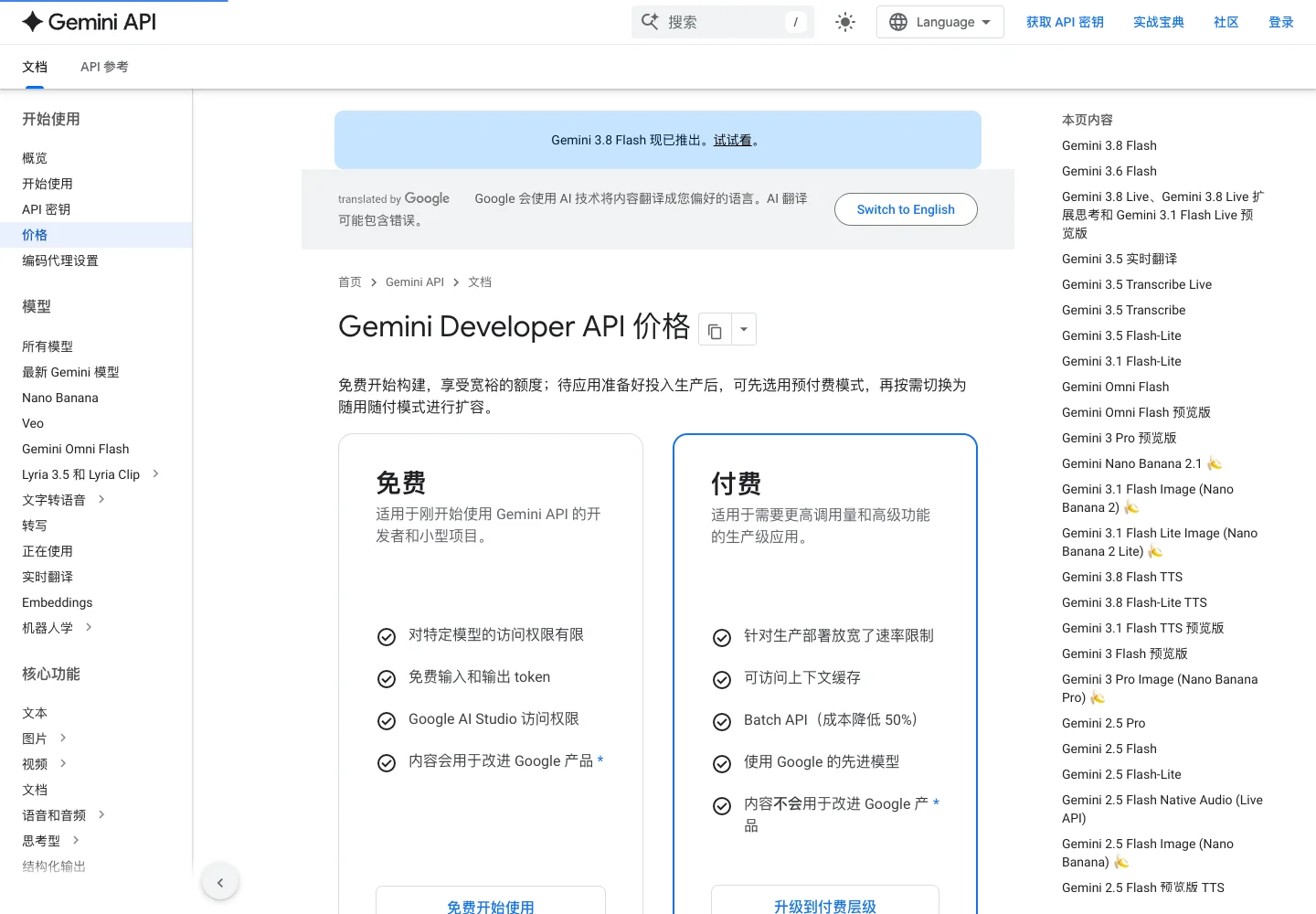
Eligible models have a free API tier; paid usage is metered by model and token type.

Best suited to

Developers evaluating model behavior before integrating an API.

Fit is editorial guidance, not a measured result.
Platforms

Access: Web, API. Operating systems not separately verified. Deployment: Vendor cloud.

Published-source facts and editorial guidance. No product test is implied. Confirm current conditions before purchase.

Google AI Studio official website reference, not a hands-on test result
Official website; English-locale reshoot · Captured 2026-10-18 · Source ↗

What to know before choosing

Good fit

Developers evaluating model behavior before integrating an API.

Limits and trade-offs

Free-tier content may be used to improve products. Paid model, token and grounding charges differ.

Plans and free allowances

Eligible models have a free API tier; paid usage is metered by model and token type. Check the model-specific table before enabling billing.

Evidence

Official product and plan information ↗ (reviewed 2026-10-13)

Official published page review; no authenticated product test

Dates: Last reviewed 2026-10-17 · Sources checked 2026-10-13. Last reviewed is the latest source or editorial review date; it is not a content-change date.

A closer look at Google AI Studio

Google AI Studio is a workspace for prototyping prompts and Gemini API applications. It suits developers evaluating model behavior before integrating the API into a product. Note the data term: free-tier content may be used to improve products, and paid usage involves separate model, token, and grounding charges.

Editorial guidance based on published documentation. The workflow below is a suggested starting point, not a measured product result.

When to choose Google AI Studio

  • A developer wants to test prompts and model behavior before writing integration code.
  • A team is comparing Gemini models for a feature and needs a quick prototyping surface.
  • A builder wants to understand API pricing dimensions (model, tokens, grounding) before committing.

When to choose something else

  • The work involves sensitive or proprietary prompts that must not be used for product improvement.
  • The requirement is a production deployment with fixed, predictable per-request pricing and no usage metering.

A practical starting workflow

  1. Define the task and the model behavior to evaluate before opening the studio.
  2. Prototype prompts with representative inputs, including edge cases.
  3. Check outputs against the actual requirements, not just fluency.
  4. Review the pricing page for model, token, and grounding charges that will apply beyond the free tier.
  5. Confirm the data-handling terms for the tier in use before testing anything sensitive.

Check before committing

  • Free-tier content may be used to improve products; do not prototype with confidential material on the free tier.
  • Paid model, token, and grounding charges differ; confirm the current pricing page for the exact structure.
  • This review covers published documentation, not a hands-on test of model quality.

Common questions

What is Google AI Studio?

A workspace for prototyping prompts and Gemini API applications, aimed at developers evaluating model behavior before integrating an API.

Official product and plan information ↗

Is what I type into the free tier private?

Not necessarily. The official information states free-tier content may be used to improve products.

Official product and plan information ↗

How is paid usage charged?

Paid model, token, and grounding charges differ; the exact structure is on the official pricing documentation.

Official product and plan information ↗

Compare approaches for this task

  • ChatGPT — Turning a brief or source files into structured drafts, explanations, and working documents.
  • Claude — Working through source material, developing structured drafts, and iterating on code or documents.
  • Cursor — Developers who want repository-aware coding help and reviewable edits inside an IDE.

Put it into practice

Alternatives to Google AI Studio

Tools the catalogue itself links to Google AI Studio: an editor lists them as related, an editorial comparison or switching guide covers the pair, or both are reviewed picks for the same task. Each reason below can be checked on the tool pages. This is not a quality ranking.

Official site reference
CuCursor logo

Cursor

Code & Dev

An AI coding IDE with agents that can inspect a repository, edit files, run commands, and review changes.

Why it is listed Same category: Code & Dev · Listed by editors as related to Google AI Studio · Shares 1 task (Build and debug code)

Price
Price not verified Pricing details
Evidence
Sources checked 2026-10-25 · 5 sources
Official site reference
Ch

ChatGPT

Chatbots

A general-purpose AI assistant for writing, research, file work, and analysis.

Why it is listed Different category: Chatbots (Google AI Studio is Code & Dev) · Listed by editors as related to Google AI Studio · Shares 1 task (Build and debug code) · Access in common: Web · Same pricing type: Free + paid


Price
Plan type verified Free + paid · See pricing
Evidence
Sources checked 2026-10-15 · 5 sources
Official site reference
ClClaude logo

Claude

Chatbots

An AI assistant for document work, research, writing, and coding.

Why it is listed Different category: Chatbots (Google AI Studio is Code & Dev) · Listed by editors as related to Google AI Studio · Shares 1 task (Build and debug code) · Access in common: Web · Same pricing type: Free + paid
Price
Plan type verified Free + paid · See pricing
Evidence
Sources checked 2026-10-15 · 3 sources
Official site reference
Bo

Bolt.new

Code & Dev

A browser-based AI builder for JavaScript web apps and mobile projects, with code view, GitHub, hosting, and database integrations.

Why it is listed Same category: Code & Dev · Shares 1 task (Build and debug code) · Access in common: Web · Same pricing type: Free + paid

Price
Plan type verified Free + paid · See pricing
Evidence
Sources checked 2026-10-15 · 3 sources
Official site reference
GCGithub Copilot logo

Github Copilot

Code & Dev

Coding assistance across editors, GitHub, and the command line, with chat, inline suggestions, and agent workflows.

Why it is listed Same category: Code & Dev · Shares 1 task (Build and debug code) · Access in common: Web · Same pricing type: Free + paid

Price
Plan type verified Free + paid · See pricing
Evidence
Sources checked 2026-10-25 · 8 sources
Lo

Lovable

Code & Dev

A browser-based AI builder for creating and iterating on web apps from written requirements.

Why it is listed Same category: Code & Dev · Shares 1 task (Build and debug code) · Access in common: Web

Price
Price not verified Pricing details
Evidence
Sources checked 2026-10-15 · 4 sources

See all 12 alternatives to Google AI Studio →

Sources and checks

Last source review is not a date of product testing. No rating or test result is implied by inclusion. Check the current plan and terms before buying.

Official site ↗