Sprite Flow is an AI sprite generator for game developers: from one character reference image it generates reference-consistent 2D animation sequences (idle, walk, run, jump, dash, attack and custom actions) in Classic mode at 4 to 16 frames or Pro mode at 32 frames, plus direction sprites, tilesets, props and game audio in one workspace. Exports are transparent PNG sprite sheets with Aseprite-compatible JSON for Unity, Godot, Unreal Engine, RPG Maker and Phaser. New accounts start free with starter credits to test real animations; downloading asset files requires an active subscription or a credit pack, and plan prices are on the vendor's pricing page rather than the homepage.
Fit is editorial guidance, not a measured result.
Platforms
Access: not separately verified. Operating systems not separately verified.
Published-source facts and editorial guidance. No product test is implied. Confirm current conditions before purchase.
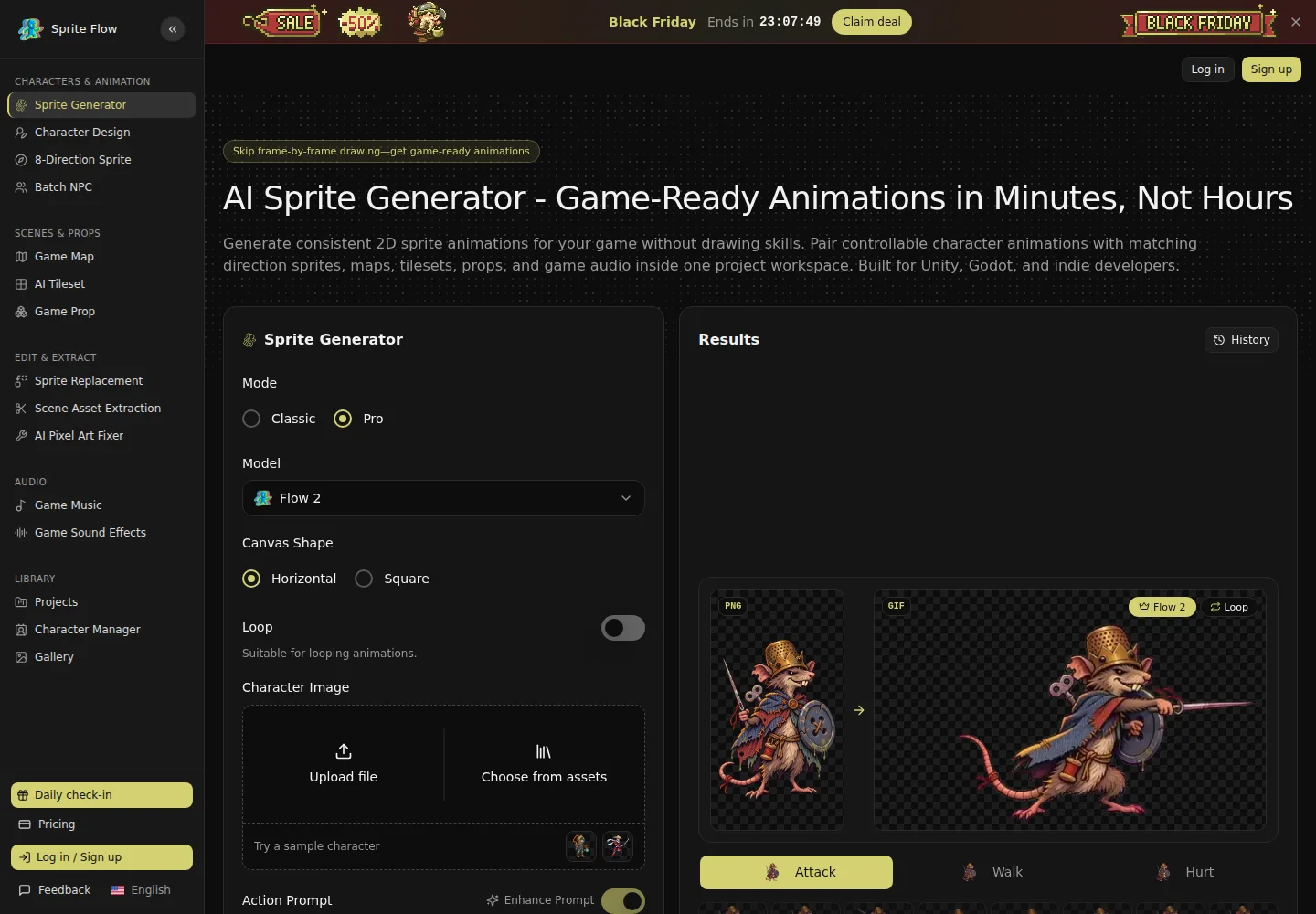
Official website; English-locale capture · Captured 2026-11-29 · Source ↗
This listing has 1 image; no further gallery images exist.
What to know before choosing
Good fit
Sprite Flow is an AI sprite generator for game developers: from one character reference image it generates reference-consistent 2D animation sequences (idle, walk, run, jump, dash, attack and custom actions) in Classic mode at 4 to 16 frames or Pro mode at 32 frames, plus direction sprites, tilesets, props and game audio in one workspace. Exports are transparent PNG sprite sheets with Aseprite-compatible JSON for Unity, Godot, Unreal Engine, RPG Maker and Phaser. New accounts start free with starter credits to test real animations; downloading asset files requires an active subscription or a credit pack, and plan prices are on the vendor's pricing page rather than the homepage.
Limits and trade-offs
Downloading asset files requires an active subscription or credit pack.
Plans and free allowances
New accounts start free with starter credits before paying.
Maker-submitted product description
Reviewed for publication 2026-11-20. This material was supplied with the submission; it is not a hands-on test or independent verification of every claim.
Sprite Flow is an AI toolkit for making 2D game assets without frame-by-frame drawing. Upload a character image or describe one, pick an art style such as pixel art, cartoon or anime, choose an animation like idle, walk, run or attack, and it generates consistent frames. Results export as APNG, GIF, or sprite sheets with transparent backgrounds and JSON atlas metadata for Unity, Godot, Unreal and Phaser. It suits indie developers, game-jam teams and small studios.
Maker-reported pricing model: freemium. Pricing has not been independently verified. Confirm current plans on the official website.
Official-site collection and source-backed editorial review
Dates: Last reviewed 2026-11-28 · Catalogued 2026-11-20. Last reviewed is the latest source or editorial review date; it is not a content-change date.
A closer look at Sprite Flow
Sprite Flow is an AI sprite generator built around one problem: keeping a 2D game character looking like the same character in every frame. You upload or design a single character reference image, and every animation sequence is anchored to it, so proportions, outfits and colours stay aligned across idle, walk, run, jump, dash and attack cycles, directional turnarounds and equipment variants. Classic mode generates sequences of 4, 6, 8, 10, 12 or 16 frames, while Pro mode generates 32-frame sequences at 8 FPS with optional loop closure; movement cycles, combat actions such as attack, punch, hit reaction and death, and custom action descriptions are all covered. A built-in onion-skin editor lets you fine-tune frame positions and scale after generation, and a free browser-local pixel fixer snaps uneven pixel edges onto a clean grid. Exports are engine-ready: an aligned transparent PNG sprite sheet plus a ZIP of numbered per-frame PNGs, Aseprite-compatible JSON metadata for Pro sheets and character exports, and transparent video in Pro mode. Sheets slice or import directly in Unity's 2D Sprite Editor, Godot's AnimatedSprite2D, Unreal Engine, RPG Maker and Phaser. For multi-angle games, a dedicated generator produces 4-way and 8-way turnarounds plus per-direction motion sheets for top-down and isometric projects. Sprite Replacement recolours specific parts such as hair, cloaks or armour, or swaps weapons and equipment, while keeping poses, silhouettes and sheet layouts aligned — the fast route to team colours, enemy tiers and gear progression. The same project workspace also generates tilesets, props, NPCs, sound effects and music, so a whole cast and its environment can share one visual identity instead of coming from mismatched asset packs. Styles follow your reference: retro pixel art in 8-bit, 16-bit and 32-bit aesthetics, modern 2D cartoon, anime and painterly looks. No drawing or animation skills are required; the vendor's framing is that a core set of idle, walk, run and attack animations can be built in a single short session instead of the 20-plus hours a hand-drawn set can take.
Editorial guidance based on published documentation. The workflow below is a suggested starting point, not a measured product result.
When to choose Sprite Flow
You are an indie developer who needs a full animation set — idle, walk, run, attack — for your own character, in your own style, without drawing every frame.
You work in Unity, Godot, Unreal Engine, RPG Maker or Phaser and want transparent PNG sheets with Aseprite-compatible JSON you can import directly.
You need 4-way or 8-way directional turnarounds for a top-down or isometric game, kept consistent with the same reference image.
You need recolours and equipment variants of one character for team colours, enemy tiers or gear progression without redrawing poses.
When to choose something else
You only need a single static illustration or avatar rather than frame sequences and sprite sheets.
You want pixel-perfect hand-tuned frames straight out of the generator — the workflow assumes you may refine alignment in the onion-skin editor or finish frames in Aseprite.
You need to download finished asset files without paying anything: generation and preview run on credits, but downloads require an active subscription or a credit pack.
A practical starting workflow
Upload a character reference image, or design one in the Character Design workspace, and set your art style.
Choose an animation preset — idle, walk, run, jump, dash, attack — or write a short motion prompt, then pick Classic or Pro mode and generate.
Preview the loop, adjust frame positions and scale in the onion-skin editor, and clean pixel edges with the free pixel fixer if needed.
Export the transparent PNG sprite sheet, per-frame PNGs and Aseprite-compatible JSON, then import into your engine; use Sprite Replacement when you need colour or equipment variants.
Check before committing
Billing is credit-based and structured, not unlimited: you start with one-time starter credits to test real character animations, generating and previewing is open to any account with credits, and downloading asset files requires an active subscription or a credit pack; credit packs do not expire. Each tool shows its credit cost before you submit. Current prices are published on the vendor's pricing page rather than the homepage.
Consistency is anchored to your reference image, but generated frames can still need manual alignment or touch-ups — the built-in editor and Aseprite export exist because output is a fast base, not a guaranteed finished asset.
The wider workspace (tilesets, props, NPCs, sound and music) exports in its own formats, such as Godot and Tiled packages for tilesets and MP3 for audio, so check the export format per tool before planning a pipeline around it.
Common questions
How does Sprite Flow keep a character consistent across animations?
Every animation sequence is anchored directly to your character reference image, so proportions, costume details, colours and silhouette carry across frames. Afterwards you can fine-tune frame positions and scale in the built-in onion-skin frame editor.
A transparent PNG sprite sheet plus a ZIP of numbered per-frame PNGs. Pro sheets and character exports include Aseprite-compatible JSON with frame coordinates, durations, animation tags and pivot metadata, which loads directly in Phaser and slices in Unity's Sprite Editor or Godot's AnimatedSprite2D.
Can I make colour or equipment variants of the same character?
Yes. Sprite Replacement recolours specific parts such as hair, cloaks or armour, or swaps weapons and equipment across single sprites and sprite sheets while keeping poses and cell layouts aligned — suited to multiplayer team colours, enemy tiers and RPG gear progression.
No. You upload a character image or generate one in Character Design, select an animation preset or write a short motion prompt, choose Classic or Pro mode, and generate a preview loop in the browser.
Makko AI — Creators who want 2D games without code or art skills, since Makko is designed for anyone with a creative vision and handles the technical side from plain English.; Creators who want game art alone, since many creators use the Art Studio for characters, backgrounds, objects, and animations for their own projects.
Retro Diffusion — Indie game developers who need pixel art, sprites, animations, and low-poly 3D models
Mixels.ai — Indie game developers and digital artists who need consistent, grid-aligned pixel art sprites and a free browser editor.
Product details from official sources
Sprite Flow is an AI sprite generator for game developers: from one character reference image it generates reference-consistent 2D animation sequences (idle, walk, run, jump, dash, attack and custom actions) in Classic mode at 4 to 16 frames or Pro mode at 32 frames, plus direction sprites, tilesets, props and game audio in one workspace. Exports are transparent PNG sprite sheets with Aseprite-compatible JSON for Unity, Godot, Unreal Engine, RPG Maker and Phaser. New accounts start free with starter credits to test real animations; downloading asset files requires an active subscription or a credit pack, and plan prices are on the vendor's pricing page rather than the homepage.
Capabilities and conditions
Animations are anchored to the character reference so style stays consistent. Source ↗
Classic mode makes 4 to 16 frames and Pro mode 32 frames at 8 FPS. Source ↗
Exports are transparent PNG sheets with Aseprite-compatible JSON. Source ↗
New accounts start free with starter credits before paying. Source ↗
Downloading asset files requires an active subscription or credit pack. Source ↗
Price and free allowance
See the sourced plan statements above; confirm currency, billing period and checkout eligibility on the vendor site.
Published-source profile · collected 2026-11-28. Automated collection followed by editorial review. These are vendor-published claims, not hands-on product test results.
Alternatives to Sprite Flow
Tools the catalogue itself links to Sprite Flow: an editor lists them as related, an editorial comparison or switching guide covers the pair, or both are reviewed picks for the same task. Each reason below can be checked on the tool pages. This is not a quality ranking.
An AI 2D game studio: describe an idea in plain English and Makko builds characters, animations, worlds, and playable games, with art that stays consistent.
Why it is listed Same category: Gaming · Listed by editors as related to Sprite Flow
When this listing’s recorded facts changed, from what to what. Dates are the day (UTC) the change was recorded in the ByTask data, not the day the vendor changed anything. Only changes that can be traced in the data history appear here; a fact that has not changed shows nothing.

 Official site reference