Spreadsheet to App turns Excel, CSV or Google Sheets into a hosted web app with AI: describe the workflow, build and refine the interface conversationally in Studio with an inspectable codebase, and publish - while your data stays in Google Sheets with direct reads and writes. The homepage says it is free to start with no credit card, but publishes no plans, prices, limits or paid tiers, so the pricing model is unverified from public evidence.
Fit is editorial guidance, not a measured result.
Platforms
Access: not separately verified. Operating systems not separately verified.
Published-source facts and editorial guidance. No product test is implied. Confirm current conditions before purchase.
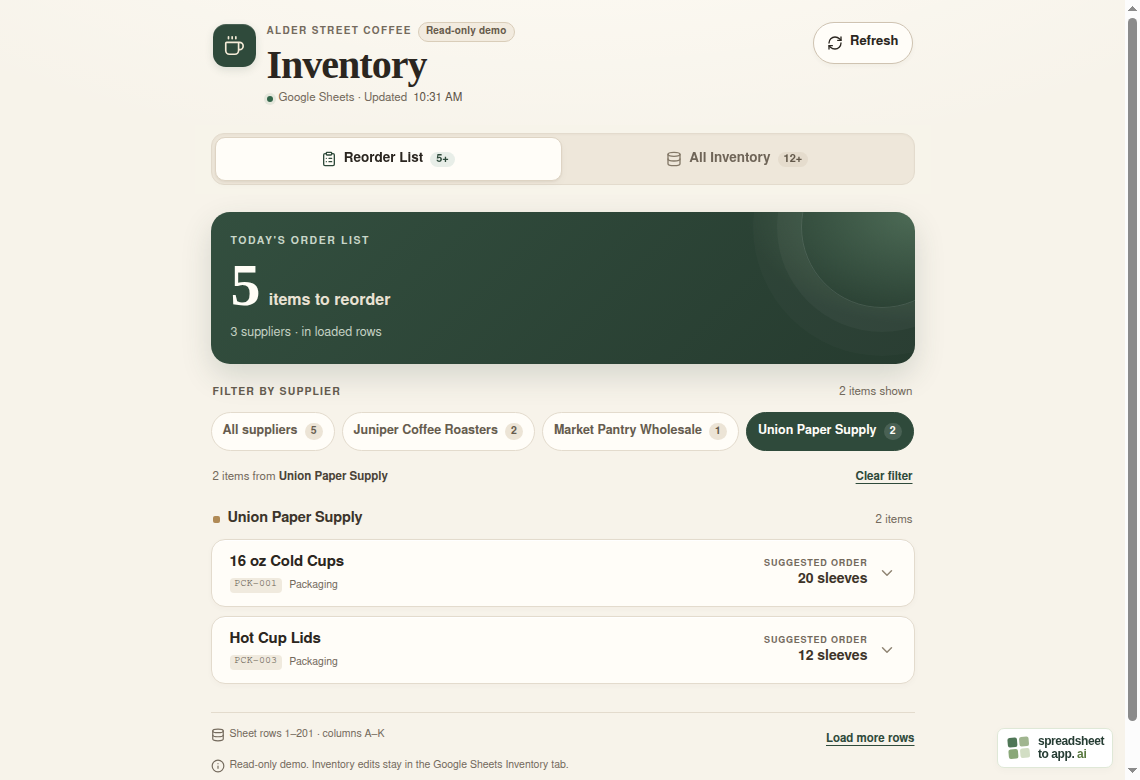
Maker-provided screenshot · Capture date not recorded · Asset reviewed 2026-11-27 · Source ↗
This listing has 1 image; no further gallery images exist.
What to know before choosing
Good fit
Spreadsheet to App turns Excel, CSV or Google Sheets into a hosted web app with AI: describe the workflow, build and refine the interface conversationally in Studio with an inspectable codebase, and publish - while your data stays in Google Sheets with direct reads and writes. The homepage says it is free to start with no credit card, but publishes no plans, prices, limits or paid tiers, so the pricing model is unverified from public evidence.
Limits and trade-offs
The current data gateway does not provide per-row access controls.
Plans and free allowances
Price and free limits not verified. Confirm current vendor terms.
Maker-submitted product description
Reviewed for publication 2026-11-27. This material was supplied with the submission; it is not a hands-on test or independent verification of every claim.
Spreadsheet to App helps a small operations team publish a browser app over Google Sheets. Connect a sheet, describe the task, inspect or edit the generated code in Studio and preview before publishing. The connected sheet stays the live data source. Excel and CSV are imported into Google Sheets as copies, so later changes to a local file do not sync.
The attached screenshot shows a fictional cafe's read-only reorder list filtered to Union Paper Supply. For a separate account-free sample, visit https://spreadsheettoapp.ai/spreadsheet-to-inventory-app and set COF-01 to 10 and then 11. The reorder flag clears above 10. Building an app with your own sheet requires Google sign-in.
The free plan includes one app, one workspace seat and limited monthly AI. Paid pricing is published at https://spreadsheettoapp.ai/pricing. This submission comes from the product team.
Maker-reported pricing model: freemium. Pricing has not been independently verified. Confirm current plans on the official website.
Official-site collection and source-backed editorial review
Dates: Last reviewed 2026-11-29 · Sources checked 2026-11-28 · Catalogued 2026-11-27. Last reviewed is the latest source or editorial review date; it is not a content-change date.
A closer look at Spreadsheet to App
Spreadsheet to App turns an existing spreadsheet into a working web app. You add Excel or CSV files, or connect Google Sheets, describe the workflow the app should support, and click Build my app; after signing in and connecting Google, you review the generated app in Studio before publishing it. You can add up to five spreadsheets, and your starting point is saved through sign-in. The defining choice here is that Google Sheets stays the database: connected apps read and write the original Google Sheets, and uploaded files first become Google Sheets in your own account, so the records your team already maintains remain the live data behind the app rather than a copy imported into a new system. That makes the tool a thin, fast route from a sheet a small team already uses — for stock checks and similar small-team workflows — to a browser app people can open instead of editing the raw sheet. The trade-off is access control: the current data gateway does not provide per-row access controls, so who sees what is governed by workspace roles and app data settings, and viewers can read the data shared with their workspace. The homepage says the builder is free to start with no credit card; it publishes no plan prices, so treat anything beyond starting as unconfirmed until you check inside the product.
Editorial guidance based on published documentation. The workflow below is a suggested starting point, not a measured product result.
When to choose Spreadsheet to App
A small team already keeps its records in Google Sheets and wants a browser app over the same live data instead of editing the sheet directly.
You have Excel or CSV files you are willing to have converted into Google Sheets in your account as the app's database.
Your workflow fits within five connected spreadsheets and a describe-build-preview-publish flow.
When to choose something else
You need each signed-in user to see only their own rows — the current data gateway does not provide per-row access controls.
You need the data to live in a database other than Google Sheets; uploaded files are converted into Sheets and connected apps work against Sheets.
You need published plan pricing before committing — the homepage publishes no plan prices.
A practical starting workflow
Add Excel or CSV files, or connect existing Google Sheets (up to five spreadsheets).
Describe the workflow the app should support and click Build my app.
Sign in and connect Google when prompted.
Review the generated app in Studio.
Publish the app; it reads and writes the original Google Sheets.
Check before committing
No per-row access controls: workspace roles and app data settings control access to approved tables, and viewers can read the data shared with their workspace.
Google Sheets is always the database — connected apps read and write the original sheets, and uploaded files first become Google Sheets in your account.
Pricing beyond 'free to start, no credit card' is not published on the homepage; no plan structure or limits are stated there.
Common questions
Does my spreadsheet stay my database?
Yes. Google Sheets holds your business records: connected apps read and write the original Google Sheets, and uploaded files first become Google Sheets in your account.
No. The current data gateway does not provide per-row access controls; workspace roles and app data settings control access to approved tables, and viewers can read the data shared with their workspace.
Glide AI — Teams using Glide Classic who want AI-generated app components and transformations of text, audio and images.
Jestor — Operations teams that need apps, tables, forms and dashboards without a development project.; Companies replacing scattered Trello, Zapier, Sheets and WhatsApp workarounds with one system.
Softr — Teams building secure client portals and internal tools without code
Product details from official sources
Spreadsheet to App turns Excel, CSV or Google Sheets into a hosted web app with AI: describe the workflow, build and refine the interface conversationally in Studio with an inspectable codebase, and publish - while your data stays in Google Sheets with direct reads and writes. The homepage says it is free to start with no credit card, but publishes no plans, prices, limits or paid tiers, so the pricing model is unverified from public evidence.
Capabilities and conditions
Turn Excel, CSV, or Google Sheets into a web app with AI, keeping your data in Google Sheets. Source ↗
Google Sheets holds your business records; connected apps read and write the original sheets. Source ↗
The current data gateway does not provide per-row access controls. Source ↗
Price and free allowance
Price and free limits not verified. Check the current vendor plans before signing up; this listing does not imply the product is free.
Published-source profile · collected 2026-11-28. Automated collection followed by editorial review. These are vendor-published claims, not hands-on product test results.
Alternatives to Spreadsheet to App
Tools the catalogue itself links to Spreadsheet to App: an editor lists them as related, an editorial comparison or switching guide covers the pair, or both are reviewed picks for the same task. Each reason below can be checked on the tool pages. This is not a quality ranking.
When this listing’s recorded facts changed, from what to what. Dates are the day (UTC) the change was recorded in the ByTask data, not the day the vendor changed anything. Only changes that can be traced in the data history appear here; a fact that has not changed shows nothing.

 Official site reference


