PoseLoop turns a photo into a viral trend video: pick a rising trend (rap duets, lip-syncs, flying cars, pet trends), add one or two photos, and get a vertical clip with the trend's sound for TikTok, Reels and Shorts, running on models such as Seedance, Veo 3.1 and Kling. New accounts start with 15 free credits good for 90 days; each trend shows its credit price before generating, and plans or one-time packs are sold on the pricing page.
Fit is editorial guidance, not a measured result.
Platforms
Access: not separately verified. Operating systems not separately verified.
Published-source facts and editorial guidance. No product test is implied. Confirm current conditions before purchase.
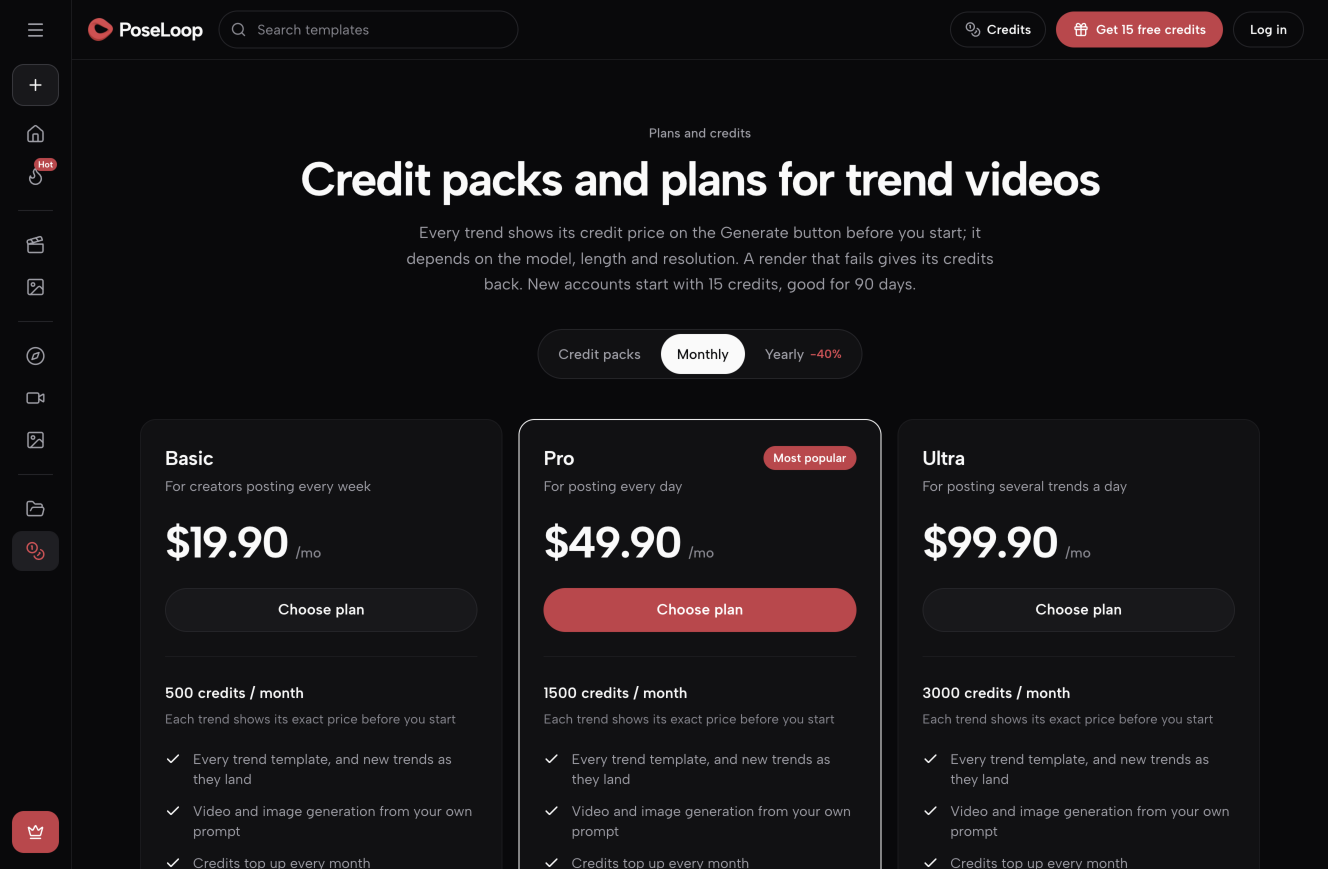
Maker-provided screenshot · Capture date not recorded · Asset reviewed 2026-11-27 · Source ↗
This listing has 1 image; no further gallery images exist.
What to know before choosing
Good fit
PoseLoop turns a photo into a viral trend video: pick a rising trend (rap duets, lip-syncs, flying cars, pet trends), add one or two photos, and get a vertical clip with the trend's sound for TikTok, Reels and Shorts, running on models such as Seedance, Veo 3.1 and Kling. New accounts start with 15 free credits good for 90 days; each trend shows its credit price before generating, and plans or one-time packs are sold on the pricing page.
Limits and trade-offs
Each trend shows its price in credits on the button before you start.
Plans and free allowances
New accounts start with 15 credits, good for 90 days.
Maker-submitted product description
Reviewed for publication 2026-11-27. This material was supplied with the submission; it is not a hands-on test or independent verification of every claim.
PoseLoop is an image-to-video AI for the viral trends rising right now. Pick a climbing format, add a photo of you, a friend, a pet or a car, and get a 9:16 clip with the trend sound, ready for TikTok, Instagram Reels and YouTube Shorts. You do not write a prompt. New accounts start with 15 free credits. The library includes Tiny Desk AI, Chat GTT AI, Popstar AI, AI Dance and 58 photo-to-video effects.
Maker-reported pricing model: trial. Pricing has not been independently verified. Confirm current plans on the official website.
Official-site collection and source-backed editorial review
Dates: Last reviewed 2026-11-29 · Sources checked 2026-11-28 · Catalogued 2026-11-27. Last reviewed is the latest source or editorial review date; it is not a content-change date.
A closer look at PoseLoop
PoseLoop turns a photo into a viral trend video. You pick a rising trend, add your photo, and get the vertical clip with its sound — the format made for TikTok, Reels and Shorts — with no prompt to write. The workflow is deliberately small: choose the trend, supply the photo, and the finished clip comes back with the trend's audio already in place. New accounts start with 15 free credits, good for 90 days; that is a one-time starter grant, not a monthly allowance that refills. When you need more, you choose a plan or a one-time pack. Pricing is shown in credits rather than as a fixed price list: each trend shows its price in credits on the button before you start, and the price depends on the length and resolution you pick, so you see the cost of a specific render before committing to it. Credit packs never expire, and a render that fails gives its credits back automatically. Because every trend is priced individually by length and resolution, there is no single per-video price to quote — the honest summary is that you check the credit price on the trend's button, spend from your balance, and only successful renders keep the charge. It suits someone who wants to join a current trend with their own photo without learning video editing or prompt writing.
Editorial guidance based on published documentation. The workflow below is a suggested starting point, not a measured product result.
When to choose PoseLoop
You want to appear in a current viral trend using just your photo — no filming, editing or prompt writing.
You post to TikTok, Reels or Shorts and want the vertical clip delivered with the trend's sound already attached.
You want to see the exact credit price of a trend before you start, and failed renders refunded automatically.
When to choose something else
You expect a free allowance that renews: the 15 starter credits are a one-time grant for new accounts and expire after 90 days.
You want a fixed published price per video: each trend is priced in credits by length and resolution, shown on its button before you start.
You want to write your own prompts or direct the video's content beyond picking a trend and a photo.
A practical starting workflow
Sign up — new accounts start with 15 free credits, good for 90 days.
Pick a rising trend from the catalogue.
Check the trend's price in credits, which depends on the length and resolution you pick.
Add your photo and start the render — no prompt to write.
Download the vertical clip with its sound, ready for TikTok, Reels or Shorts; a failed render returns its credits automatically.
Check before committing
The 15 free credits are a one-time starter grant for new accounts, valid for 90 days — not a recurring free tier.
Prices are per trend in credits and vary with length and resolution; there is no single fixed price per video.
Credit packs never expire, but the starter credits do — they are good for 90 days.
Common questions
How many free credits do I get?
New accounts start with 15 free credits, good for 90 days. It is a one-time starter grant; after that you choose a plan or a one-time pack.
Each trend shows its price in credits on the button before you start, and the price depends on the length and resolution you pick. Credit packs never expire.
Effect Farm — Effect Farm is a photo-to-video effects library: pick one of 33 effects (dances, scenes and pet formats), upload one photo - no account needed - and get an HD video in about 3-6 minutes, paying as a guest by card or PayPal. Every video is paid: one video uses 30 credits on every effect, $9.99 bought singly, with never-expiring packs at $14.90 for 100 credits, $29.90 for 360 and $79.90 for 1,260 bringing the per-video price down. Failed or blocked videos return their credits, and every paid video includes one free remake within 7 days.
ReelMuse — ReelMuse is an all-in-one AI video platform that turns photos into short viral-style videos - AI kiss, lip sync, dance, figurine, Ghibli-style and cinematic effects - powered by top video models, with production tools for cleanup, enhancement and audio isolation, built for TikTok, Reels and Shorts. The homepage says it is free to try but publishes no pricing, plans or free allowance, so the pricing model is unverified from public evidence.
MemeVideoMaker — MemeVideoMaker turns portrait photos into shot-for-shot remakes of viral meme video trends (78 live templates) with no prompt writing, exporting watermark-free 9:16 MP4s. The vendor states plainly that it is a paid service with no free tier, sold as annual-billing subscriptions or one-time credit packs, with automatic refunds for failed renders.
Video Effect AI — Video Effect AI turns photos of you, your friends or your pets into downloadable 720p template videos: 24 effects (Hotel Lobby, Tiny Desk, pet dances and reactions, cinematic scenes) where your photos supply the cast and the effect sets the scene, each with its credit cost shown before you create. Videos cost 10, 20 or 40 credits depending on the effect, paid from one-time credit packs - Starter $9 for 10 credits, Creator $29 for 40 credits, Studio $79 for 120 credits, no subscription. Confirmed generation failures return the reserved credits.
Product details from official sources
PoseLoop turns a photo into a viral trend video: pick a rising trend (rap duets, lip-syncs, flying cars, pet trends), add one or two photos, and get a vertical clip with the trend's sound for TikTok, Reels and Shorts, running on models such as Seedance, Veo 3.1 and Kling. New accounts start with 15 free credits good for 90 days; each trend shows its credit price before generating, and plans or one-time packs are sold on the pricing page.
Capabilities and conditions
Pick a rising trend, add your photo and get the vertical clip with its sound. Source ↗
New accounts start with 15 credits, good for 90 days. Source ↗
Each trend shows its price in credits on the button before you start. Source ↗
Price and free allowance
See the sourced plan statements above; confirm currency, billing period and checkout eligibility on the vendor site.
Published-source profile · collected 2026-11-28. Automated collection followed by editorial review. These are vendor-published claims, not hands-on product test results.
Alternatives to PoseLoop
Tools the catalogue itself links to PoseLoop: an editor lists them as related, an editorial comparison or switching guide covers the pair, or both are reviewed picks for the same task. Each reason below can be checked on the tool pages. This is not a quality ranking.
When this listing’s recorded facts changed, from what to what. Dates are the day (UTC) the change was recorded in the ByTask data, not the day the vendor changed anything. Only changes that can be traced in the data history appear here; a fact that has not changed shows nothing.