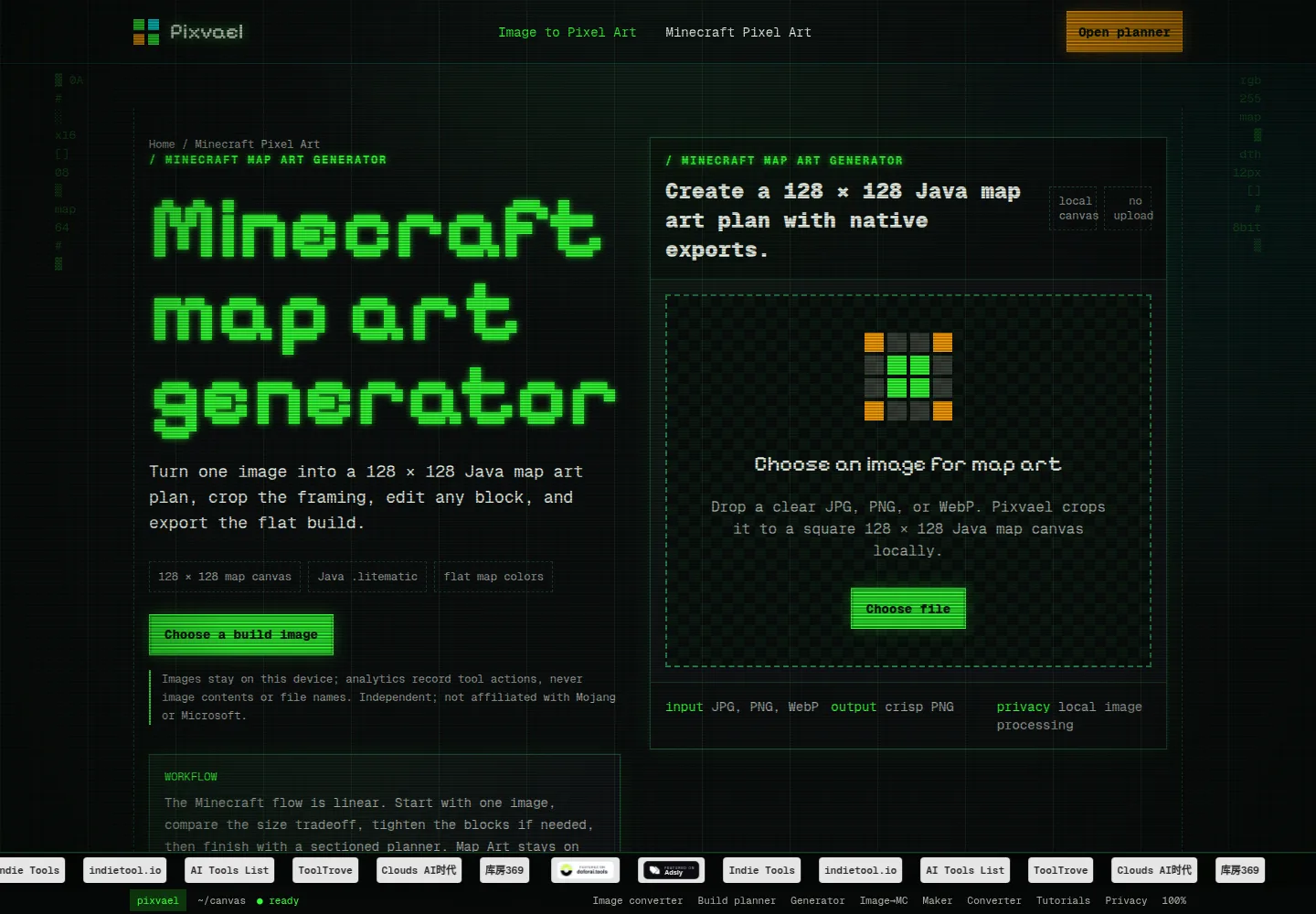
Pixvael's Minecraft Map Art Generator is a free browser tool that turns one image into a 128x128 Java map art plan: crop the framing, tune the block plan cell by cell, review material totals, and export a native .litematic, a .schematic fallback, the blueprint PNG and a material CSV. Everything runs locally in your browser - your image never leaves the device - and it is independent, not affiliated with Mojang or Microsoft.
Fit is editorial guidance, not a measured result.
Platforms
Access: not separately verified. Operating systems not separately verified.
Published-source facts and editorial guidance. No product test is implied. Confirm current conditions before purchase.
Official website; English-locale capture · Captured 2026-11-29 · Source ↗
This listing has 1 image; no further gallery images exist.
What to know before choosing
Good fit
Pixvael's Minecraft Map Art Generator is a free browser tool that turns one image into a 128x128 Java map art plan: crop the framing, tune the block plan cell by cell, review material totals, and export a native .litematic, a .schematic fallback, the blueprint PNG and a material CSV. Everything runs locally in your browser - your image never leaves the device - and it is independent, not affiliated with Mojang or Microsoft.
Limits and trade-offs
Independent; not affiliated with Mojang or Microsoft; images stay on this device.
Plans and free allowances
A free 128x128 Java tool.
Maker-submitted product description
Reviewed for publication 2026-11-20. This material was supplied with the submission; it is not a hands-on test or independent verification of every claim.
Pixvael converts any image into a 128×128 Minecraft Java Edition map art plan that fits inside a single in-game map. Every pixel is mapped to the closest placeable block automatically. Builders can crop the source image, preview the plan at full resolution, and fix individual pixels with a per-block painter that swaps glass, clay, wool or terracotta shades one block at a time. A live material counter tallies every block type while editing, so the exact amount of each resource is known before building starts. The finished plan exports as a .litematic file for the Litematica mod or a .schematic file for WorldEdit, or as a PNG reference grid for hand building. Everything runs locally in the browser: no account, no upload, no watermark, entirely free. It is aimed at Minecraft Java builders, server owners and pixel artists planning map art walls, spawn decorations and event art.
Maker-reported pricing model: free. Pricing has not been independently verified. Confirm current plans on the official website.
Official-site collection and source-backed editorial review
Dates: Last reviewed 2026-11-29 · Sources checked 2026-11-28 · Catalogued 2026-11-20. Last reviewed is the latest source or editorial review date; it is not a content-change date.
A closer look at Pixvael
Pixvael is a free browser tool that turns one image into a 128 × 128 Minecraft Java map art plan. You load a JPG, PNG or WebP image, crop the framing, and Pixvael converts it into a flat map art layout using flat map colors; you can then edit any block in the plan before exporting the flat build. Exports are native to the job: a Java .litematic file for the build, and a crisp PNG of the plan. Everything runs locally in your browser — image decoding, cropping, conversion, editing and export never leave the device, and the site states that its analytics record tool actions only, never image contents or file names. Pixvael is an independent tool: it is not affiliated with Mojang or Microsoft, and it is not an official Minecraft product. There is no account step and no price in the picture — the generator is presented as a free tool, and the page publishes no paid tier. The fixed 128 × 128 canvas is both the point and the limit: the output is exactly one Java map's worth of artwork, planned block by block so it can be built in game, rather than a general pixel-art editor or a texture pack. It suits a Java player who has a picture — a logo, a portrait, a piece of fan art — and wants a buildable plan for it without uploading the image to a server.
Editorial guidance based on published documentation. The workflow below is a suggested starting point, not a measured product result.
When to choose Pixvael
You play Minecraft Java and want to turn a specific image into a 128 × 128 map art you can actually build.
You want the plan in native formats: a Java .litematic export for the build and a crisp PNG of the layout.
You don't want your image uploaded anywhere: decoding, conversion, editing and export all run locally in your browser.
When to choose something else
You need artwork larger than a single 128 × 128 map, or a multi-map mural: the canvas is fixed at one map.
You want a Minecraft skin, a texture or a 3D model rather than a flat map art plan.
You are looking for an official Mojang or Microsoft product: Pixvael is independent and not affiliated with either.
A practical starting workflow
Open the Pixvael map art generator in your browser — the image stays on your device.
Load an image in JPG, PNG or WebP format.
Crop the framing for the 128 × 128 map canvas.
Review the converted plan and edit any block you want to change.
Export the flat build as a Java .litematic file, and the plan as a crisp PNG.
Check before committing
Pixvael is an independent tool, not affiliated with Mojang or Microsoft; it is not an official Minecraft product.
The canvas is fixed at 128 × 128 — one Java map — so larger artwork needs a different approach.
The page publishes no paid tier or pricing; the generator is presented as a free tool.
Common questions
Does my image leave my browser?
No. Image decoding, cropping, conversion, editing, and export run locally in your browser, and analytics record tool actions, never image contents or file names.
Mixels.ai — Indie game developers and digital artists who need consistent, grid-aligned pixel art sprites and a free browser editor.
skingenerator.io — Minecraft players who want custom skins generated from a text prompt
Identity note Not an official Minecraft product and not associated with Mojang or Microsoft Read the listing
Gridize — Gridize is an AI pixel art sprite generator and animator: describe a character to get grid-true pixel sprites at 16, 32 or 64 px, then animate any sprite into a game-ready clip of 9 to 49 frames and export GIF, WebP, PNG frames or sprite sheets. New users get 30 free credits once after email verification; generation then costs purchased credits (8 per sprite, 30 per animation), via subscriptions from Starter $9/month or one-time top-ups from $4.99.
Product details from official sources
Pixvael's Minecraft Map Art Generator is a free browser tool that turns one image into a 128x128 Java map art plan: crop the framing, tune the block plan cell by cell, review material totals, and export a native .litematic, a .schematic fallback, the blueprint PNG and a material CSV. Everything runs locally in your browser - your image never leaves the device - and it is independent, not affiliated with Mojang or Microsoft.
Capabilities and conditions
Turn one image into a 128 x 128 Java map art plan, crop the framing, edit any block, and export the flat build. Source ↗
Independent; not affiliated with Mojang or Microsoft; images stay on this device. Source ↗
Price and free allowance
See the sourced plan statements above; confirm currency, billing period and checkout eligibility on the vendor site.
Published-source profile · collected 2026-11-28. Automated collection followed by editorial review. These are vendor-published claims, not hands-on product test results.
Alternatives to Pixvael
Tools the catalogue itself links to Pixvael: an editor lists them as related, an editorial comparison or switching guide covers the pair, or both are reviewed picks for the same task. Each reason below can be checked on the tool pages. This is not a quality ranking.
When this listing’s recorded facts changed, from what to what. Dates are the day (UTC) the change was recorded in the ByTask data, not the day the vendor changed anything. Only changes that can be traced in the data history appear here; a fact that has not changed shows nothing.


 Official site reference


