My Look Story is a photo studio built around seeing yourself: AI hair design and hairstyle try-on, professional headshots, AI photo filters, plus an image generator, enhancer and upscaler, background remover, image extender and a MiniMax H3 video generator. Creations run on credits with the estimated cost shown before generating, but no plans, prices or free allowance are published on the homepage, so pricing is unverified from public evidence.
Fit is editorial guidance, not a measured result.
Platforms
Access: not separately verified. Operating systems not separately verified.
Published-source facts and editorial guidance. No product test is implied. Confirm current conditions before purchase.
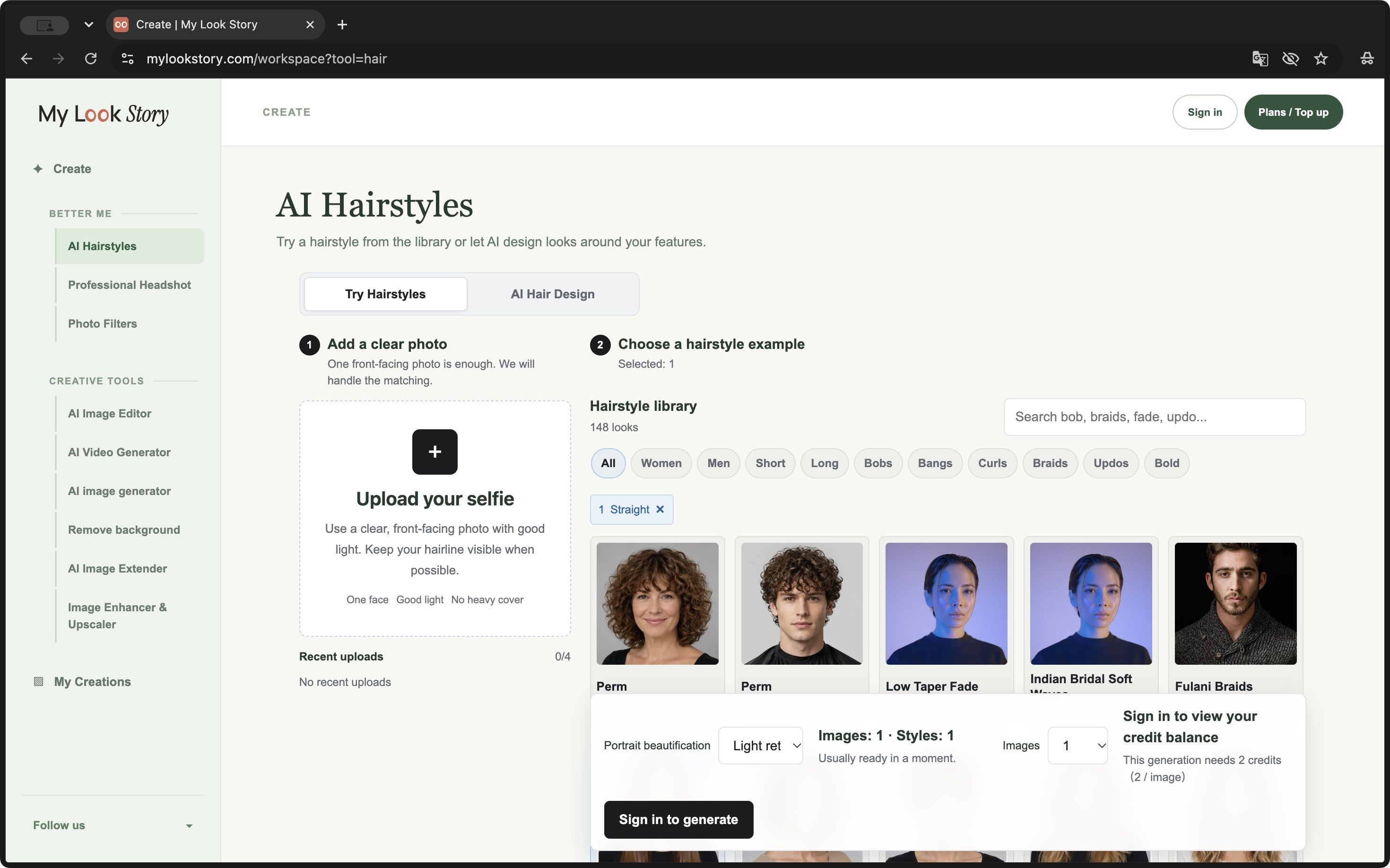
Maker-provided screenshot · Capture date not recorded · Asset reviewed 2026-11-27 · Source ↗
This listing has 1 image; no further gallery images exist.
What to know before choosing
Good fit
My Look Story is a photo studio built around seeing yourself: AI hair design and hairstyle try-on, professional headshots, AI photo filters, plus an image generator, enhancer and upscaler, background remover, image extender and a MiniMax H3 video generator. Creations run on credits with the estimated cost shown before generating, but no plans, prices or free allowance are published on the homepage, so pricing is unverified from public evidence.
Limits and trade-offs
Check current plans and credit costs before creating.
Plans and free allowances
Price and free limits not verified. Confirm current vendor terms.
Maker-submitted product description
Reviewed for publication 2026-11-27. This material was supplied with the submission; it is not a hands-on test or independent verification of every claim.
My Look Story is an online AI workspace for trying haircuts and hair colors on your own portrait. Pick a style, upload a clear photo, and compare the generated preview before changing your hair. In the same workspace, create professional headshots or short videos, generate or enhance images, and remove or blur backgrounds. Signed-in users can revisit their creations. AI generation uses account credits.
Maker-reported pricing model: paid. Pricing has not been independently verified. Confirm current plans on the official website.
Official-site collection and source-backed editorial review
Dates: Last reviewed 2026-11-29 · Sources checked 2026-11-28 · Catalogued 2026-11-27. Last reviewed is the latest source or editorial review date; it is not a content-change date.
A closer look at My Look Story
My Look Story is a photo-centred AI toolkit built around your own pictures. Its four main lines are AI hair design, trying on a hairstyle — seeing how a cut or colour frames your face, or finding a hairstyle for work or exercise — professional headshots, for example preparing one for LinkedIn, and AI photo filters. Around those sit a set of generation and enhancement tools: an AI image generator, an image enhancer and upscaler, a background remover, an AI image extender and an AI video generator. You do not need to upload a photo to generate an image: you can start from a text description, or optionally add up to four reference images in the same editor, and create product visuals, illustrations and posters. The editor lets you choose a model — the page names Nano Banana 2.1 and GPT Image 2.5, which are the vendor's own labels for the models it offers — along with resolution and image count, check the estimated credits, and generate; favourite prompts can be saved for reuse. Because the tools run on credits, the site directs users to check current plans and credit costs before creating, and it links to an explanation of how uploads and results are stored and deleted for the photo-privacy questions that personal pictures raise.
Editorial guidance based on published documentation. The workflow below is a suggested starting point, not a measured product result.
When to choose My Look Story
Someone deciding on a new cut or colour who wants to see hairstyles tried on their own photo first, including options suited to work or exercise.
A user who wants a professional headshot for LinkedIn and other photo touch-ups (filters, background removal, upscaling) in one toolkit instead of several single-purpose apps.
When to choose something else
Anyone who needs published plan prices before trying: the page tells users to check current plans and credit costs before creating rather than listing them in the material reviewed.
Anyone unwilling to upload personal photos to an online editor at all — the hairstyle, headshot and filter lines all start from your own photo.
A practical starting workflow
Pick the task that matches your goal: AI hair design, try on a hairstyle, professional headshots, or AI photo filters — or open one of the extra tools such as the image generator, enhancer and upscaler, background remover, image extender or video generator.
For image generation, start with a description or add up to four reference images, then choose a model, resolution and image count.
Check the estimated credits for the job before generating, and save prompts you like for reuse.
Generate, review the result against your photo, and adjust the prompt, model or settings before spending credits on another version.
Check before committing
Model names shown in the editor (Nano Banana 2.1, GPT Image 2.5) are the vendor's own labels; the page does not present them as official offerings from the model providers.
Costs are credit-based and the homepage does not state plan prices; check the current plans and the estimated credits for each creation first.
For photo privacy, the site links to its own explanation of how uploads and results are stored and deleted — read that page before uploading personal photos, since the homepage itself does not spell out retention periods.
Common questions
Do I need to upload a photo to generate an image?
No. You can start with a description, or optionally add up to four reference images in the same editor; then choose a model, resolution and image count, check the estimated credits, and generate.
Four main lines use your photo: AI hair design, trying on a hairstyle to see how a cut or colour frames your face, professional headshots (for example for LinkedIn), and AI photo filters. Extra tools include an image enhancer and upscaler, a background remover and an image extender.
Creations run on credits: the editor shows an estimated credit cost before you generate, and the site asks users to check current plans and credit costs before creating. The homepage does not publish the plan prices themselves.
Hairstyle AI — People deciding on a haircut who want to see it first.; Anyone who wants confidence about a new style before a real cut.
Hairforge — Hairforge (at beardstyles.co) helps men find and try beard styles: browse styles by face shape, growth and upkeep, optionally run a free face analysis that detects your face shape and beard density and recommends 3 styles, then generate a personal AI preview of a chosen style on your photo - front and both 45-degree views from one front photo, processed in the browser by default. Browsing and face analysis are free; personal previews use paid Credits with the cost shown before confirmation, but credit prices are not published on the homepage, so paid amounts are unverified.
Aragon — Professionals and teams who need fast, studio-style AI headshots without booking a photographer.
My Look Story is a photo studio built around seeing yourself: AI hair design and hairstyle try-on, professional headshots, AI photo filters, plus an image generator, enhancer and upscaler, background remover, image extender and a MiniMax H3 video generator. Creations run on credits with the estimated cost shown before generating, but no plans, prices or free allowance are published on the homepage, so pricing is unverified from public evidence.
Capabilities and conditions
Try AI hairstyles and create professional headshots from your own photo. Source ↗
Create product visuals, illustrations and posters from text or up to four reference images. Source ↗
Check current plans and credit costs before creating. Source ↗
Price and free allowance
Price and free limits not verified. Check the current vendor plans before signing up; this listing does not imply the product is free.
Published-source profile · collected 2026-11-28. Automated collection followed by editorial review. These are vendor-published claims, not hands-on product test results.
Alternatives to My Look Story
Tools the catalogue itself links to My Look Story: an editor lists them as related, an editorial comparison or switching guide covers the pair, or both are reviewed picks for the same task. Each reason below can be checked on the tool pages. This is not a quality ranking.
When this listing’s recorded facts changed, from what to what. Dates are the day (UTC) the change was recorded in the ByTask data, not the day the vendor changed anything. Only changes that can be traced in the data history appear here; a fact that has not changed shows nothing.

 Official site reference


