Motion Control AI transfers real movement to any character using Kling 3.0: upload a reference video and a character image and it maps dance moves, gestures and facial expressions frame-accurately in under 60 seconds, up to 1080p. Accounts are free but include no credits - generation requires a subscription billed annually (Basic as $167.9/year, Pro as $419.9/year, Business as $839.9/year) or one-time 30-day credit packs.
Fit is editorial guidance, not a measured result.
Platforms
Access: not separately verified. Operating systems not separately verified.
Published-source facts and editorial guidance. No product test is implied. Confirm current conditions before purchase.
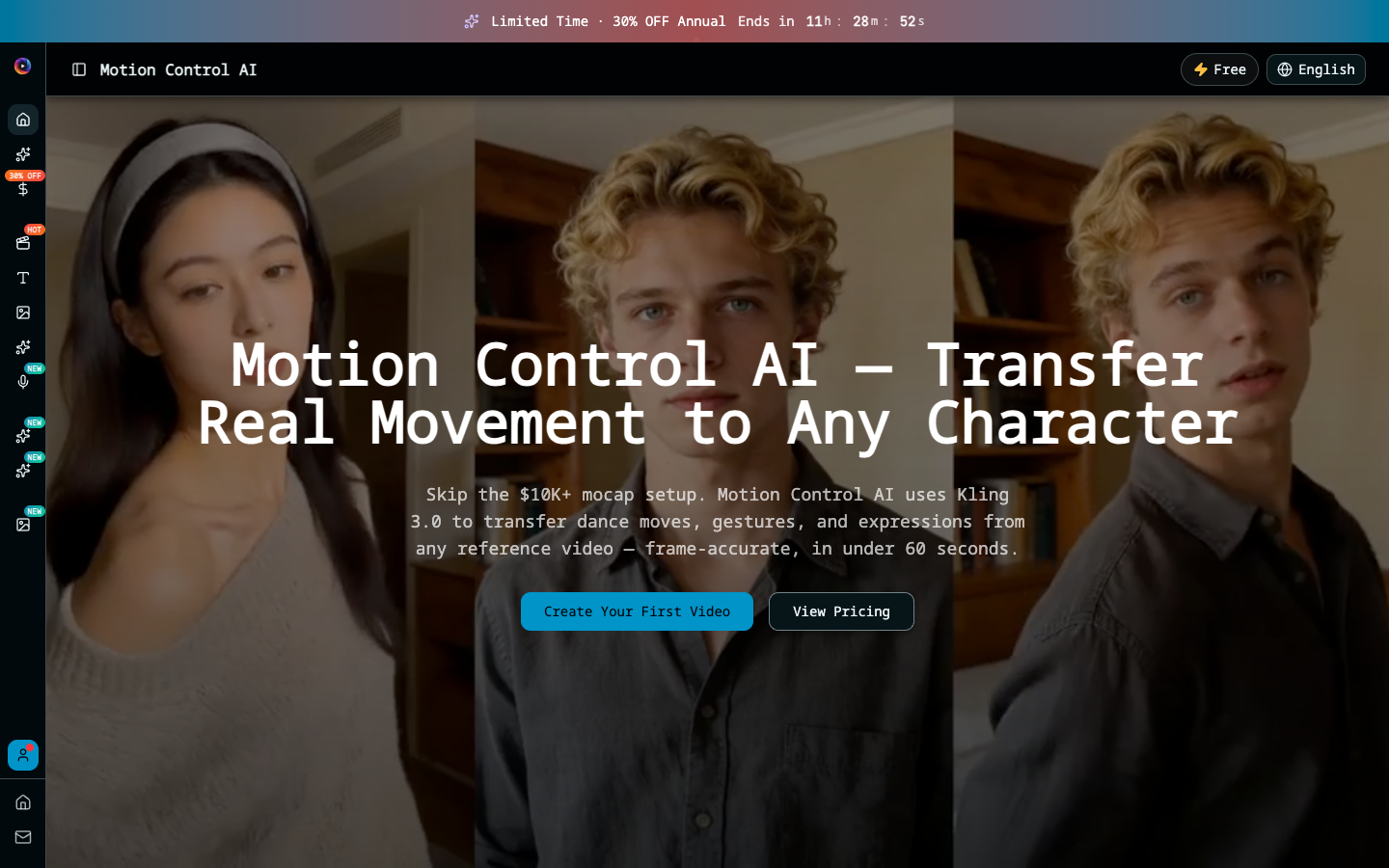
Maker-provided screenshot · Capture date not recorded · Asset reviewed 2026-11-27 · Source ↗
This listing has 1 image; no further gallery images exist.
What to know before choosing
Good fit
Motion Control AI transfers real movement to any character using Kling 3.0: upload a reference video and a character image and it maps dance moves, gestures and facial expressions frame-accurately in under 60 seconds, up to 1080p. Accounts are free but include no credits - generation requires a subscription billed annually (Basic as $167.9/year, Pro as $419.9/year, Business as $839.9/year) or one-time 30-day credit packs.
Limits and trade-offs
New accounts don't include free credits; generating needs a subscription or credit pack.
Plans and free allowances
Basic is billed as $167.9/year and Pro as $419.9/year.
Maker-submitted product description
Reviewed for publication 2026-11-27. This material was supplied with the submission; it is not a hands-on test or independent verification of every claim.
Motion Control AI (https://motioncontrolai.io/) is an independent online studio, not an official model-vendor website, and has no partnership with the model vendor. It transfers dance moves, gestures and expressions from a reference video onto a character image. The homepage says it uses Kling 3.0 and does not require mocap equipment, with frame-accurate results typically in under 60 seconds. Four modes are listed: Motion Transfer for full-body movement, Gesture Control for hands and fingers, Expression Sync for faces, and Cinematic Realism at up to 1080p 30fps with camera moves. A free plan lets you browse examples. The homepage FAQ states that new accounts do not include free credits, and that generating a video requires a subscription or a one-time credit pack.
Maker-reported pricing model: freemium. Pricing has not been independently verified. Confirm current plans on the official website.
Official-site collection and source-backed editorial review
Dates: Last reviewed 2026-11-29 · Sources checked 2026-11-28 · Catalogued 2026-11-27. Last reviewed is the latest source or editorial review date; it is not a content-change date.
A closer look at Motion Control AI
Motion Control AI transfers real movement onto a character you choose. In the maker's own description it uses Kling 3.0 — a model name the vendor itself applies to the service, not an endorsement by any model provider — to transfer dance moves, gestures, and expressions from any reference video, frame-accurate, in under 60 seconds. The idea is that you supply footage of a performance and a character, and the tool re-renders that performance on the character instead of you animating it by hand. Creating an account is free, but new accounts do not include free credits: the Free $0 tier includes no credits and is limited to Text to Video AI in Fast Mode and Motion Control AI in the v2.6 Standard mode, at 720p output only, with a watermark and public generation only. To actually generate, you pick a subscription or a one-time credit pack. Subscriptions are shown at discounted monthly prices billed annually: Basic is $14.0 per month billed as $167.9 per year (list $19.9) with 700 credits per month, Pro is $35.0 per month billed as $419.9 per year (list $49.9) with 1,800 credits per month, and Business is $70.0 per month billed as $839.9 per year (list $99.9) with 3,500 credits per month. One-time credit packs are valid for 30 days: the Pro Pack is $49.9 for 1,200 credits and the Business Pack is $89.9 for 2,000 credits. It fits creators who already have reference footage of the movement they want and a character to put it on. It is a poor fit if you expected to test generation on free credits, or if watermarked, public, 720p output is not acceptable and you are not ready to pay.
Editorial guidance based on published documentation. The workflow below is a suggested starting point, not a measured product result.
When to choose Motion Control AI
You have a reference video of a dance, gesture sequence, or expressive performance and want that exact movement transferred onto a character, frame-accurately and in under 60 seconds.
You are willing to pay per generation and prefer a choice between an annual-billed subscription with monthly credits and one-time credit packs.
Your output target is short social-style character video where the v2.6 Standard motion control mode at 720p is enough to evaluate the tool.
When to choose something else
You want to try generating before paying: creating an account is free, but new accounts include no free credits, so generation requires a subscription or a credit pack.
You need private, watermark-free, higher-than-720p output on the free tier: the Free $0 tier is public generation only, watermarked, and capped at 720p.
A practical starting workflow
Create a free account, then choose a subscription or a one-time credit pack, since generation needs credits.
Provide a reference video whose dance moves, gestures, or expressions you want to reuse, and choose the character that should perform them.
Run the transfer in Motion Control AI (v2.6 Standard on the free tier) or use Text to Video AI in Fast Mode for a prompt-driven clip.
Review the generated video for frame-accurate movement, then regenerate or step up to a paid tier if you need output beyond 720p, watermarked, public results.
Check before committing
The Free $0 tier includes no credits at all; it only exposes Fast Mode text-to-video and v2.6 Standard motion control at 720p, watermarked and public. Paid generation starts only once you buy a subscription or a pack.
Subscription prices are discounted rates billed annually ($167.9, $419.9, or $839.9 per year); the struck-through list prices are $19.9, $49.9, and $99.9 per month, so compare on the annual totals.
One-time credit packs expire: both packs are valid for 30 days only, unlike the monthly credit allowances on subscriptions.
Kling 3.0 is the vendor's own label for the model behind the service; this entry repeats it as the maker's description, not as a model provider's endorsement.
Common questions
Is Motion Control AI free to use?
Creating an account is free, but new accounts don't include free credits. The Free $0 tier has no credits and is limited to Text to Video AI (Fast Mode) and Motion Control AI (v2.6 Standard) at 720p, with a watermark and public generation only. To generate beyond that, you choose a subscription or a one-time credit pack.
Basic is shown at $14.0 per month, billed as $167.9 per year, with 700 credits per month; Pro is $35.0 per month, billed as $419.9 per year, with 1,800 credits per month; Business is $70.0 per month, billed as $839.9 per year, with 3,500 credits per month. The undiscounted list prices shown are $19.9, $49.9, and $99.9 per month.
Credit packs are one-time purchases valid for 30 days: the Pro Pack costs $49.9 for 1,200 credits and the Business Pack costs $89.9 for 2,000 credits. Because they expire after 30 days, they suit a single burst of generation rather than slow, occasional use.
What does the tool actually do with my reference video?
It uses Kling 3.0 — the vendor's own name for its model — to transfer dance moves, gestures, and expressions from any reference video to any character, frame-accurate, in under 60 seconds.
DomoAI — Social creators and marketers who want to turn text, images, or existing footage into animated, restyled, or avatar-led videos quickly, using ready-made scenario templates and multiple integrated video and image models.
Plask — Animators and game developers who want video-based 3D motion capture
AnimateImage — AnimateImage is an independent image-to-video studio that turns one photo or drawing into a short clip using 18 video models (Seedance, Veo, Kling, Wan, Grok, Hailuo, HappyHorse), with clips up to 15 seconds. The Free plan includes 12 of the 18 models at up to 768P and new accounts get free credits valid for 30 days; downloading generated videos starts on the Basic plan. Six GIF tools (background remover, compressor, resizer and more) run free in the browser with no account and no credits.
Identity note The video models it offers are made by third parties not affiliated with it. Read the listing
Product details from official sources
Motion Control AI transfers real movement to any character using Kling 3.0: upload a reference video and a character image and it maps dance moves, gestures and facial expressions frame-accurately in under 60 seconds, up to 1080p. Accounts are free but include no credits - generation requires a subscription billed annually (Basic as $167.9/year, Pro as $419.9/year, Business as $839.9/year) or one-time 30-day credit packs.
Capabilities and conditions
Transfers dance moves, gestures and expressions from any reference video to a character. Source ↗
Basic is billed as $167.9/year and Pro as $419.9/year. Source ↗
New accounts don't include free credits; generating needs a subscription or credit pack. Source ↗
Price and free allowance
See the sourced plan statements above; confirm currency, billing period and checkout eligibility on the vendor site.
Published-source profile · collected 2026-11-28. Automated collection followed by editorial review. These are vendor-published claims, not hands-on product test results.
Alternatives to Motion Control AI
Tools the catalogue itself links to Motion Control AI: an editor lists them as related, an editorial comparison or switching guide covers the pair, or both are reviewed picks for the same task. Each reason below can be checked on the tool pages. This is not a quality ranking.
When this listing’s recorded facts changed, from what to what. Dates are the day (UTC) the change was recorded in the ByTask data, not the day the vendor changed anything. Only changes that can be traced in the data history appear here; a fact that has not changed shows nothing.

 Official site reference


