Published-source facts and editorial guidance. No product test is implied. Confirm current conditions before purchase.
Official website; English-locale capture · Captured 2026-11-29 · Source ↗
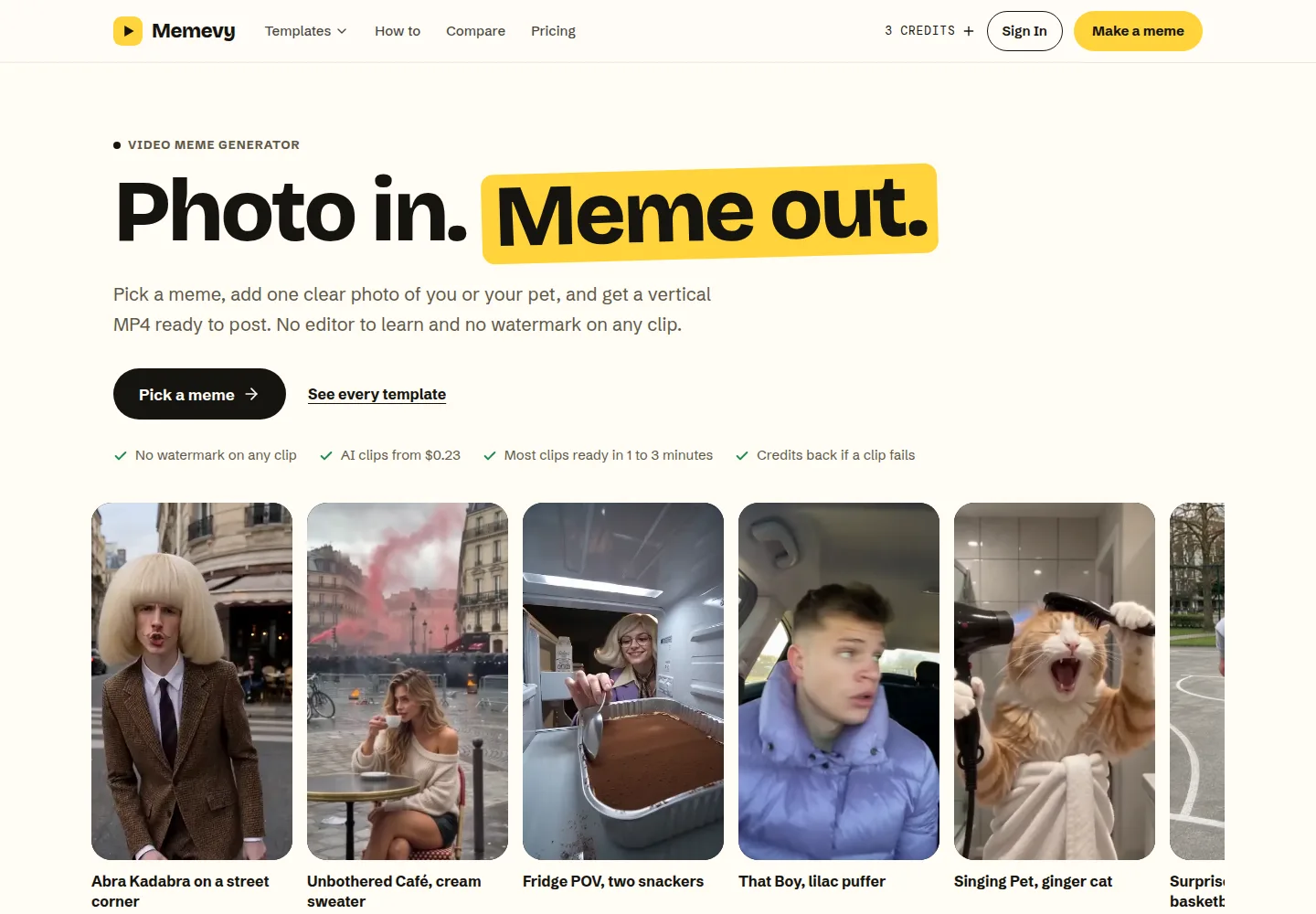
This listing has 1 image; no further gallery images exist.
What to know before choosing
Good fit
People who want to post one funny clip without learning an editor.
Limits and trade-offs
There is no free plan at all: every clip is paid per use through credit packs from $4.99, and credits expire after 12 months (failed clips are refunded).
Reviewed for publication 2026-11-21. This material was supplied with the submission; it is not a hands-on test or independent verification of every claim.
The pricing page lists credit packs and we did not find a free plan, so the pricing model the maker reported is not shown here. Check the official site before you pay.
Memevy is a video meme generator for people who want to post one funny clip without learning an editor. Upload a photo and pick a meme template (Abra Kadabra, Unbothered Café, Fridge POV, That Boy, Opa Opa, Daijoubu Dog, Singing Pet, Surprise Backflip) or describe a joke and get an AI clip. AI clips run 5 to 15 seconds at up to 1080p and never carry a watermark.
Dates: Last reviewed 2026-11-27 · Sources checked 2026-11-24 · Catalogued 2026-11-21. Last reviewed is the latest source or editorial review date; it is not a content-change date.
A closer look at Memevy
Memevy is a browser-based video meme generator that turns one photo into a short vertical MP4. You pick a meme template — each one keeps the original clip's motion, timing and sound — or describe a joke as a prompt, add a clear photo of yourself, your pet or a consenting adult, and an AI video model generates the clip, usually in 1 to 3 minutes. There is no editor to learn and no watermark on any clip; instead of a subscription, you pay per clip with one-time credit packs.
Editorial guidance based on published documentation. The workflow below is a suggested starting point, not a measured product result.
When to choose Memevy
Social posters who want to appear in a recognised meme clip without learning a video editor — the whole workflow is pick a template, add one photo, post the MP4
Pet owners making short clips of their animals — templates such as Daijoubu Dog and Singing Pet are made for pet photos, and several others accept a pet photo too
Occasional creators who post about a meme a week and would rather pay per clip than keep a monthly editor subscription running
Anyone who needs a watermark-free vertical clip for TikTok, Reels or Shorts at up to 1080p
When to choose something else
Editors who need a timeline, text overlays, clip joining or a sound-effect library — Memevy makes the clip, not the edit, and offers none of these
Anyone who needs a free tool — there is no free plan, and every AI clip is paid for in credits
Users who need GIF output — finished clips download as MP4 only, with no GIF export
Anyone making longer videos — AI clips run 5 to 15 seconds on most templates and prompts
A practical starting workflow
Pick a meme template — each is timed shot by shot from the original, with its own scene and sound — or open the Describe tab and write the joke as a prompt instead
Add one clear photo of yourself, your pet, or an adult who has agreed, and tick the permission box confirming whose photo it is
Choose the video model, resolution and length; the price in credits is shown on the button before you pay anything
Generate the clip — most finish in 1 to 3 minutes, and a failed generation returns its credits automatically
Download the vertical, watermark-free MP4 and post it to TikTok, Reels or Shorts; if the joke needs caption text, add it in the posting app
Check before committing
Clips are short and single-purpose: 5 to 15 seconds depending on the template or prompt (a few Seedance 2.5 dance templates reach 16 to 30 seconds), and the tool is built for one meme at a time, not for editing projects
There is no timeline, text overlay, joining or sound-effect library in the tool, so any text on the joke has to be added in TikTok or Instagram after download
Faces, hands and fast motion can warp, and small or group photos do worst, per the vendor's own limits list
Photos of children, well-known people or anyone who has not agreed are not allowed, and a finished clip must not be presented as real footage
Pricing is per clip in credits at roughly $0.01 each: a 10-second 480p template clip on the cheapest model costs 56 credits, while 15 seconds at 1080p on Seedance 2.5 costs 2,005 credits; credits expire 12 months after purchase
On the Seedance 2.5 model a photo is also registered in the AI provider's private asset library under that provider's retention rules; otherwise photos sit in a private bucket, clips stay private to your account, and photos are not used to train models
Common questions
How much does one Memevy clip cost?
It depends on the model, resolution and length you pick. A typical 10-second template clip costs 56 credits at 480p (about $0.56) or 119 credits at 720p (about $1.19), and clips start from $0.23. Credit packs start with a $4.99 first-purchase trial worth one clip, then $9.90 for 900 credits; there is no subscription — you pay per clip, not per month.
Does Memevy add a watermark, and is there a free plan?
No clip carries a watermark, on any pack. There is no free plan — AI generation is paid per clip in credits — but a failed generation returns its credits, and unused credits stay valid for 12 months.
What photos can I upload, and what happens to them?
Only photos of yourself, your pet, or an adult who has agreed; photos of children or well-known people are not allowed. Photos are re-encoded in your browser before upload, which also strips location data, then stored in a private bucket and passed to the AI model through short-lived links. Finished clips are private to your account with no public gallery, and your photos are not used to train models. On Seedance 2.5 the photo is also registered in that provider's private asset library, under the provider's retention rules.
MP4 only — there is no GIF export. Clips are made for vertical posting to TikTok, Reels and Shorts at up to 1080p, and run 5 to 15 seconds on most templates and prompts, with a few Seedance 2.5 dance templates reaching 16 to 30 seconds.
Viggle — Turning imagination into 3D motion, worlds and character-swapped videos.
MakeRapVideo — Social creators who want a quick AI rap video from two photos, plus free rap lyrics and name generators.
DomoAI — Social creators and marketers who want to turn text, images, or existing footage into animated, restyled, or avatar-led videos quickly, using ready-made scenario templates and multiple integrated video and image models.
Tools the catalogue itself links to Memevy: an editor lists them as related, an editorial comparison or switching guide covers the pair, or both are reviewed picks for the same task. Each reason below can be checked on the tool pages. This is not a quality ranking.
When this listing’s recorded facts changed, from what to what. Dates are the day (UTC) the change was recorded in the ByTask data, not the day the vendor changed anything. Only changes that can be traced in the data history appear here; a fact that has not changed shows nothing.


 Official site reference


