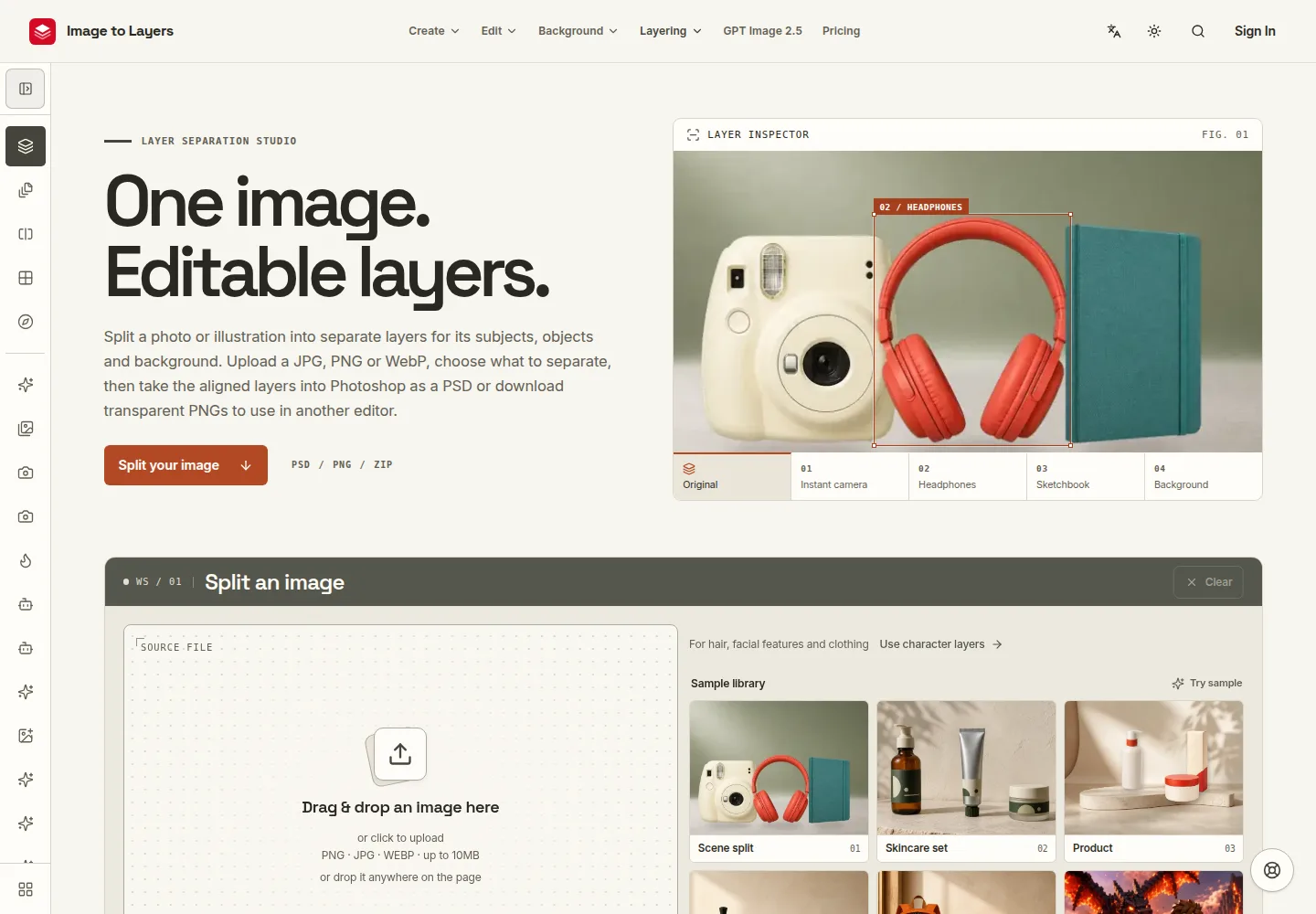
Image to Layers splits a photo or illustration into separate editable layers - subjects, objects and background - exported as transparent PNGs or a PSD-ready stack (2 to 17 layers, Flash or Pro models at 1K/1.5K/2K). Layer splits are paid per returned layer in credits (Flash 10 credits per layer; Pro 12 or 24), with credit packs and subscriptions whose prices are not published on the homepage, and the FAQ confirms free accounts exist without stating any free allowance, so pricing is unverified from public evidence.
Fit is editorial guidance, not a measured result.
Platforms
Access: not separately verified. Operating systems not separately verified.
Published-source facts and editorial guidance. No product test is implied. Confirm current conditions before purchase.
Official website; English-locale capture · Captured 2026-11-29 · Source ↗
This listing has 1 image; no further gallery images exist.
What to know before choosing
Good fit
Image to Layers splits a photo or illustration into separate editable layers - subjects, objects and background - exported as transparent PNGs or a PSD-ready stack (2 to 17 layers, Flash or Pro models at 1K/1.5K/2K). Layer splits are paid per returned layer in credits (Flash 10 credits per layer; Pro 12 or 24), with credit packs and subscriptions whose prices are not published on the homepage, and the FAQ confirms free accounts exist without stating any free allowance, so pricing is unverified from public evidence.
Limits and trade-offs
Uploads and results are private on every account, including free accounts.
Plans and free allowances
Pay per layer returned: Flash uses 10 credits per output layer; Pro uses 12 at 1K/1.5K or 24 at 2K.
Maker-submitted product description
Reviewed for publication 2026-11-21. This material was supplied with the submission; it is not a hands-on test or independent verification of every claim.
Turn any image into editable layers with AI. Upload a picture and get the subject, background, and objects as separate transparent PNG (RGBA) layers in about a minute. Works in any editor like Photoshop, Figma, or After Effects. Ideal for designers, motion artists, and developers who need quick, clean layer stacks without manual masking.
Official-site collection and source-backed editorial review
Dates: Last reviewed 2026-11-29 · Sources checked 2026-11-28 · Catalogued 2026-11-21. Last reviewed is the latest source or editorial review date; it is not a content-change date.
A closer look at Image to Layers
Image to Layers AI takes a single flat image — a photo or an illustration — and splits it into separate, editable layers for its subjects, objects and background, so the pieces can be rearranged or restyled instead of staying locked in one flattened file. You upload a JPG, PNG or WebP, choose what to separate, and the service returns the aligned layers either as a PSD you can take straight into Photoshop or as transparent PNG downloads. That makes it a preparation step for design work: a product shot, a poster or a piece of artwork goes in as one picture and comes back as a stack of parts a designer can move, replace or recombine. Billing follows the output rather than a flat subscription rate: you pay per layer returned, with a Flash mode at 10 credits per output layer and a Pro mode at 12 credits per layer at 1K/1.5K or 24 credits per layer at 2K. Credits can be bought as you go, or through a subscription at a lower rate, and paid credits never expire — credit packs and subscription credits stay in your balance until you use them. The site also states that uploads and results are private on every account, including free accounts. The reviewed page publishes no free allowance, so the practical way to judge it is by the per-layer credit cost of the separations you actually need.
Editorial guidance based on published documentation. The workflow below is a suggested starting point, not a measured product result.
When to choose Image to Layers
A designer who needs a flat photo or illustration broken into subject, object and background layers they can keep editing in Photoshop as a PSD.
Someone who needs the elements of an existing image as separate transparent PNGs — for compositing, restyling or reuse — without manually masking each part.
When to choose something else
Anyone expecting a free allowance to experiment with: the reviewed page states no free credits, and every returned layer is billed in credits.
Anyone looking for a complete photo editor: this tool only separates layers — the actual editing happens afterwards in Photoshop or another editor.
A practical starting workflow
Upload a JPG, PNG or WebP image you want to take apart.
Choose what to separate — subjects, objects and background.
Run the separation in Flash mode for a lower per-layer cost, or Pro mode for higher resolutions.
Take the aligned layers into Photoshop as a PSD, or download them as transparent PNGs.
Pay the per-layer credit charge for the layers returned, from a pay-as-you-go pack or a subscription balance.
Check before committing
Cost scales with how many layers come back and which tier you pick: Pro at 2K costs 24 credits per layer, more than double the Flash rate of 10.
Free accounts exist and uploads on them are private, but the reviewed page publishes no free credit allowance — do not budget on free separations.
Prices are stated only in credits on the reviewed page; check the current credit pack and subscription prices on the vendor's site before buying.
Common questions
How is Image to Layers priced?
You pay per layer returned: Flash uses 10 credits per output layer, and Pro uses 12 credits per layer at 1K/1.5K or 24 credits per layer at 2K. You can buy credits as you go or subscribe for a lower rate.
You can upload a JPG, PNG or WebP and choose what to separate. The aligned layers can be taken into Photoshop as a PSD or downloaded as transparent PNGs.
Cutout Pro — E-commerce sellers and creators who need background removal, product staging, and many small AI image and video tools under one credit balance.
Slazzer — Sellers and marketers who need clean product cutouts and polished images fast
MultiMatte — Researchers and developers interested in object-retentive background removal.
Image to Layers splits a photo or illustration into separate editable layers - subjects, objects and background - exported as transparent PNGs or a PSD-ready stack (2 to 17 layers, Flash or Pro models at 1K/1.5K/2K). Layer splits are paid per returned layer in credits (Flash 10 credits per layer; Pro 12 or 24), with credit packs and subscriptions whose prices are not published on the homepage, and the FAQ confirms free accounts exist without stating any free allowance, so pricing is unverified from public evidence.
Capabilities and conditions
Split a photo or illustration into separate layers for its subjects, objects and background. Source ↗
Pay per layer returned: Flash uses 10 credits per output layer; Pro uses 12 at 1K/1.5K or 24 at 2K. Source ↗
Uploads and results are private on every account, including free accounts. Source ↗
Price and free allowance
See the sourced plan statements above; confirm currency, billing period and checkout eligibility on the vendor site.
Published-source profile · collected 2026-11-28. Automated collection followed by editorial review. These are vendor-published claims, not hands-on product test results.
Alternatives to Image to Layers
Tools the catalogue itself links to Image to Layers: an editor lists them as related, an editorial comparison or switching guide covers the pair, or both are reviewed picks for the same task. Each reason below can be checked on the tool pages. This is not a quality ranking.
When this listing’s recorded facts changed, from what to what. Dates are the day (UTC) the change was recorded in the ByTask data, not the day the vendor changed anything. Only changes that can be traced in the data history appear here; a fact that has not changed shows nothing.


 Official site reference


