GetYouTubeTranscript returns the text of any YouTube video, Short or TikTok in about a second from the video's own captions: read and copy transcripts free without an account, with a free account adding downloads in 6 formats plus more transcripts each day, across the website, Chrome extension, API and MCP server. AI extras (chat, summaries, notes, quizzes) run on credits - 1 credit per AI answer - with a Monthly plan at $5.00/month for 1,000 credits and API plans from $19/month.
Fit is editorial guidance, not a measured result.
Platforms
Access: not separately verified. Operating systems not separately verified.
Published-source facts and editorial guidance. No product test is implied. Confirm current conditions before purchase.
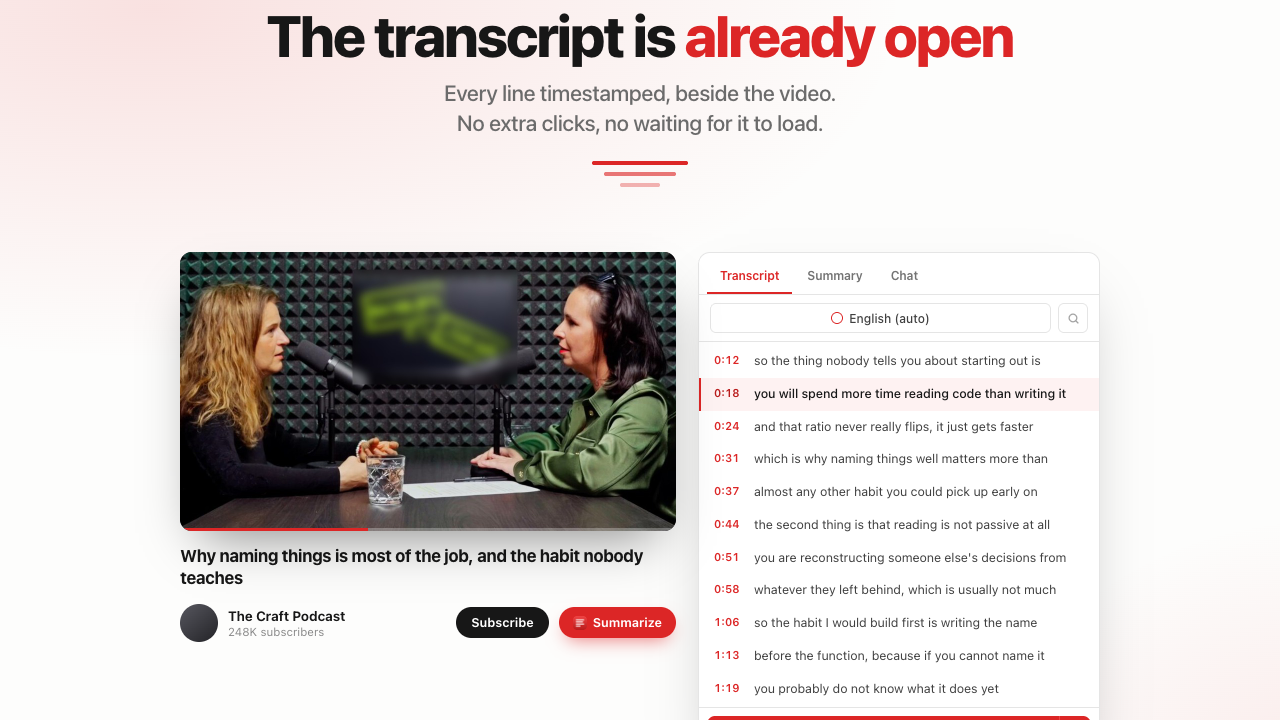
Maker-provided screenshot · Capture date not recorded · Asset reviewed 2026-11-27 · Source ↗
This listing has 1 image; no further gallery images exist.
What to know before choosing
Good fit
GetYouTubeTranscript returns the text of any YouTube video, Short or TikTok in about a second from the video's own captions: read and copy transcripts free without an account, with a free account adding downloads in 6 formats plus more transcripts each day, across the website, Chrome extension, API and MCP server. AI extras (chat, summaries, notes, quizzes) run on credits - 1 credit per AI answer - with a Monthly plan at $5.00/month for 1,000 credits and API plans from $19/month.
Limits and trade-offs
AI chat and summaries use credits: each AI answer uses 1 credit.
Plans and free allowances
Transcribing and reading the result is free; paid plans add credits for the AI tools.
Maker-submitted product description
Reviewed for publication 2026-11-27. This material was supplied with the submission; it is not a hands-on test or independent verification of every claim.
GetYouTubeTranscript turns a YouTube link into a timestamped transcript in about a second, for regular videos, Shorts and live replays, in every caption language the video has. Search inside the transcript and jump to that moment, copy it, or download it as TXT, SRT, VTT, JSON, Markdown or CSV. AI features turn long videos into summaries, notes and quizzes. There are Chrome, Edge and Firefox extensions, a REST API with Python and Node.js SDKs, and a remote MCP server for Claude, ChatGPT and Cursor. New accounts get 100 free credits (1 credit per transcript), and paid plans start at $5/month.
Maker-reported pricing model: freemium. Pricing has not been independently verified. Confirm current plans on the official website.
Official-site collection and source-backed editorial review
Dates: Last reviewed 2026-11-29 · Sources checked 2026-11-28 · Catalogued 2026-11-27. Last reviewed is the latest source or editorial review date; it is not a content-change date.
A closer look at GetYouTubeTranscript
GetYouTubeTranscript gives you the text of any YouTube video, Short or TikTok in about a second, straight from the video's own captions. You can read the transcript and copy the full text in one click without an account; a free account adds downloads in 6 formats, including TXT, SRT, and VTT, and gives you more transcripts each day. The same account works across the website, the Chrome extension, the API, and the MCP server, so a workflow started in the browser can continue in a developer tool without a second login. On top of the raw transcript sit credit-based AI features — Ask the video questions, summaries, notes, flashcards, quizzes, and chapters — which need a free account and draw on the free credits you get when you sign up, at 1 credit per AI answer. The tool reads the captions a video already has; if a video has none, signing in lets it make an AI transcript from the audio instead, at 3 credits per minute of video. Paid plans add more credits: the Monthly plan is $5.00/month for 1,000 credits plus AI chat in the Chrome extension, and the API plan starts at $19/month for developers, with search, channel, and playlist endpoints. For pasting clean text into ChatGPT or Claude, or for building transcript data into an application, it covers both the casual and the programmatic route in one account.
Editorial guidance based on published documentation. The workflow below is a suggested starting point, not a measured product result.
When to choose GetYouTubeTranscript
You want the text of a YouTube video, Short, or TikTok in about a second, readable and copyable without an account.
You want to download transcripts in formats such as TXT, SRT, or VTT, or feed clean text into ChatGPT or Claude.
You need transcripts programmatically: the same account covers the website, Chrome extension, API, and MCP server.
When to choose something else
Most of your videos have no captions: the tool reads existing captions, and AI transcription from audio costs 3 credits per minute after sign-in.
You expect the AI features to be free throughout: Ask the video, summaries, notes, flashcards, quizzes, and chapters each draw on credits, starting from the one-time free credits granted at sign-up.
A practical starting workflow
Paste a YouTube, Short, or TikTok link and read the transcript taken from the video's own captions, in about a second.
Copy the full text in one click, or create a free account to download it in one of 6 formats such as TXT, SRT, or VTT.
Use the sign-up credits for AI features — Ask the video, summaries, notes, flashcards, quizzes, or chapters — at 1 credit per AI answer.
For a video without captions, sign in and generate an AI transcript from the audio at 3 credits per minute.
Scale up on a paid plan or through the API and MCP server, which add search, channel, and playlist endpoints.
Check before committing
It reads the captions a video already has; a video with no captions needs the signed-in AI audio route at 3 credits per minute.
The free credits granted when you sign up are a one-time grant for AI features — separate from the daily free transcript allowance, which a free account increases.
AI answers cost 1 credit each, so heavy Ask-the-video or summary use consumes the balance that paid plans top up.
Common questions
Is this YouTube to transcript tool really free?
Yes. Transcribing and reading the result is free. You can try it without an account, and a free account gives you more transcripts each day.
The transcript is free. AI chat (Ask the video), summaries, notes, flashcards, quizzes, and chapters need a free account and use credits: each AI answer uses 1 credit, from the free credits you get when you sign up. Paid plans add more credits.
It reads the captions a video already has. If a video has none, sign in and it can make an AI transcript from the audio, at 3 credits per minute of video.
Monthly is $5.00/month for 1,000 credits, plus AI chat in the Chrome extension. The API plan starts from $19/month for developers, with search, channel, and playlist endpoints.
YouTranscripts — YouTranscripts is a 100% free YouTube transcript generator: paste a supported YouTube link and get the video's captions as readable text - no signup needed - with downloads in TXT, DOCX, PDF, SRT or CSV, translation into 17 languages, and unlimited AI summaries (Quick, Detailed or Very Detailed) with a free account. There is no published monthly credit quota for normal personal use; the Fair Usage Policy and request-rate protections apply, and transcripts are only available for videos whose captions the service can access.
GistMint — gistmint turns videos into clean, structured text: paste a YouTube, TikTok or Instagram link (or drop a video, audio or podcast file) and get a timestamped transcript you can search, copy or export as TXT, SRT or VTT. The subtitle tools are free in the browser with no account; new transcripts use credits - 5 free credits when you sign up (a one-time grant), or 600 every month on Pro at $9.99/month, which also unlocks AI transcription of your own files at 4 credits per minute. Captured from the clean homepage without the referral parameter in the registered URL.
Transcriptik — Transcriptik is an AI transcript generator that turns audio, video and online content into accurate text across 99+ languages, starting from a TikTok, Instagram, YouTube or direct media link or an uploaded file, with timestamps and speaker labels.
Product details from official sources
GetYouTubeTranscript returns the text of any YouTube video, Short or TikTok in about a second from the video's own captions: read and copy transcripts free without an account, with a free account adding downloads in 6 formats plus more transcripts each day, across the website, Chrome extension, API and MCP server. AI extras (chat, summaries, notes, quizzes) run on credits - 1 credit per AI answer - with a Monthly plan at $5.00/month for 1,000 credits and API plans from $19/month.
Capabilities and conditions
Gives the text of any YouTube video, Short or TikTok from the video's own captions. Source ↗
Transcribing and reading the result is free; paid plans add credits for the AI tools. Source ↗
AI chat and summaries use credits: each AI answer uses 1 credit. Source ↗
Price and free allowance
See the sourced plan statements above; confirm currency, billing period and checkout eligibility on the vendor site.
Published-source profile · collected 2026-11-28. Automated collection followed by editorial review. These are vendor-published claims, not hands-on product test results.
Alternatives to GetYouTubeTranscript
Tools the catalogue itself links to GetYouTubeTranscript: an editor lists them as related, an editorial comparison or switching guide covers the pair, or both are reviewed picks for the same task. Each reason below can be checked on the tool pages. This is not a quality ranking.
Paste a YouTube link, get the full, accurate transcript.
Why it is listed Different category: Audio & Voice (GetYouTubeTranscript is Video) · Listed by editors as related to GetYouTubeTranscript · Same pricing type: Free + paid
Turn TikToks into searchable transcripts and stats.
Why it is listed Different category: Writing (GetYouTubeTranscript is Video) · Listed by editors as related to GetYouTubeTranscript · Same pricing type: Free + paid
When this listing’s recorded facts changed, from what to what. Dates are the day (UTC) the change was recorded in the ByTask data, not the day the vendor changed anything. Only changes that can be traced in the data history appear here; a fact that has not changed shows nothing.

 Official site reference


