Framov is an AI frame-to-video generator: upload a start frame and an end frame (or a single image, or a keyframe set), describe the motion between them, and generate a video with control over motion, composition and consistency, using models such as Veo 3, Kling 3.0 and Runway. Workflows cover character motion, cinematic camera movement, product animation and scene-to-scene transitions. The homepage publishes no plans, prices or free allowance, so pricing is unverified from public evidence.
Fit is editorial guidance, not a measured result.
Platforms
Access: not separately verified. Operating systems not separately verified.
Published-source facts and editorial guidance. No product test is implied. Confirm current conditions before purchase.
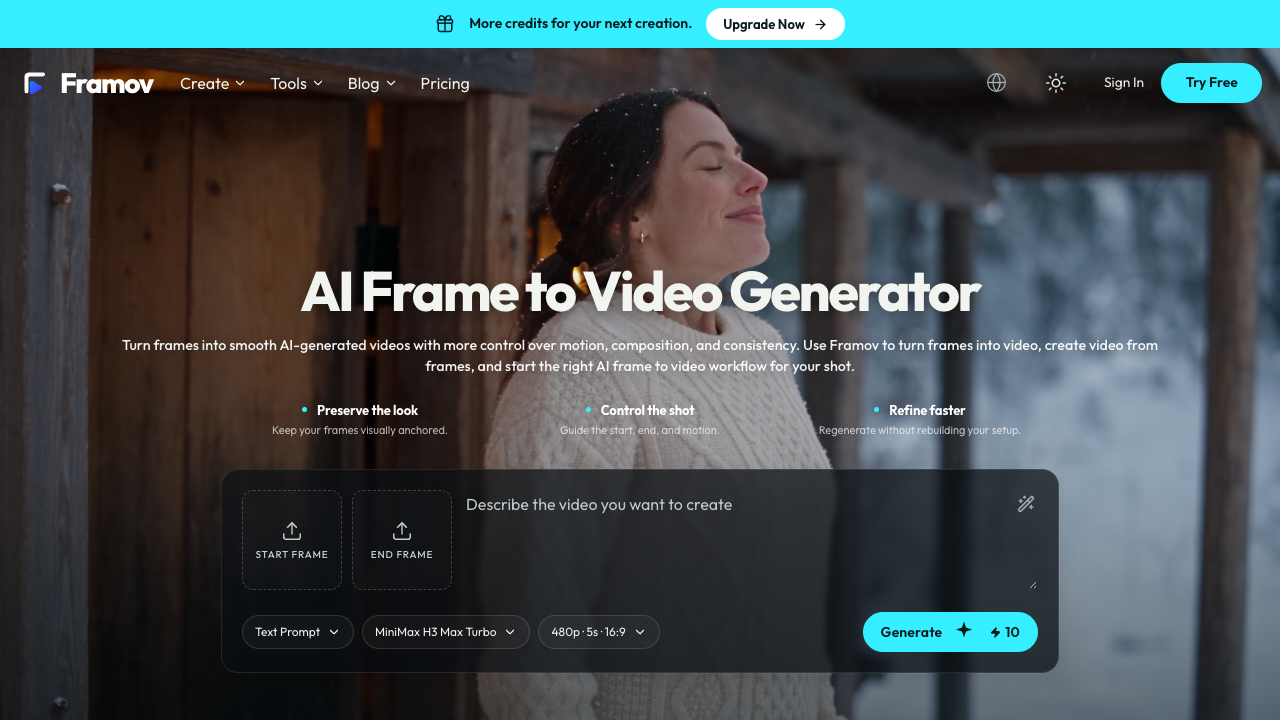
Maker-provided screenshot · Capture date not recorded · Asset reviewed 2026-11-27 · Source ↗
This listing has 1 image; no further gallery images exist.
What to know before choosing
Good fit
Framov is an AI frame-to-video generator: upload a start frame and an end frame (or a single image, or a keyframe set), describe the motion between them, and generate a video with control over motion, composition and consistency, using models such as Veo 3, Kling 3.0 and Runway. Workflows cover character motion, cinematic camera movement, product animation and scene-to-scene transitions. The homepage publishes no plans, prices or free allowance, so pricing is unverified from public evidence.
Limits and trade-offs
Two-frame generation depends on the selected model supporting start and end frame control.
Plans and free allowances
Price and free limits not verified. Confirm current vendor terms.
Maker-submitted product description
Reviewed for publication 2026-11-27. This material was supplied with the submission; it is not a hands-on test or independent verification of every claim.
Framov combines AI video generation with a practical browser-based frame extractor. Creators can generate clips from text and reference images, guide motion with first and last frames, or pull exact still images from uploaded footage for reuse in later creative work. The product supports iterative workflows where a source frame becomes a new visual direction, while the extraction utility can be tried independently in the browser.
Maker-reported pricing model: freemium. Pricing has not been independently verified. Confirm current plans on the official website.
Official-site collection and source-backed editorial review
Dates: Last reviewed 2026-11-29 · Sources checked 2026-11-28 · Catalogued 2026-11-27. Last reviewed is the latest source or editorial review date; it is not a content-change date.
A closer look at Framov
Framov is a frame-to-video workflow tool: instead of relying on text alone, you give the AI visual frames that define the subject, composition and scene, and it generates the motion between them. The core setup is to upload a start frame and an end frame, then describe the motion between them in text. You can also start from one image, or use a more directed keyframe setup. The workflow is built around three promises: preserve the look, by keeping your frames visually anchored; control the shot, by guiding the start, end and motion; and refine faster, by regenerating without rebuilding your setup. Framov positions the method for launches, ads, product showcases and short-form social content, and names the kinds of shots it suits: a subtle camera move, a stylized character shot, or a clean transition between scenes. One limit is stated in its own FAQ: creating a video between two frames works when the selected model supports start and end frame control. The material reviewed describes the workflow only — it publishes no plan amounts — so the entry describes the method and its stated uses, and nothing more.
Editorial guidance based on published documentation. The workflow below is a suggested starting point, not a measured product result.
When to choose Framov
A creator who already has the opening and closing frames of a shot — for a product launch, ad or showcase — and wants AI to generate the motion between them.
A social-video maker who wants a controlled camera move or a clean scene transition anchored to prepared frames rather than a text-only prompt.
When to choose something else
Anyone who wants to generate video from text alone with no frames to prepare — Framov's method starts from visual frames by design.
Anyone whose chosen model does not support start and end frame control: the two-frame connection only works when the selected model supports it.
A practical starting workflow
Prepare the visual anchors: a single image, a start frame and an end frame, or a more directed keyframe setup that defines the subject, composition and scene.
Upload the start frame and end frame and describe the motion between them in text.
Generate the video and check that the result keeps the frames visually anchored while following the guided start, end and motion.
Regenerate to refine the shot without rebuilding the setup, adjusting the motion description or frames as needed.
Check before committing
Two-frame generation depends on the selected model: Framov's FAQ says you can create a video between two frames when the selected model supports start and end frame control.
The pages reviewed describe a workflow method, not a model or a plan; no amounts are published in the material, so costs cannot be stated here.
How well the look is preserved depends on the frames supplied — they define the subject, composition and scene the AI works from.
Common questions
What is frame to video?
Framov defines it as an AI video generation method that uses one or more visual frames as references for creating a video: the frames help define how the subject, composition and scene should appear while AI generates the motion.
Yes, when the selected model supports start and end frame control: you provide two frames and generate motion that connects the first visual state with the second.
What kinds of content is the frame-to-video workflow used for?
Framov names launches, ads, product showcases and short-form social content, with shots such as a subtle camera move, a stylized character shot or a clean transition between scenes.
FreeVideo AI — FreeVideo AI is a credit-based AI video generator with three workflows - text to video, image to video, and first & last frame - on the hosted MiniMax H3 Standard model plus 35 paid Cloud models (Seedance, Veo, Kling, Wan, Grok and more), with the exact credit quote shown before submission. New Google accounts receive 60 one-time welcome credits valid for 30 days; after that, generation runs on purchased credits from one-time packs starting at US$3.99 or subscriptions from Lite at US$10/month.
Veo3o1 — Veo3o1 is an independent service (not affiliated with Google) for generating videos with Google's Veo 3.1 model: text-to-video, first-and-last-frame animation and reference-image workflows at 4, 6 or 8 seconds. Browsing and setting up a video are free; generation runs on credits whose prices and costs are not published on the homepage, and promotional credits can be used, so the pricing model is unverified from public evidence.
Identity note Veo3o1 is an independent service (not affiliated with Google) for generating videos with Google's Veo 3.1 model: text-to-video, first-and-last-frame animation and reference-image workflows at 4, 6 or 8 seconds. Read the listing
AnimateImage — AnimateImage is an independent image-to-video studio that turns one photo or drawing into a short clip using 18 video models (Seedance, Veo, Kling, Wan, Grok, Hailuo, HappyHorse), with clips up to 15 seconds. The Free plan includes 12 of the 18 models at up to 768P and new accounts get free credits valid for 30 days; downloading generated videos starts on the Basic plan. Six GIF tools (background remover, compressor, resizer and more) run free in the browser with no account and no credits.
Identity note The video models it offers are made by third parties not affiliated with it. Read the listing
Framov is an AI frame-to-video generator: upload a start frame and an end frame (or a single image, or a keyframe set), describe the motion between them, and generate a video with control over motion, composition and consistency, using models such as Veo 3, Kling 3.0 and Runway. Workflows cover character motion, cinematic camera movement, product animation and scene-to-scene transitions. The homepage publishes no plans, prices or free allowance, so pricing is unverified from public evidence.
Capabilities and conditions
Turns frames into AI-generated videos with control over motion, composition and consistency. Source ↗
With start and end frame control, it generates motion connecting the first visual state with the second. Source ↗
Suits launches, ads, product showcases and short-form social content. Source ↗
Price and free allowance
Price and free limits not verified. Check the current vendor plans before signing up; this listing does not imply the product is free.
Published-source profile · collected 2026-11-28. Automated collection followed by editorial review. These are vendor-published claims, not hands-on product test results.
Alternatives to Framov
Tools the catalogue itself links to Framov: an editor lists them as related, an editorial comparison or switching guide covers the pair, or both are reviewed picks for the same task. Each reason below can be checked on the tool pages. This is not a quality ranking.
Create videos from text, starting and ending frames, or reference images.
Why it is listed Same category: Video · Listed by editors as related to Framov
Identity note Veo3o1 is an independent service (not affiliated with Google) for generating videos with Google's Veo 3.1 model: text-to-video, first-and-last-frame animation and reference-image workflows at 4, 6 or 8 seconds. Read the listing
When this listing’s recorded facts changed, from what to what. Dates are the day (UTC) the change was recorded in the ByTask data, not the day the vendor changed anything. Only changes that can be traced in the data history appear here; a fact that has not changed shows nothing.

 Official site reference


