CookAIfood free accounts receive 3 credits on signup and 3 credits refreshed monthly; additional credits are sold in packages of 100 for USD 5, 225 for USD 10 and 500 for USD 20 (basic recipes cost 1 credit, detailed HD recipes 3).
CookAIfood free accounts receive 3 credits on signup and 3 credits refreshed monthly; additional credits are sold in packages of 100 for USD 5, 225 for USD 10 and 500 for USD 20 (basic recipes cost 1 credit, detailed HD recipes 3).
Published-source facts and editorial guidance. No product test is implied. Confirm current conditions before purchase.
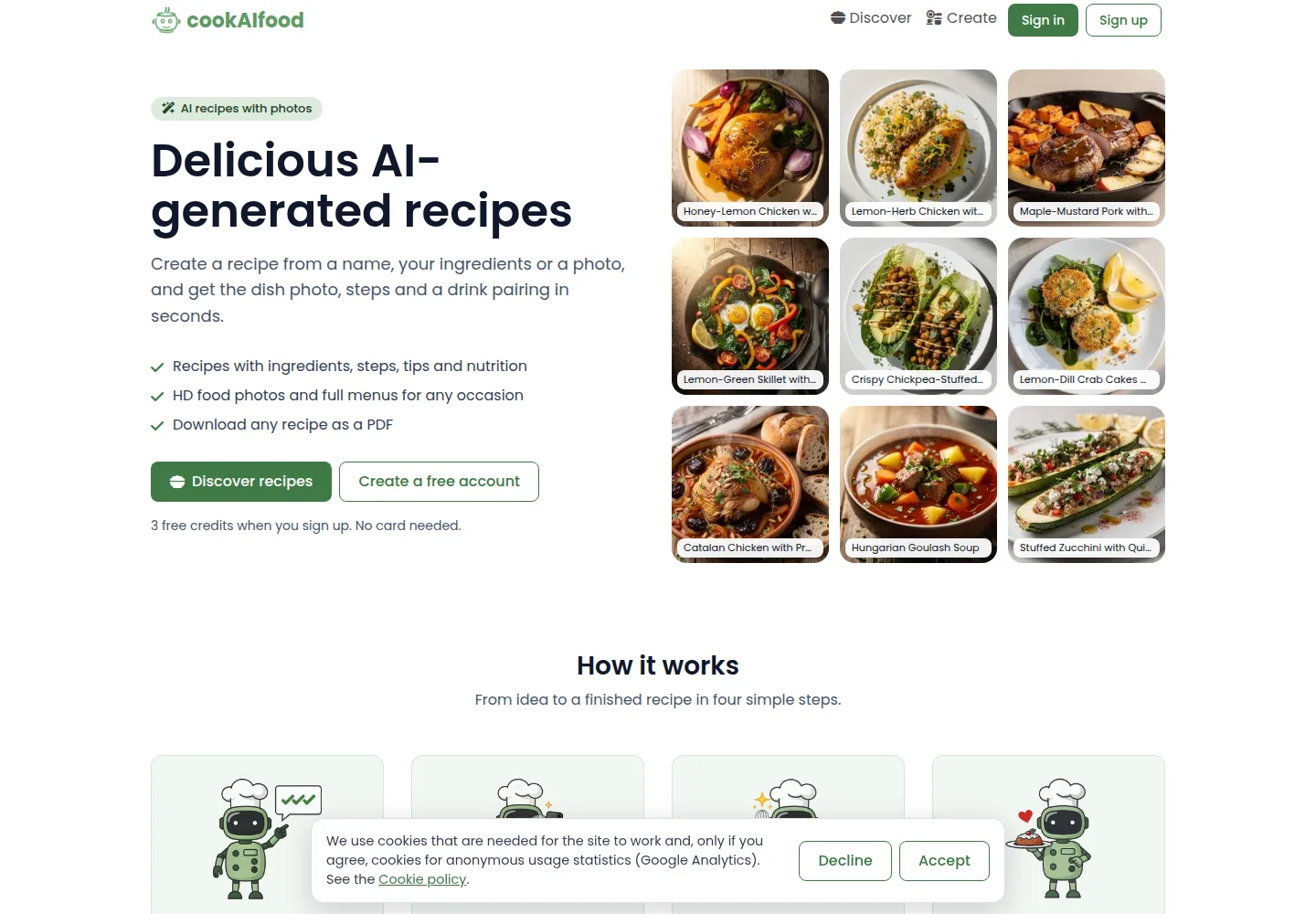
Official website; English-locale capture · Captured 2026-11-29 · Source ↗
This listing has 1 image; no further gallery images exist.
What to know before choosing
Good fit
Home cooks who want a recipe from whatever is in the fridge, by name, ingredient, or photo.
Limits and trade-offs
Nutrition analysis and weekly menu planning are listed as in-development or future tools, even though recipe pages show nutrition information: do not buy the product for deep nutrition tracking until those features actually ship. Credits do not accumulate, and the free refresh is only 3 credits per month.
Plans and free allowances
CookAIfood free accounts receive 3 credits on signup and 3 credits refreshed monthly; additional credits are sold in packages of 100 for USD 5, 225 for USD 10 and 500 for USD 20 (basic recipes cost 1 credit, detailed HD recipes 3).
Official-site collection and source-backed editorial review
Dates: Last reviewed 2026-11-24. Last reviewed is the latest source or editorial review date; it is not a content-change date.
A closer look at cookAIfood
cookAIfood generates recipes from a dish name, a list of ingredients, or a photo, with a dish image, steps, tips, nutrition, and wine pairing suggestions in about 20 seconds. It runs on one-time credit packs rather than a subscription, with a small free monthly refresh, and it also offers PDF export, ingredient math, nearby restaurants, and a private recipe library.
Editorial guidance based on published documentation. The workflow below is a suggested starting point, not a measured product result.
When to choose cookAIfood
Home cooks who want a recipe from whatever is in the fridge, by name, ingredient, or photo.
Food creators who need quick recipe drafts with photos, steps, and wine pairings.
Users who prefer one-time credit packs over a subscription.
When to choose something else
Anyone who needs deep nutrition tracking or weekly menu planning today, which are still in development.
Heavy daily cooks who would burn through 3 free monthly credits in a day.
Users who want a subscription with unlimited generation.
A practical starting workflow
Enter a dish name, list ingredients, or upload a food photo.
Pick a basic recipe for 1 credit or an advanced recipe with more detail and a high-definition image for 3 credits.
Review the steps, tips, and wine pairing, then save the recipe to a private library.
Export to PDF or use ingredient math when cooking for a group.
Check before committing
Nutrition analysis and weekly menu planning are listed on the site as in-development or future tools, even though recipe pages show nutrition information: do not buy the product for deep nutrition tracking until those features actually ship.
Credits do not accumulate: the free refresh is 3 credits per month, and the base recipe costs 1 credit while the advanced recipe costs 3, so heavy users burn through credits fast.
Recipe generation takes about 20 seconds per recipe and the free tier starts with only 3 signup credits, so the free experience is a short trial, not a pantry staple.
Pricing and feature availability may change; confirm current terms on the official website before committing.
Common questions
How do cookAIfood credits work?
The free tier starts with 3 signup credits and refreshes 3 credits per month, with no accumulation. A basic recipe costs 1 credit and an advanced recipe with more detail and a high-definition image costs 3 credits. Credit packs cost $5 for 100, $10 for 225, and $20 for 500, payable by Stripe or cryptocurrency.
Yes, from a dish name, from ingredients, or from a photo, producing a recipe with a dish photo, steps, tips, nutrition, and wine pairing suggestions in about 20 seconds.
Does cookAIfood track nutrition and plan weekly menus?
Not yet as a full feature: nutrition analysis and weekly menu planning are listed as in-development or future tools, even though generated recipes already show nutrition information. Treat deep nutrition tracking as unshipped.
Article Fiesta — Blog owners who need long-form SEO articles at volume without writing each one by hand.
Mindtrip — Travelers who want a visual, map-based itinerary they can build from screenshots, links, or voice memos.
Product details from official sources
cookAIfood is an AI recipe generator and cooking assistant: create a recipe from a dish name, ingredients, a cuisine or diet, or a photo of a dish, fridge, or ingredients, and get the recipe with an HD dish photo, steps, tips, nutrition, and a drink pairing in about 20 seconds. Users can scale servings, download any recipe as PDF, save favorites, share their page, and browse thousands of AI-generated recipes. Signing up gives 3 free credits with no card needed.
Capabilities and conditions
Creates recipes with AI from a dish name, the user's ingredients, or a photo. Source ↗
Delivers the recipe with a dish photo, tips, nutrition, and a drink pairing in about 20 seconds. Source ↗
New accounts get 3 free credits on signup with no card required. Source ↗
Price and free allowance
See the sourced plan statements above; confirm currency, billing period and checkout eligibility on the vendor site.
Published-source profile · collected 2026-11-24. Automated collection followed by editorial review. These are vendor-published claims, not hands-on product test results.
Alternatives to cookAIfood
Tools the catalogue itself links to cookAIfood: an editor lists them as related, an editorial comparison or switching guide covers the pair, or both are reviewed picks for the same task. Each reason below can be checked on the tool pages. This is not a quality ranking.
When this listing’s recorded facts changed, from what to what. Dates are the day (UTC) the change was recorded in the ByTask data, not the day the vendor changed anything. Only changes that can be traced in the data history appear here; a fact that has not changed shows nothing.

 Official site reference