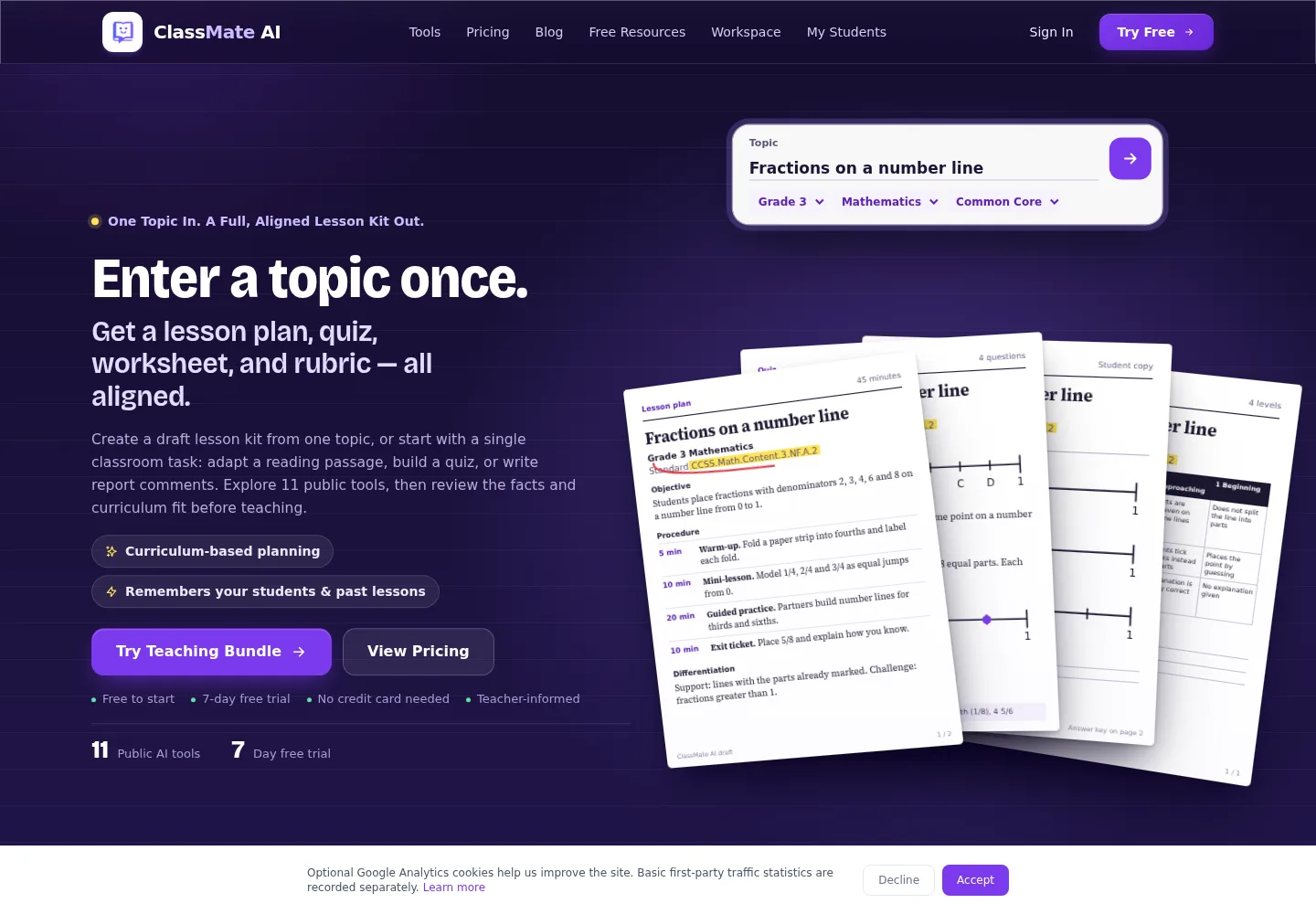
Your AI teaching assistant that remembers your classroom. Enter one topic, get a full lesson kit.
At a glance
Free + paid · Source review 2026-11-01
Price & billing
Free $0: 3 guest generations with no account, 7 days of unlimited access to all 11 public tools after sign-in, then 2 free generations per tool per day. All Access Monthly $9.99 per month with unlimited generations; All Access Yearly $39.99 per year, billed annually. Prices from the official pricing page, reviewed 2026-11-01.
Free $0: 3 guest generations with no account, 7 days of unlimited access to all 11 public tools after sign-in, then 2 free generations per tool per day.
K-12 teachers who want a full lesson kit from one topic: lesson plan, quiz, worksheet, and rubric, plus standalone tools for report comments, slides, IEP goals, and reading levels.
Fit is editorial guidance, not a measured result.
Platforms
Access: not separately verified. Operating systems not separately verified.
Published-source facts and editorial guidance. No product test is implied. Confirm current conditions before purchase.
Official website; English-locale capture · Captured 2026-11-29 · Source ↗
This listing has 1 image; no further gallery images exist.
What to know before choosing
Good fit
K-12 teachers who want a full lesson kit from one topic: lesson plan, quiz, worksheet, and rubric, plus standalone tools for report comments, slides, IEP goals, and reading levels.
Limits and trade-offs
Teacher-facing only, with no student accounts; AI-generated content must be reviewed by the teacher before teaching; after the trial, free use is capped at 2 generations per tool per day.
Plans and free allowances
Free $0: 3 guest generations with no account, 7 days of unlimited access to all 11 public tools after sign-in, then 2 free generations per tool per day. All Access Monthly $9.99 per month with unlimited generations; All Access Yearly $39.99 per year, billed annually. Prices from the official pricing page, reviewed 2026-11-01.
Official-site collection and source-backed editorial review
Dates: Last reviewed 2026-11-01. Last reviewed is the latest source or editorial review date; it is not a content-change date.
A closer look at ClassMate AI
ClassMate AI is a teacher-facing AI assistant that turns one topic into a full lesson kit: a lesson plan, quiz, worksheet, and rubric, all aligned to the same topic and grade. Its 11 public tools also cover report card comments, writing prompts, slides, IEP goals, reading levels, and student reports. Use starts free: 3 guest generations with no account, then 7 days of unlimited access after sign-in, and 2 free generations per tool per day after the trial. Content is AI-generated, so the site requires teachers to review facts and curriculum fit before teaching.
Editorial guidance based on published documentation. The workflow below is a suggested starting point, not a measured product result.
When to choose ClassMate AI
K-12 teachers who want a complete lesson kit from one topic: lesson plan, quiz, worksheet, and rubric aligned to the same topic, grade, and curriculum standard, including Common Core, Texas TEKS, and NGSS.
Teachers who need bulk report card comments in warm, professional, or balanced tones, importing a class list from My Students to generate reports in one batch.
Teachers who need differentiated reading material, using Text Leveler to adapt a passage toward a target grade with vocabulary and comprehension checks.
Teachers who need presentation-ready slides with speaker notes and PowerPoint export from the Slides Generator.
When to choose something else
Teachers who need student accounts or student-facing logins, since ClassMate AI is teacher-facing with no student accounts and keeps rosters and saved content in the teacher's browser.
Teachers who want to use AI output without reviewing it, since the site states content is AI-generated and teacher review of facts and curriculum fit is required before teaching.
Teachers who need more than 2 free generations per tool per day without paying, since the free tier after the trial is capped at 2 per tool per day and unlimited generations require an All Access plan.
A practical starting workflow
Enter one topic, plus subject, grade level, and curriculum standard, in the Teaching Bundle or a single tool such as the Lesson Plan Generator.
Review the generated draft, checking facts and curriculum fit before teaching.
Export in Word or PDF, or PowerPoint for Slides, and keep the work in the browser; sign in for the 7-day unlimited trial.
For report season, import a class list from My Students and generate report comments in one batch, then review each comment before sharing.
Check before committing
Prices and features may change, so confirm current pricing with the vendor before buying.
Grade targets in the reading material are not certified reading assessments.
Keep names and confidential student information out of AI requests; the site asks teachers to use initials or pseudonyms.
Common questions
What does ClassMate AI generate from one topic?
A full lesson kit: a lesson plan, quiz, worksheet, and rubric, all aligned to the same topic and grade. The Teaching Bundle generates them together, or each tool can be used on its own.
Free starts with 3 guest generations and no account. Signing in gives 7 days of unlimited access to all 11 public tools, and after the trial each tool keeps 2 free generations per day. All Access Monthly ($9.99 per month) and All Access Yearly ($39.99 per year) remove the daily generation cap with unlimited generations.
No. It is a teacher-facing tool with no student accounts; student rosters and saved teaching content stay in the teacher's browser, and the site asks teachers to use initials or pseudonyms in AI requests.
Choose a subject and grade level from kindergarten to grade 12, enter the topic, pick a curriculum standard such as Common Core, Texas TEKS, or NGSS, add optional duration and learning objectives, and generate a plan with objectives, procedures, materials, assessment, and homework.
Eduaide.Ai — K-12 teachers creating lesson plans, worksheets, and assessments.
EducatorLab — Teachers wanting AI help creating teaching material
Product details from official sources
ClassMate AI is an AI teaching assistant that remembers the classroom: entering one topic generates an aligned lesson kit (lesson plan, quiz, worksheet, rubric), with 11 public tools including a lesson plan generator, report card comments writer and text leveler. It claims curriculum-based planning across standards (Common Core, NGSS, IB, UK National Curriculum and others) and remembers students and past lessons. Pricing is freemium: free to start with a 7-day free trial of unlimited access (no credit card), then 2 free generations per tool per day; All Access is $9.99/month or $39.99/year. The homepage shows illustrative previews such as report card comments with a fictional student example and a free downloadable reading pack, and stresses that grade targets are not certified reading assessments.
Capabilities and conditions
Entering one topic produces a lesson plan, quiz, worksheet and rubric — all aligned — from the AI teaching assistant. Source ↗
The lesson plan generator builds complete, standards-aligned lesson plans with objectives, materials and procedures in seconds. Source ↗
It remembers students and past lessons, with curriculum-based planning and support for curricula like Common Core, Texas TEKS and NGSS. Source ↗
Free to start with a 7-day free trial and no credit card; after the trial, 2 free generations per tool per day; All Access $9.99/month or $39.99/year. Source ↗
Price and free allowance
See the sourced plan statements above; confirm currency, billing period and checkout eligibility on the vendor site.
Published-source profile · collected 2026-10-17. Automated collection followed by editorial review. These are vendor-published claims, not hands-on product test results.
Alternatives to ClassMate AI
Tools the catalogue itself links to ClassMate AI: an editor lists them as related, an editorial comparison or switching guide covers the pair, or both are reviewed picks for the same task. Each reason below can be checked on the tool pages. This is not a quality ranking.
Lesson plans, worksheets, and assessments for K-12 teachers.
Why it is listed Same category: Education · Covered in an editorial comparison with ClassMate AI · Listed by editors as related to ClassMate AI · Same pricing type: Free + paid
When this listing’s recorded facts changed, from what to what. Dates are the day (UTC) the change was recorded in the ByTask data, not the day the vendor changed anything. Only changes that can be traced in the data history appear here; a fact that has not changed shows nothing.
Recorded (UTC)
Price & plansPrice and plan wording changed
Links & sourcesOfficial sources on file: 1 added, 2 re-checked

 Official site reference