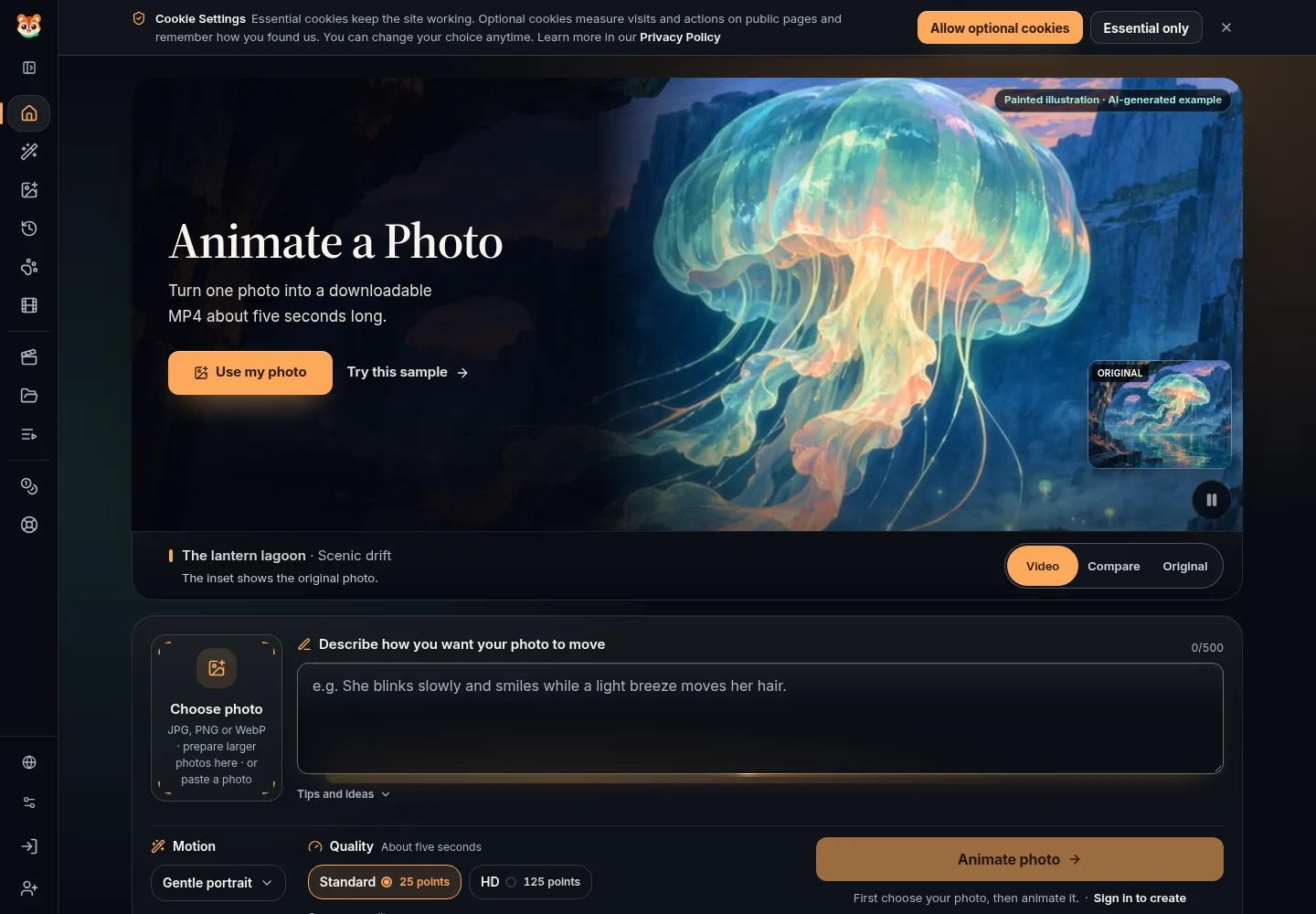
Animate Picture turns one photo into a downloadable silent MP4 of about five seconds, using the photo as the reference and a written direction for the motion. A Standard video uses 25 points and an HD video uses 125 points from one balance; new accounts start with 0 points. Offers are a one-time Hobby pack ($6.90 for 500 points, valid 3 months), a monthly Basic plan ($9.90 for 1,200 points a month) and a yearly Basic plan ($83.90).
Fit is editorial guidance, not a measured result.
Platforms
Access: not separately verified. Operating systems not separately verified.
Published-source facts and editorial guidance. No product test is implied. Confirm current conditions before purchase.
Official website; English-locale capture · Captured 2026-11-29 · Source ↗
This listing has 1 image; no further gallery images exist.
What to know before choosing
Good fit
Animate Picture turns one photo into a downloadable silent MP4 of about five seconds, using the photo as the reference and a written direction for the motion. A Standard video uses 25 points and an HD video uses 125 points from one balance; new accounts start with 0 points. Offers are a one-time Hobby pack ($6.90 for 500 points, valid 3 months), a monthly Basic plan ($9.90 for 1,200 points a month) and a yearly Basic plan ($83.90).
Limits and trade-offs
New accounts start with 0 points, so a purchase is required before the first video.
Plans and free allowances
A Standard video uses 25 points and an HD video uses 125 points from one balance.
Maker-submitted product description
Reviewed for publication 2026-11-27. This material was supplied with the submission; it is not a hands-on test or independent verification of every claim.
Animate Picture is a browser-based image-to-video studio for portraits, old photos, pet pictures, and illustrations. Upload one JPG, PNG, or WebP, choose a motion preset, and optionally add a direction. Each result is an approximately five-second silent MP4. Standard and HD generation use paid credits, and finished videos can be played or downloaded.
Maker-reported pricing model: paid. Pricing has not been independently verified. Confirm current plans on the official website.
Official-site collection and source-backed editorial review
Dates: Last reviewed 2026-11-29 · Sources checked 2026-11-28 · Catalogued 2026-11-27. Last reviewed is the latest source or editorial review date; it is not a content-change date.
A closer look at Animate Picture
Animate Picture does one narrow job: it turns one photo into a downloadable, silent MP4 of about five seconds. There are no templates, timelines or model choices to configure. The site is specific about what works best - photos with one clear subject, such as portraits, pets, old prints and illustrations, with faces visible and eyes open. Uploads must be a single JPG, PNG or WebP file where each side is at least 300 pixels, the long side is at most 2.5 times the short side, and the prepared upload is at most 4 MB. Every finished video is saved in My videos, where you can play or download it, and if you want a looping GIF you can download the MP4 and use the browser GIF tool to turn a short part of it into a loop. Uploads and results are private. Everything runs on points from one balance: a Standard video uses 25 points and an HD video uses 125 points. New accounts start with 0 points, so there is no free allowance to try the service with - the first video requires a purchase. Confirmed failures return points to the original balance. The one-time Hobby offer costs $6.90 for 500 points, valid for 3 months, enough for up to 20 Standard or 4 HD videos. Basic costs $9.90 per month for 1,200 points per month on monthly billing, or $83.90 per year on yearly billing, with the same 1,200 points arriving each month. It suits someone who occasionally wants a single treasured photo to move - an old family print, a pet portrait - and is happy to pay per clip for a deliberately simple tool.
Editorial guidance based on published documentation. The workflow below is a suggested starting point, not a measured product result.
When to choose Animate Picture
Someone who wants one portrait, pet photo or old print turned into a short moving clip without learning a video tool: one upload produces one roughly five-second MP4.
An occasional user: the $6.90 one-time Hobby pack (500 points, valid 3 months) covers up to 20 Standard videos without a subscription.
A privacy-conscious user: the site states uploads and results are private, and finished videos stay in your own My videos library.
When to choose something else
Anyone wanting to try before paying: new accounts start with 0 points and there is no free allowance, so the first video requires a purchase.
Anyone needing sound, longer clips or editing controls: the output is a silent MP4 of about five seconds, and GIF looping is done afterwards in a separate browser tool.
Photos that break the upload rules - smaller than 300 pixels on a side, more stretched than a 2.5-to-1 ratio, or over 4 MB once prepared - cannot be used as they are.
A practical starting workflow
Prepare one photo that meets the upload rules: JPG, PNG or WebP, each side at least 300 pixels, long side at most 2.5 times the short side, at most 4 MB prepared.
Buy points if your balance is empty - new accounts start at 0 points - choosing the one-time Hobby pack or a Basic monthly or yearly plan.
Upload the photo and generate: a Standard video costs 25 points, an HD video 125 points, from the same balance.
If a generation is a confirmed failure, the points return to your original balance.
Play or download the finished silent MP4 (about five seconds) from My videos, and optionally turn a short part into a looping GIF with the browser GIF tool.
Check before committing
There is no free tier or trial allowance: new accounts start with 0 points, and every video costs points, so the first use requires paying.
Check each offer's points and expiration before buying: the Hobby pack's 500 points are valid for 3 months, while Basic points arrive monthly.
Output is a silent clip of about five seconds; there is no soundtrack, and subjects with hidden faces or closed eyes are not the intended input - faces should be visible with eyes open.
Common questions
What do I get from Animate Picture?
A silent MP4 of about five seconds, made using your uploaded photo as the reference. Every finished video is saved in My videos, where you can play or download it, and you can turn a short part into a looping GIF with the browser GIF tool.
No. New accounts start with 0 points, and a Standard video uses 25 points while an HD video uses 125 points, so you need to buy an offer first - for example the one-time Hobby pack at $6.90 for 500 points, valid for 3 months. Confirmed failures return points to the original balance.
Which photos work best and what files are accepted?
Photos with one clear subject work best - portraits, pets, old prints and illustrations - with faces visible and eyes open. Upload one JPG, PNG or WebP: each side at least 300 pixels, the long side at most 2.5 times the short side, and the prepared upload at most 4 MB. Uploads and results are private.
AnimateImage — AnimateImage is an independent image-to-video studio that turns one photo or drawing into a short clip using 18 video models (Seedance, Veo, Kling, Wan, Grok, Hailuo, HappyHorse), with clips up to 15 seconds. The Free plan includes 12 of the 18 models at up to 768P and new accounts get free credits valid for 30 days; downloading generated videos starts on the Basic plan. Six GIF tools (background remover, compressor, resizer and more) run free in the browser with no account and no credits.
Identity note The video models it offers are made by third parties not affiliated with it. Read the listing
AI Photo Animator — AI Photo Animator turns one still photo — a portrait, old family photo, pet or artwork — into a short video with sound, either by describing the motion or by picking one of its many viral template effects. It offers several hosted video models side by side (Seedance, Kling, Wan and Hailuo), Frames and Photo modes, clips of 4–30 seconds up to 4K, and an MCP server for AI agents. New accounts get free credits on sign-up; after that, generations are bought with credits or a subscription, with the exact cost shown before generating, but no prices are published on the homepage.
DomoAI — Social creators and marketers who want to turn text, images, or existing footage into animated, restyled, or avatar-led videos quickly, using ready-made scenario templates and multiple integrated video and image models.
Product details from official sources
Animate Picture turns one photo into a downloadable silent MP4 of about five seconds, using the photo as the reference and a written direction for the motion. A Standard video uses 25 points and an HD video uses 125 points from one balance; new accounts start with 0 points. Offers are a one-time Hobby pack ($6.90 for 500 points, valid 3 months), a monthly Basic plan ($9.90 for 1,200 points a month) and a yearly Basic plan ($83.90).
Capabilities and conditions
Turns one photo into a downloadable MP4 about five seconds long. Source ↗
A Standard video uses 25 points and an HD video uses 125 points from one balance. Source ↗
New accounts start with 0 points, so a purchase is required before the first video. Source ↗
Price and free allowance
See the sourced plan statements above; confirm currency, billing period and checkout eligibility on the vendor site.
Published-source profile · collected 2026-11-28. Automated collection followed by editorial review. These are vendor-published claims, not hands-on product test results.
Alternatives to Animate Picture
Tools the catalogue itself links to Animate Picture: an editor lists them as related, an editorial comparison or switching guide covers the pair, or both are reviewed picks for the same task. Each reason below can be checked on the tool pages. This is not a quality ranking.
When this listing’s recorded facts changed, from what to what. Dates are the day (UTC) the change was recorded in the ByTask data, not the day the vendor changed anything. Only changes that can be traced in the data history appear here; a fact that has not changed shows nothing.

 Maker-provided visual


